
Conversion Tracking: How to Know Which Marketing Activity Actually Creates Qualified Leads
Your website traffic increased. Search visibility improved. Ads generated more clicks. Social media brought visitors to the site.
But which marketing activity actually produced qualified leads?
That question gets harder to answer when conversion tracking is incomplete or disconnected from the way the business handles leads. Conversion tracking measures the actions people take after interacting with marketing, such as submitting a form, calling, booking a consultation, or completing a purchase, and ties those actions back to the channels and campaigns that influenced them.
A marketing report may count form submissions without showing whether those inquiries were qualified. Phone calls may never appear in the same reporting environment. Booked consultations may be recorded in another platform. Sales outcomes may live inside the CRM.
The business ends up measuring activity instead of outcomes.
For businesses and marketing teams investing in SEO, advertising, content, and other digital channels, that gap makes it harder to see which efforts create real business value and which only generate clicks or raw leads. This page explains how to define meaningful conversion events, separate raw lead volume from qualified outcomes, set up form and call tracking, understand attribution models, connect marketing channels to CRM or sales results, test whether tracking is configured correctly, and see how Masterly Tech supports conversion tracking that reflects what the business actually cares about.
Conversion Tracking Should Start With the Business Outcome
The first conversion question should not be technical.
It should be:
What action tells us that marketing produced something valuable?
For one business, that might be a completed consultation request.
For another, it may be a purchase.
A professional service company may care about qualified inquiries.
A company with a longer sales cycle may need to follow leads from initial contact through several stages before determining whether marketing created a meaningful opportunity.
These differences are why conversion events should reflect the business rather than simply track everything a website can technically measure.
Not Every Website Action Is a Conversion
Modern analytics tools can record many different interactions.
A visitor might:
View a service page.
Scroll through an article.
Click a navigation link.
Watch a video.
Download a document.
Click a phone number.
Submit a form.
Book a consultation.
Purchase a product.
All of these actions may provide information, but they do not necessarily have the same business value.
Google's current Analytics documentation describes a key event as an event measuring an action that is particularly important to the success of a business.
That provides a useful principle for broader marketing measurement.
Track supporting behavior when it helps answer useful questions, but give the greatest attention to actions connected to actual business outcomes.
Lead Tracking Should Continue Beyond the First Inquiry
A common reporting problem appears when marketing measurement stops as soon as someone submits a form.
Suppose two campaigns each generate 20 inquiries.
Campaign A produces mostly people who are not a fit.
Campaign B produces fewer casual inquiries but several strong prospects who move into the sales process.
If reporting looks only at raw lead volume, both campaigns may appear equally successful.
They are not necessarily creating equal business value.
This is why lead tracking becomes stronger when it can distinguish between an initial inquiry and a meaningful lead as that contact moves through the sales funnel.
Raw Leads and Qualified Leads Tell Different Stories
A raw lead tells you that someone responded.
A qualified lead tells you that the response met the business's defined criteria for further sales attention.
The exact definition of "qualified" will differ by company. For example, product qualified leads have experienced the product firsthand before being treated as stronger opportunities. Some businesses also separate marketing qualified leads, sales qualified leads, or service qualified leads using their own internal criteria.
That definition should come from the business, not from an analytics platform.
Once it is established, qualified lead reporting can provide a more useful view of marketing performance than simply counting every submission equally.
Form Tracking Needs to Measure the Right Completion
Forms are one of the most common lead-generation tools on business websites, and they remain common because many businesses use form submissions to capture leads — in fact, 84% of marketers use form submissions to collect leads.
But form tracking can become unreliable when the measurement setup does not reflect what actually happens.
For example, a business may track clicks on a submit button rather than a successful form completion.
A visitor clicks the button.
The form contains an error.
Nothing is submitted.
The tracking system still records a conversion.
The marketing report now shows an outcome that never occurred.
Form tracking usually relies on a code snippet or pixel firing on the correct completion step, not just on a button interaction.
A stronger measurement approach connects reporting as closely as practical to the completed action the business actually cares about.
That could be a confirmed inquiry, successful consultation request, completed registration, or another meaningful result.
Call Tracking Can Fill a Major Measurement Gap
Not every customer wants to fill out a form.
Some businesses rely heavily on inbound phone calls as a lead source.
For businesses where phone conversations are an important part of sales or intake, ignoring those calls can create an incomplete picture of marketing performance.
Many businesses use phone calls for lead generation, and 50% of marketers use phone calls for inbound lead generation, which is why this gap matters.
Call tracking can help businesses understand how phone inquiries relate to marketing activity when it is configured appropriately for the business and technology environment. Call tracking software or other tracking software can use Dynamic Number Insertion to assign unique phone numbers to different marketing sources.
The important question is not simply how many calls occurred.
Businesses may also need to understand whether calls represented new leads, existing customers, sales opportunities, support requests, or unrelated conversations.
That distinction becomes especially important when comparing marketing channels.
A campaign that generates many short or irrelevant calls may not have the same value as a campaign producing fewer but more qualified conversations. Used well, call tracking data shows which sources drive higher-value inbound calls, and call data can help improve marketing ROI, reveal customer preferences, and reduce wasted ad spend from underperforming channels so teams can optimize campaigns.
Call recordings may also be reviewed for quality assurance or coaching when that fits the business process.
Booked Consultations Can Be Stronger Conversion Events
For many professional service businesses, a booked consultation can represent a more meaningful action than a general website interaction.
Consider the difference:
A visitor views the contact page.
A visitor clicks a scheduling button.
A visitor successfully books a consultation.
Those actions show different levels of intent.
The right conversion tracking framework can distinguish between supporting engagement and more meaningful outcomes.
This does not mean every business should use the same conversion hierarchy.
It means measurement should reflect the actual customer journey.
Conversion Events Need Consistent Definitions
Measurement becomes difficult when marketing and sales teams use different definitions.
Marketing may call every form submission a conversion.
Sales may call only qualified opportunities conversions.
Leadership may think a conversion means a completed sale.
Nobody is necessarily wrong.
They are simply measuring different stages.
A clearer measurement structure can separate these stages.
Alignment between marketing and sales improves lead management and keeps the sales pipeline clearer.
For example:
Inquiry
Someone contacts the business.
Qualified Lead
The inquiry meets the company's established qualification criteria. Qualification may consider fit, timing, pain points, authority, or similar criteria defined by the business.
Consultation or Sales Meeting
The prospect reaches a defined next step.
Customer or Completed Purchase
The lead produces the final business outcome being measured.
The exact stages will vary.
What matters is that the organization agrees on the definitions before building reports around them.
Attribution Helps Explain Where Conversions Came From
A prospect's journey is not always simple.
Someone may discover a company through social media, later search for the business on Google, read several website pages, return through an email, and eventually complete a consultation request.
Which channel deserves credit?
That is the challenge of attribution.
Google defines attribution as assigning credit for important user actions to different marketing touchpoints along the path toward those actions. Multi-channel lead attribution tracks customer interactions across channels instead of assigning all credit to a single touchpoint. Google Analytics currently provides attribution reporting that can help businesses examine conversion paths and how different models distribute credit. In fact, 46% of marketers use multi-touch attribution for optimization when several interactions contribute to one conversion, which also supports clearer lead attribution.
Attribution is important because the final click does not always tell the entire story.
The Last Interaction May Not Be the First Influence
Imagine a prospect who:
Finds an educational article through organic search.
Returns later after seeing a post on a social media platform.
Clicks a paid search ad several days afterward.
Eventually searches the company name and submits a consultation request.
A simple report may focus heavily on whichever interaction receives the final credit.
A broader attribution view can help the business understand that several touchpoints may have contributed to the journey.
Google Analytics' attribution paths reporting is specifically designed to show sequences of touchpoints leading to key events such as purchases or form submissions. This also helps show where leads originated across different marketing campaigns.
Marketing Measurement Should Connect Channels to Outcomes
Businesses often have separate reports for separate channels.
SEO reports show rankings and traffic.
Advertising reports show impressions and clicks.
Email reports show opens and clicks.
Social reports show engagement.
These metrics can be useful, but leadership eventually needs to connect marketing activity to business outcomes.
That connection is what improves marketing effectiveness.
That is the role of stronger marketing measurement.
Instead of asking only:
"How much traffic did SEO generate?"
The business can also ask:
"How many meaningful inquiries came from organic search?"
Instead of:
"How many people clicked our marketing campaigns?"
The better question may be:
"How many qualified opportunities followed those clicks?"
This shift changes the conversation from marketing efforts to marketing contribution.
Stronger tracking data also matters more as AI-assisted decisions become more common, and half of leading marketers now use AI for real-time measurement.
Qualified Lead Reporting Gives Leadership Better Context
A marketing channel can produce fewer leads and still be valuable if those leads are more relevant to the business.
That is why qualified lead reporting can be so important.
Imagine three channels:
Channel A produces 100 inquiries.
Channel B produces 50.
Channel C produces 20.
If raw lead count is the only measure, Channel A appears strongest.
But suppose the company's sales process determines that Channel C generated the largest number of inquiries matching its qualification criteria. Those are often the most promising leads for the sales team to prioritize and the high quality leads the business wants more of.
The business now has a different picture.
The purpose of conversion tracking is not to make one channel look better.
It is to give decision-makers better information.
Conversion Tracking Should Be Tested, Not Assumed
A conversion configuration can stop working.
A website redesign may change a form.
A scheduling platform may change.
A thank-you page may be removed.
An event may fire twice.
A marketing integration may stop passing information correctly.
Regular audits help confirm the tracking work is still functioning correctly after site or platform changes.
That is why conversion measurement should be tested and reviewed rather than treated as a one-time configuration.
Google Analytics currently provides tools such as Realtime reporting and DebugView that can help verify whether configured key events are being recorded.
For a business, the larger lesson is simple:
If an important report influences marketing decisions, the underlying measurement should be trustworthy.
A Practical Conversion Measurement Framework
Businesses can evaluate conversion tracking across four areas.
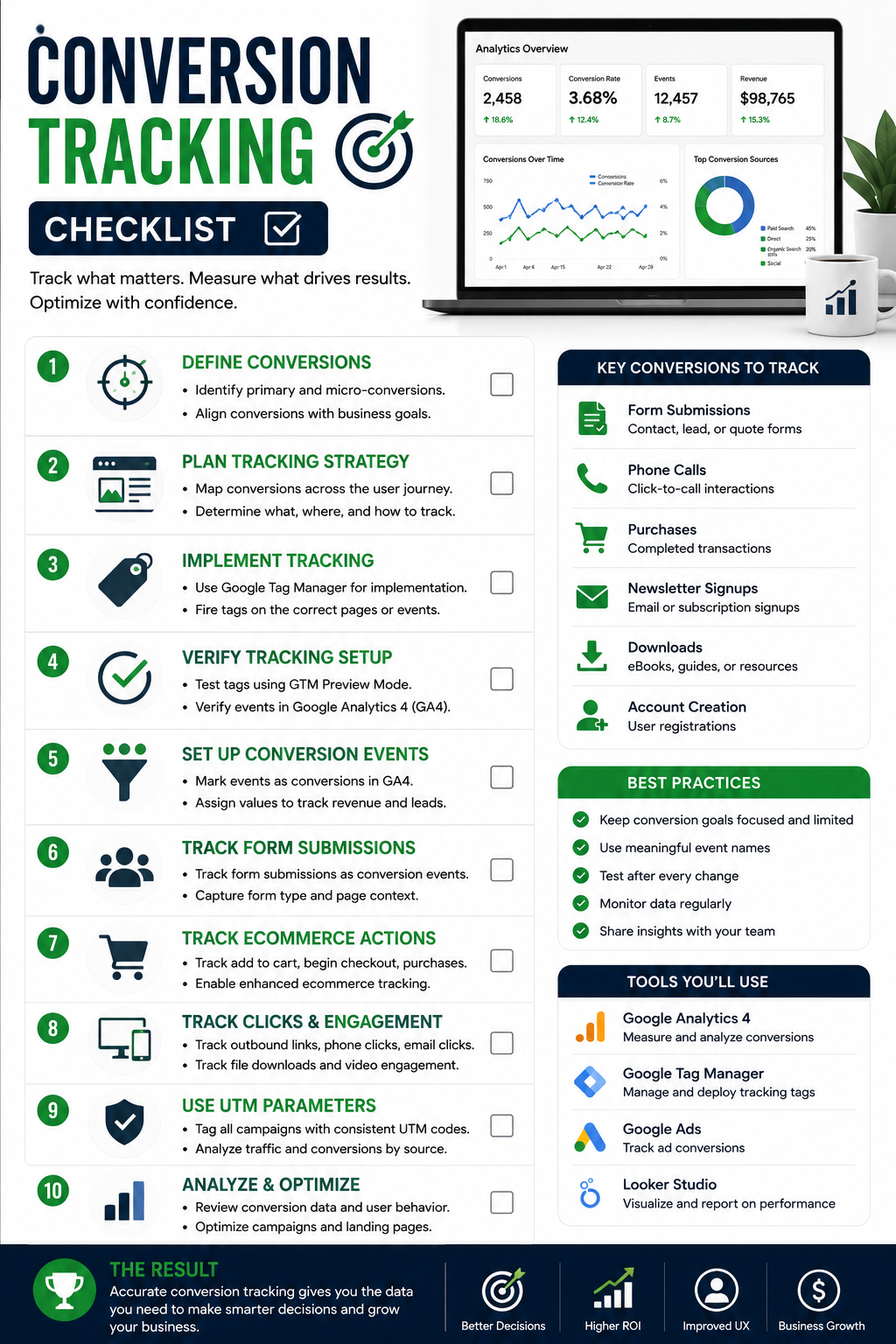
1. Define Meaningful Outcomes
Identify the actions that actually matter to the business.
These may include forms, calls, booked consultations, purchases, qualified leads, or other defined outcomes, chosen based on the business’s target audience and the actions most likely to turn interest into paying customers.
2. Connect the Conversion Events
Determine how those actions are captured across the website and connected systems.
This is where form tracking, call tracking, scheduling events, and other measurement points may become relevant. This usually involves tracking technologies configured across those systems. Privacy requirements and user consent affect how conversion tracking is implemented. Some businesses also use server-side tracking to reduce data loss from ad blockers.
3. Connect Outcomes to Marketing Sources
Use appropriate source and attribution information to understand which channels, touchpoints, and various marketing channels contributed to the result. Ad platforms such as google ads often assign a temporary cookie or identifier after an ad interaction to support attribution. A google ads account may also need its own conversion setup so ad-platform reporting reflects the same outcomes used elsewhere.
4. Connect Marketing Reporting to Lead Quality
Where appropriate and technically possible, connect initial marketing conversions with later sales or qualification information across the entire customer journey.
This final stage can move reporting from "we received a lead" toward "we received the type of lead the business actually wanted." It also helps track leads through the sales pipeline and support lead nurturing after the first inquiry.
Conversion Tracking Is Different From Google Tag Manager
Google Tag Manager and conversion tracking are related, but they are not the same thing.
Google Tag Manager is a tag management system that can help deploy and manage measurement configurations.
Conversion tracking is the broader strategy for defining, capturing, validating, and reporting meaningful business actions.
A company can have technically correct tags and still have poor conversion measurement if it tracks the wrong actions.
That distinction protects this page from becoming another Google Tag Manager guide.
For businesses that need to understand the tag-management side of their measurement environment, Masterly Tech's existing Google Tag Manager content is the more relevant next resource.
Recommended internal link: Link Google Tag Manager above to the existing Masterly Tech Google Tag Manager article or service page. This supports the technical implementation stage without competing with this page's conversion-measurement intent.
When Professional Conversion Tracking Support Makes Sense
Professional support can become useful when:
- Marketing reports show traffic but not meaningful outcomes
- Calls and forms are reported separately
- Nobody agrees on what counts as a conversion
- Form submissions are being counted incorrectly
- The business cannot clearly connect where an inbound lead came from or how an outbound lead should be evaluated, which makes it harder to see how lead tracking work is performing
- Advertising and analytics platforms report different numbers
- Promising leads or high value leads cannot be separated from general inquiries when the business needs priority follow-up
- Website changes regularly disrupt tracking
- Leadership does not trust the existing reports
These problems are rarely solved by adding another dashboard.
They require clearer measurement definitions and better connections between systems.
Masterly Tech Helps Businesses Measure What Happens After the Click
Masterly Tech approaches digital marketing measurement from the perspective of the full and entire customer journey.
Traffic matters.
Clicks matter.
Engagement can matter.
But businesses ultimately need to understand whether marketing activity is contributing to meaningful outcomes.
That is where conversion tracking, lead tracking, forms, calls, attribution, and qualified lead reporting come together.
Depending on the agreed project scope, Masterly Tech can help evaluate the measurement requirements around a business's website, marketing activity, and connected digital systems. Masterly Tech can also help businesses use tracking tools and marketing automation to connect lead flow with reporting.
The objective is not to collect the largest amount of data.
It is to create reporting that helps the business understand what its marketing is actually producing. Better lead management and measurement also support stronger business growth over time.
Frequently Asked Questions About Conversion Tracking
What is conversion tracking?
Conversion tracking measures important actions potential customers take after interacting with marketing, such as submitting a form, calling, booking a consultation, or completing a purchase.
What are conversion events?
Conversion events are defined actions that represent meaningful outcomes for the business. The right events depend on the company's customer journey and goals.
What is lead tracking?
Lead tracking follows inquiries through defined stages so businesses can understand what happens after someone first responds to marketing. It also helps track leads from website visits, forms, calls, and other touchpoints as they move into later stages of the sales process.
What is form tracking?
Form tracking measures defined form interactions or successful submissions so businesses can understand when website visitors complete important lead actions.
What is call tracking?
Call tracking helps connect phone inquiries with marketing activity when supported by the business's chosen tracking setup. It can also support direct sales contact by showing which phone inquiries came from which source.
What is marketing attribution?
Attribution is the process of assigning credit for important actions to marketing touchpoints that contributed to the customer journey.
Why is qualified lead reporting important?
Qualified lead reporting helps businesses distinguish between general inquiries and leads that meet their established criteria, giving leadership more context about marketing quality. Stronger qualification frameworks may also use lead scoring or predictive lead scoring to help prioritize follow-up.
Is conversion tracking the same as Google Analytics?
No. Conversion tracking is the broader measurement strategy. Analytics platforms can be part of the technology used to capture and report conversion information.
Can Masterly Tech help with conversion tracking?
Masterly Tech can help businesses evaluate conversion tracking and reporting requirements based on their website, marketing activity, lead flow, and agreed project scope. This may include helping the marketing team, sales teams, sales reps, or broader marketing organization agree on definitions, reporting needs, and key functions. That alignment can strengthen sales strategies and coordination with other key functions.
Discuss Conversion Tracking and Reporting Setup With Masterly Tech Group
Marketing should not stop being measurable after someone clicks an ad or lands on your website.
The stronger question is what happened next.
Masterly Tech can help businesses evaluate conversion tracking, lead tracking, form tracking, call tracking, attribution, and qualified lead reporting so marketing and sales teams can see which various marketing channels are actually producing promising leads.
Better reporting can strengthen lead generation efforts, improve conversion rates, and support overall marketing effectiveness.
Call Masterly Tech at (888) 209-4055 or visit masterlytechgroup.com to discuss conversion tracking and reporting setup with Masterly Tech Group.










