
Workflow Automation What Growing Businesses Should Automate First and What Should Stay Human
Growth often exposes process problems that were easy to overlook when a business was smaller. If your team is copying information between systems, sending the same follow-up messages every week, chasing approvals by email, or checking whether routine tasks were completed, workflow automation uses technology to perform or coordinate defined steps in those processes with less manual intervention.
Adding more employees does not always solve those issues. It often adds more people to an inefficient process, especially when important information lives in disconnected platforms that do not work together. The value of workflow automation is not automating everything, but reducing repetitive administrative work, improving routine business processes, lowering errors, and making the client experience smoother without removing the human judgment some work still requires.
For founders, operations leaders, professional firms, and growing businesses assessing what to change next, this page looks at which workflows to automate and which to keep human, the operational friction caused by disconnected systems, how to build a practical automation strategy, where digital workflows fit, and how Masterly Tech supports workflow automation projects around the way organizations actually work.
The Problem Is Often the Workflow, Not the Employee
A team can work hard and still lose hours to inefficient processes.
Consider a new client inquiry.
Information may arrive through a website form. An employee copies the details into another system. Someone sends an internal email. A second employee creates a task. Another person schedules the next action.
None of these steps may be difficult.
Together, however, they create a workflow that requires people to repeatedly move information and remember what should happen next, which creates more room for human error when the process depends on people doing the same steps manually.
As the business grows, these small administrative tasks can multiply.
Repetitive Work Creates More Places for Processes to Break
Manual processes often depend on someone remembering the next step.
That can work when the organization is small and everyone communicates closely. It becomes harder when more employees, clients, projects, and systems are involved.
Information can sit in an inbox. A task may not be assigned. The same data may be entered several times through repeated data entry. Employees may create their own workarounds because the official process is built around time consuming tasks.
The organization may appear to have a staffing problem when it actually has a process problem.
Workflow Automation Should Start With the Right Work
Effective workflow automation is not about replacing every manual action with technology.
It is about identifying work where automation can make practical sense.
Routine processes that follow predictable rules may be stronger candidates than work requiring complex judgment. Repetitive information transfers, standard notifications, task creation, status changes, and other structured actions may create opportunities for automation depending on the systems involved.
The exact opportunities differ from one organization to another.
That is why an automation project should begin with understanding the business rather than selecting software first.
What Should Businesses Consider Automating First?
The strongest starting points are often processes that happen frequently and follow a recognizable pattern. These recurring tasks often make the best pilot projects because they can show ROI quickly.
An operations team may repeatedly move information from one system to another. A professional firm may have routine administrative steps that occur every time a new matter or project begins. A growing company may depend on employees to manually notify several departments when a status changes.
These workflows deserve attention because the repetition can consume internal time without necessarily requiring human judgment at every step.
Look for Repeated Administrative Actions
A repeated action is not automatically a good automation candidate, but repetition can reveal where a process deserves closer review.
Common patterns can include:
- Moving information between approved business systems
- Creating routine tasks after a defined event to automate repetitive tasks
- Sending standard internal notifications
- Routing information to the appropriate person or team
- Updating defined records when a status changes
- Starting an established internal process after a specific trigger
The purpose is not to remove people from the business.
It is to reduce unnecessary manual work by automating routine administrative steps so employees can spend more time on responsibilities where their involvement matters, rather than simple tasks that do not require human judgment at every step.
What Should Stay Human?
Not every workflow should be automated.
Some decisions require context that cannot be reduced to a simple rule. Others affect important relationships or require professional judgment.
A client who is frustrated may need a thoughtful conversation, not an automatic response. A manager addressing a sensitive employee matter needs context. A professional evaluating an unusual situation may need to consider information that does not fit neatly into a standard workflow.
Good automation strategy recognizes these boundaries.
Human Judgment Still Has Business Value
Automation can be useful for moving information or starting a defined process.
People are still essential when the work involves judgment, empathy, negotiation, strategy, creative thinking, or complex decisions.
This distinction is especially important for professional firms.
Clients often hire a firm because they value the knowledge and judgment of its people. Technology should support that expertise rather than make important interactions feel impersonal.
The goal is not maximum automation.
The goal is a better workflow.
Business Process Automation Can Reduce Operational Friction
Business process automation looks at repeatable processes rather than isolated tasks.
That distinction matters.
Automating one step in a poorly designed process may simply make the wrong process move faster. A better approach considers what happens before and after that step.
For example, if information enters one system and employees repeatedly need it somewhere else, the larger question is why that manual transfer exists.
Could the process be structured differently? Which system should hold the information? What event should cause the next action? When does a person need to become involved?
These questions help keep automation connected to the operational problem. Well-structured automated workflows can also improve visibility and compliance by tracking process performance and helping teams identify bottlenecks.
Disconnected Systems Create Hidden Work
Growing businesses often add technology as new needs appear.
Marketing uses one platform. Sales uses another. Operations has its own system. Documents live somewhere else. Employees communicate through additional tools.
Each system may serve a legitimate purpose.
The problem appears in the gaps between them, and 46% of product teams cite integration issues as automation blockers when tools do not connect well.
Employees become the connection.
They copy, paste, download, upload, forward, retype, and check information because the systems do not support the workflow the organization needs.
That manual effort can become part of everyday operations without leadership realizing how much work it creates. Choosing the right automation software means evaluating scalability and how well it integrates with existing systems, or the business risks creating even more disconnected work.
Digital Workflows Can Create Clearer Movement Between Tasks
Digital workflows can help organize how information and tasks move through a business.
Instead of relying entirely on email threads, memory, document sharing, or informal instructions, a workflow can establish what should happen when a defined event occurs.
The right structure depends on the organization.
A process involving a prospective client will differ from internal approval workflows. Project intake will differ from employee onboarding. A professional-services workflow may require human review at points where another business can use a more standardized process.
Masterly Tech approaches automation with those differences in mind.
Workflow Automation Tools Are Only Part of the Answer
Businesses searching for workflow automation tools can find many technology options, including broader automation platforms businesses may compare.
The harder question is what the tool should actually do. That means evaluating tools based on scalability, integration with existing tools, and who will use them.
Buying software before understanding the workflow can create another disconnected platform for employees to manage. Some teams compare low code options for non-technical users with more flexible tools favored by technical teams, with Zapier integrating with thousands of tools, Make as a budget-friendly alternative, Relay.app simplifying workflow creation, and n8n remaining popular in more technical environments.
The organization may end up adapting its operations to the tool rather than choosing technology that supports the intended process.
Start With the Business Problem
The technology should come after the operational need is understood.
What work is being repeated?
Where does information stop moving?
Which tasks require employees to copy information?
Where are people waiting for approvals?
Which steps depend on someone remembering what happens next?
Where is human judgment necessary?
Which key stakeholders should review the workflow before technology is selected?
Answering these business questions provides a stronger foundation for technology decisions and helps improve workflow adoption.
Operations Automation Should Support Growth
A process that works for a small company may become difficult as the organization expands.
An owner may personally approve requests when there are only a few each week. A manager may remember every active project when the team is small. Employees may coordinate routine tasks through informal messages.
Growth changes those conditions.
Operations automation can help organizations create more structure around repeatable processes as activity increases, support broader business operations, and let companies handle more transactions without adding staff in proportion to the workload. Strong automation efforts also make it easier to keep that structure in place as demand grows.
That does not mean removing flexibility.
It means reducing the number of routine operational steps that depend entirely on individual memory or manual movement of information.
Poor Processes Can Affect the Client Experience
Internal workflow problems do not always stay internal.
A delayed handoff can become a delayed response to a client. Missing information can force a customer to repeat something they already provided. An unclear internal process can result in inconsistent communication.
These experiences affect how people view the organization.
A business may have excellent professionals and strong services, yet operational friction can make the company feel less organized than it actually is.
That is why workflow design can have implications for brand and reputation.
The client may never see the internal system.
They experience what that system produces.
Automation Strategy Should Account for the Entire Organization
A useful automation strategy should not be a collection of unrelated shortcuts.
Automations can affect employees, departments, systems, and client interactions.
Changing one workflow may create new requirements somewhere else. Automating a handoff may change who receives information. Connecting systems may affect how employees use existing processes.
This is why automation benefits from a broader operational view. Before expanding automation across departments, define process maps, clear owners, and clearly defined Key Performance Indicators.
As automations spread, governance matters too, with access controls and audit logs where sensitive processes are involved.
The objective should be a more coherent business process, not simply a larger number of automated tasks, and to measure success you need performance metrics that track workflow efficiency and measurable business outcomes.
Masterly Tech Provides Done-for-You Workflow Automation Support
Growing businesses do not need their employees to become automation specialists.
Masterly Tech works with organizations that want professional support evaluating workflows and identifying practical automation opportunities.
We begin with the business problem.
That means looking at repetitive work, disconnected processes, system handoffs, and areas where employees may be spending time on administrative actions that could potentially be handled more efficiently. Each workflow should also have a clear owner, and we involve key stakeholders to gather feedback from the people using it day to day.
From there, appropriate automation opportunities can be considered based on the organization's needs and project scope. Successful adoption also depends on ongoing training and change management as processes are updated.
Technology Should Fit the Business
Masterly Tech does not need to turn every human interaction into an automated process.
The better objective is to determine where technology can support the business and where people should remain directly involved.
For founders and operations leaders, this creates a more practical conversation about automation.
Instead of asking, "How much can we automate?" the organization can ask, "Where would automation actually improve the way we work?"
That is a stronger foundation for sustainable operational change.
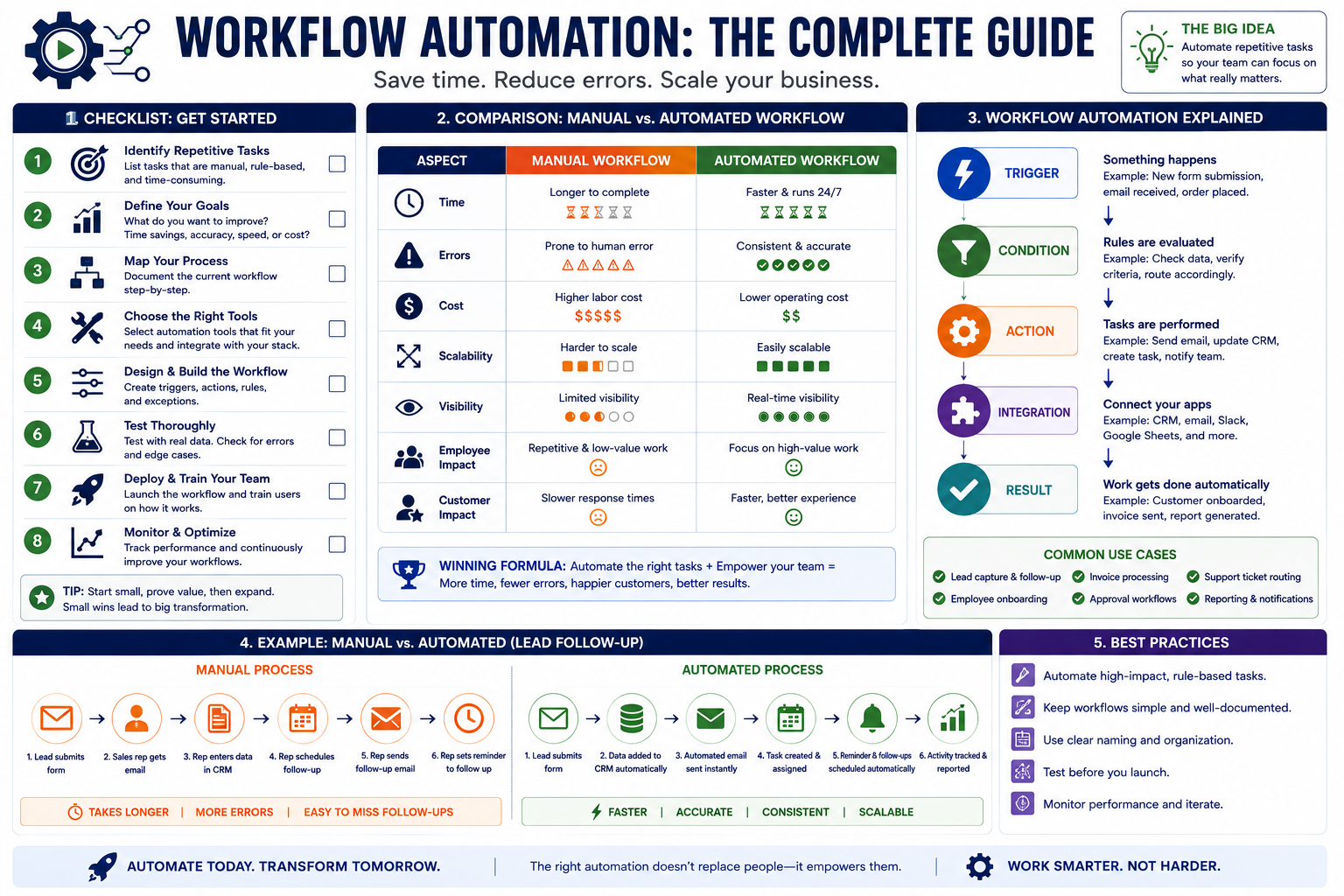
Frequently Asked Questions About Workflow Automation
What is workflow automation?
Workflow automation uses technology to perform or coordinate defined steps in a business process with less manual intervention. In some cases, artificial intelligence can turn unstructured inputs into structured next steps within a workflow. The appropriate level of automation depends on the process and the organization's needs.
What is business process automation?
Business process automation focuses on using technology to support repeatable business processes rather than relying entirely on manual actions.
What types of workflows can businesses automate?
Potential candidates can include repetitive, rules-based administrative processes, routine notifications, defined task creation, information routing, and certain system handoffs. Product managers can automate feedback collection and analysis, engineering leads can use continuous integration and automate code review assignments based on expertise, and it operations teams can automate troubleshooting and issue remediation processes. Suitability depends on the specific workflow and technology involved.
What should businesses avoid automating?
Processes that depend heavily on judgment, empathy, strategy, complex decision-making, or sensitive human interaction may require direct involvement from employees.
What are workflow automation tools?
Workflow automation tools are technologies that can help trigger actions, move information, connect processes, or coordinate defined tasks. The right technology depends on the business requirements, and some now include AI tools or AI services for more advanced workflows. Some businesses are also comparing AI workflow automation tools when workflows involve large language models or other machine learning features.
What are digital workflows?
Digital workflows organize how tasks, information, and actions move through technology-based business processes.
What is operations automation?
Operations automation applies automation to repeatable operational processes with the goal of reducing unnecessary manual work and improving process structure. It can support automated processes across departments and be especially valuable for IT teams managing recurring operational work.
Why should a business develop an automation strategy?
An automation strategy helps connect individual automation decisions to broader operational goals, especially when automation technologies are being introduced across multiple systems. It can also help businesses decide which work should be automated and which should remain human, avoid an ad hoc approach, and choose automation solutions that fit long-term needs.
Can Masterly Tech evaluate our existing workflows?
Organizations can contact Masterly Tech to discuss evaluating current workflows, repetitive administrative work, manual tasks, and complex workflows that may involve several systems or departments to determine an appropriate project approach. This review can also identify where data silos or disconnected handoffs are slowing work.
Build Better Processes Before Adding More Administrative Work
Growth should not require employees to spend increasing amounts of time copying information, checking routine tasks, and connecting systems manually.
Some of that work may be better handled through technology.
Other work should remain firmly in human hands.
The important decision is knowing the difference.
Masterly Tech helps organizations approach workflow automation from the perspective of the business first, with the goal of cost savings, fewer manual errors, and better use of employee time where appropriate. By examining processes, systems, repetitive tasks, and points where human judgment matters, companies can make more informed decisions about where automation belongs.
Request a workflow and automation assessment from Masterly Tech Group.
If repetitive administrative work, automating tasks, and disconnected systems are slowing your organization down, talk with Masterly Tech about workflow automation designed to reduce recurring tasks across your organization’s workflows and actual operations.
We can discuss your existing processes, operational challenges, and areas where automation may provide practical value, including how we design workflows that connect all the tools your business already relies on, with ai workflow automation options for more advanced needs.
Call (888) 209-4055 or visit https://www.masterlytechgroup.com/.










