
CRM Automation: What to Automate After a Lead Enters the Pipeline
Generating a lead is only the beginning.
A prospect fills out a form, calls the business, requests information, or responds to a campaign. Their information reaches your CRM. Then the process becomes dependent on someone remembering what happens next.
Who owns the lead? Has anyone responded? Should a task be created? When should another follow-up happen? What happens if the prospect books a meeting, does not respond, or moves to another stage?
This is where CRM automation becomes valuable. CRM automation uses software rules, triggers, and workflows to handle customer relationship tasks after a lead enters the pipeline, including assigning leads, creating follow-up work, updating records, and moving opportunities through the right process.
For businesses and professionals responsible for lead generation, sales, and marketing, that structure reduces the manual gaps that cause leads to be missed, delayed, or mishandled. The goal is not to remove people from customer relationships. It is to make follow-up more consistent, lead management more reliable, and the customer experience stronger without wasting time on repetitive work.
Masterly Tech helps businesses connect digital marketing with the systems that support lead conversion. Rather than treating automation as a collection of random software features, the better approach is to examine what should happen after a lead enters your business — from routing and follow-up to pipeline management, triggers, workflows, and client journey automation that reflects how your sales process actually works.
Your Lead Generation May Be Working While Your Follow-Up Is Not
Businesses often focus heavily on getting more leads.
They invest in SEO, advertising, landing pages, website design, and other marketing channels. Those efforts can bring prospective customers to the business.
But marketing performance does not stop when someone submits a form.
Imagine two prospects requesting information on the same day.
The first is assigned immediately to the correct person, receives an appropriate response, and generates a follow-up task for the sales team.
The second enters the CRM without a clear owner. Someone notices the record later and assumes another employee has already responded.
The company generated two leads.
It created two very different experiences.
That is why the process after lead capture deserves as much attention as the process before it.
CRM System Automation Should Start With the Customer Journey
The first question should not be, "What can our CRM automate?"
Modern CRM systems can automate many tasks. HubSpot, for example, currently documents workflow capabilities that can respond to triggers such as form submissions and deal-stage changes, then perform actions including sending notifications, creating tasks, assigning ownership, and updating CRM records.
The better question is:
What should happen next for this person?
That keeps technology connected to the actual customer experience.
A practical framework is:
Capture. Route. Follow Up. Advance. Continue.
Capture: Make Sure the Lead Becomes a Useful Record
A lead entering the system should create more than a name on a list.
The business needs enough information to determine what happens next.
Where did the lead come from?
What did the person request?
Which service or product are they interested in?
Is there enough information to determine who should handle the inquiry?
Good automation depends on useful data and data accuracy.
If important fields are missing, duplicated, or inconsistent, automation can move bad information faster rather than solving the underlying problem.
Automation can reduce manual data entry by up to 50%, but only when the business first protects data quality.
The workflow should therefore begin with understanding what information the business needs at the point of conversion.
Route: Get the Lead to the Right Place
Lead automation can support lead assignment or routing to assign incoming opportunities according to defined business rules, which can improve response time when those rules are clearly defined.
That may be useful when a company has several sales representatives, offices, service areas, departments, or types of inquiries.
The alternative is often manual sorting through manual processes with more manual intervention.
Someone receives a notification, reads the submission, decides who should receive it, forwards the information, and hopes the next person acts.
Each handoff creates another place where the process can slow down.
Faster automated routing and follow-ups can improve lead conversion rates by 20%.
Automation can support routing, but the business still needs to define the logic.
Technology cannot decide what "the right person" means until the organization has established that rule.
Lead Nurturing and Follow Up Automation Should Support Human Sales Activity
One of the most important areas to examine is what happens after initial contact.
Follow up automation can create reminders, tasks, notifications, or appropriate communications based on defined conditions.
This does not mean every prospect should receive an endless series of generic messages.
Poor automation can make a business feel less personal.
Good automation should support the sales process with better efficiency and clearer progress toward closing deals.
For example, if a prospect requests a consultation, the CRM might help make sure the inquiry is assigned correctly and that the responsible employee has a clear follow-up task.
CRM automation increases sales productivity by 30% by reducing repetitive tasks and supporting high-value follow-up work.
If a prospect books a meeting, the system may need a different next action.
If the opportunity becomes a customer, sales-oriented communication may need to stop so the person does not continue receiving messages intended for prospects.
The purpose is coordination, and automation should free the sales team for high-value conversations instead of repetitive tasks.
CRM Triggers Turn Customer Actions Into Workflow Actions
CRM triggers are the conditions that cause an automated process to begin or take another action.
A trigger can occur when a user submits a form.
A deal moving into a new stage can be a trigger.
A meeting booking, field update, or other defined event may also be used as a trigger depending on the CRM and configuration, and certain actions can also trigger alerts or notifications.
Current HubSpot documentation, for example, supports pipeline automations that can create tasks or send notifications when records move through stages.
Triggers matter because they connect customer or business events to what should happen next.
A useful way to think about them is:
When X happens, what should the business do?
That simple question can expose gaps in an existing sales process.
Pipeline Automation Should Reflect the Real Sales Process
A CRM pipeline is most useful when it reflects how opportunities actually move through the business inside the broader crm system.
If stages are vague or inconsistently used, pipeline automation can become difficult to trust.
For example, suppose a business has stages called:
New Lead → Contacted → Consultation → Proposal → Decision
crm workflow automation works best when the crm system uses stages consistently and teams share the same definitions.
Each stage should mean something specific.
What qualifies a lead to move from New Lead to Contacted?
Does sending an email count, or does the prospect need to respond?
What happens when a consultation is scheduled?
Who is responsible after a proposal is delivered?
Clear answers matter before automation is added.
Otherwise, the company may automate stage changes without creating a more reliable sales process.
Professional CRM planning should therefore examine the process first and automation second.
CRM Workflow Automation Should Reduce Gaps, Not Add Complexity
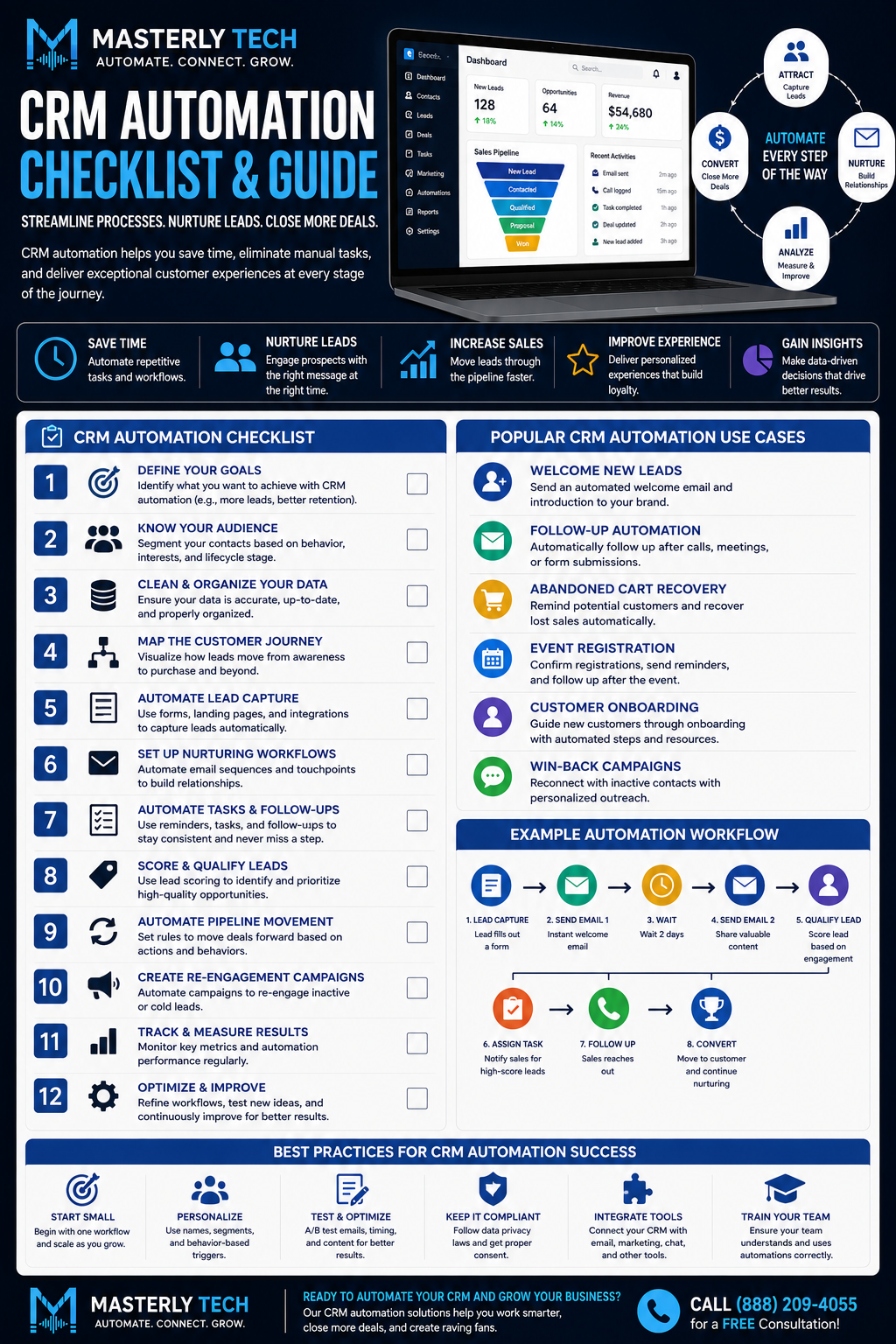
Well-designed workflow automation and automated workflows can coordinate a series of related actions.
For example:
Lead submits inquiry → CRM captures information → lead is routed → internal task is created → appropriate follow-up occurs → activity is recorded
The value comes from the connection between the steps.
Reducing manual tasks this way can save businesses about 44,000 hours annually.
The opposite is automation built one rule at a time without considering how the rules interact.
One workflow sends a message. Another changes a field. A third creates a task. Nobody remembers why the automations were created or what happens when the same person qualifies for several workflows.
Eventually, the CRM becomes difficult to manage.
The goal should not be maximum automation; businesses should build workflows and create workflows intentionally instead of layering disconnected rules.
It should be useful automation.
Client Journey Automation Extends Beyond the First Sale
The customer relationship does not necessarily end when an opportunity becomes a client.
Client journey automation can help businesses support new clients after the first sale as they move from prospect to customer and through later stages of the relationship.
The appropriate process depends on the business.
A new client may need different communications, internal handoffs, tasks, or status changes from a prospect.
CRM automation can also trigger renewal reminders and customer check-ins to improve retention.
That transition is important.
A customer should not continue moving through a workflow designed for someone who has never purchased.
This is another reason CRM automation needs a larger view of the customer journey.
Individual automations may work correctly on their own while creating a poor experience when combined.
Automation Can Affect How Customers Experience Your Brand
CRM systems may operate behind the scenes, but customers experience their results.
They notice whether someone responds.
They notice when they have to explain the same information repeatedly.
They notice when sales and marketing teams appear unaware of each other's conversations.
They also notice irrelevant messages that continue after their situation has changed.
About 60% of customers prefer self-service tools for issue resolution, which makes coordination across service teams even more important.
These experiences affect how organized the business appears.
A company can have a polished website and strong advertising while losing credibility through a disconnected follow-up process.
CRM automation should help connect the front-end marketing experience with what happens after someone becomes a lead.
Do Not Automate a Broken Process
Automation is not a substitute for process design.
If nobody knows who owns a certain type of lead, automatically creating more notifications will not solve the ownership problem.
If pipeline stages have no clear meaning, automating them may make reporting more confusing.
If the business has not decided when a salesperson should personally intervene, an automated sequence cannot make that decision responsibly on its own.
Before building automation, the organization needs to understand:
What should happen?
Who is responsible?
What information is required?
What event changes the next step?
Where should automation stop and a person take over?
Those decisions create the foundation.
Masterly Tech Connects Marketing With What Happens After Conversion
A website, SEO strategy, or advertising campaign can generate opportunities.
The CRM process determines what the business does with those opportunities.
Masterly Tech currently provides digital marketing services including website design and development, SEO, content, advertising, and related solutions focused on helping businesses build their online presence and attract clients. The company's website also recognizes that website lead flows can be connected to CRM tools. Businesses comparing systems may also look at Zoho CRM for budget-friendly automation workflows for smaller teams.
That makes the post-conversion workflow an important part of the larger digital system.
Businesses can explore Masterly Tech's digital marketing services when reviewing how lead generation, websites, and conversion systems work together.
The objective is not to add automation simply because a CRM supports it.
It is to create a more intentional path from marketing response to business follow-through.
CRM Automation FAQ
What is CRM automation?
CRM automation uses software rules and workflows within a crm system to perform defined customer relationship tasks automatically, using its automation capabilities to reduce manual processes. Common examples include record updates, lead routing, task creation, notifications, and follow-up actions, improving efficiency and keeping customer information moving through one system.
What are CRM workflows?
CRM workflows are automated workflows that perform defined actions when records meet specific conditions or triggers. They can create workflows around updates, notifications, and customer records when those trigger conditions are met.
What is lead automation?
Lead automation uses CRM rules and workflows to support activities such as capturing, routing, or following up with leads. It can assign incoming leads using lead assignment rules, which helps improve response time.
What is follow up automation?
Follow up automation uses defined events or timing to create follow-up actions such as tasks, notifications, or appropriate communications for sales and marketing teams. It also supports lead nurturing after an inquiry, so automated follow-up can assist marketing campaigns without making communication feel generic.
What are CRM triggers?
CRM triggers are events or conditions that start an automated action or workflow. Depending on the CRM, examples can include form submissions, field changes, meeting bookings, or pipeline-stage changes. In practice, certain actions within crm data can trigger alerts, notifications, or record updates.
What is pipeline automation?
Pipeline automation uses CRM rules to support workflow automation for actions connected with stages of a sales or service pipeline, including complex processes such as creating tasks, updating records, or sending internal notifications, and it can reduce manual intervention as opportunities move between stages.
What is client journey automation?
Client journey automation coordinates appropriate CRM actions as a person moves through different stages of the relationship with a business, from onboarding new clients to scheduling customer check-ins and keeping customer information updated across later relationship stages.
Should every CRM task be automated?
No. Automation is most useful when a task has a clear rule, reliable data, and a defined purpose. A task may still stay manual when pricing, exceptions, or sensitive communication require judgment. Activities requiring judgment, sensitive communication, or personal relationship management may still require human involvement.
Can CRM automation replace a sales team?
CRM automation is designed to support teams by reducing repetitive tasks and manual tasks, not replace the human judgment and relationship-building involved in professional sales. Current CRM platforms commonly use automation for tasks such as routing, follow-up task creation, record updates, and pipeline management, helping the sales team spend more time selling and less time on data updates or customer records.
Request a CRM workflow assessment
If your business is generating leads but still depends on manual processes and manual intervention after a user submits a form, the problem may not be lead generation.
It may be what happens after the lead arrives.
Masterly Tech can help assess how your marketing and lead-management systems connect, where CRM automation and workflow automation fit best, and how to improve data accuracy and response time across the customer journey.
The goal is not to automate every interaction. It is to identify the repetitive gaps that technology can handle while keeping people involved where judgment and relationships matter.
Call Masterly Tech at (888) 209-4055 or visit MasterlyTechGroup.com to request a CRM workflow assessment.










