
DKIM Record: What It Is, How It Works, and How to Set It Up
A DKIM record is a DNS TXT record that publishes the public key receiving mail servers use to verify a domain's DKIM signature. When it is set up correctly, every message your domain sends carries a digital signature that proves it came from an authorized sender and was not altered in transit. For a business that relies on email for invoices, proposals, and client communication, a correct DKIM record is one of the foundations of email authentication.
This guide explains what a DKIM record is, how DKIM works, the parts of a DKIM record and the DKIM signature header, DKIM record examples, how to set up DKIM step by step, how to run a DKIM record check, key rotation, and the most common DKIM mistakes.

What Is a DKIM Record?
DKIM stands for DomainKeys Identified Mail. DomainKeys Identified Mail (DKIM) is defined in RFC 6376, the IETF standard for DKIM signatures. DKIM uses public key cryptography: the sending mail server holds a private key and uses it to sign outgoing messages, and the domain publishes the matching public key in DNS so any receiving server can check the signature.
The DKIM record is where that public key lives. It is a DNS TXT record published at a name made of a selector, the label _domainkey
, and your domain. RFC 6376 uses the example brisbane._domainkey.example.com
, where brisbane
is the DKIM selector. The selector identifies which key to use. Because each selector points to its own DKIM key, one domain can publish multiple keys, for example one for its email provider and another for its marketing platform.
A DKIM record does not tell receivers which servers may send mail for your domain. That is the job of SPF, the Sender Policy Framework. DKIM proves message integrity and identifies the signing domain. DMARC (domain based message authentication, reporting, and conformance) then uses SPF and DKIM results to decide what happens to mail that fails.
How Does DKIM Work?
DKIM involves two keys and a few steps:
- Key pair. The domain owner, or the email service, generates a private key and a public key.
- Publishing. The public DKIM key is published in the domain's DNS records as a DKIM TXT record. This sender's DNS record is what every receiving server will consult. The private key stays on the sending mail server.
- Signing. When an email server sends a message, it uses the private key to create a cryptographic signature of selected message header fields and the message body. It adds that signature to the message in a DKIM-Signature header field.
- Lookup.
The recipient's server retrieves the public key by reading the selector (
s=) and the signing domain (d=) from the DKIM signature header, then querying DNS forselector._domainkey.domain. - Verification. The receiving server uses the public key to check the signature. If the email header and body match what was signed, the DKIM check passes. If anything was changed, or the DKIM public key cannot be found, DKIM validation fails. The result is recorded in the Authentication-Results header so other filters can use it.
Google's DKIM setup guide describes the same flow: the private key on the email server adds a DKIM signature to the header of outgoing email, and the receiver's email server gets the public key from the DKIM TXT record to authenticate the message.
Why DKIM matters
- Message integrity. DKIM shows that the signed parts of a message were not changed after it left the sender.
- Domain reputation. Mailbox providers can associate a signing domain with its sending history, which supports consistent delivery to the recipient's inbox.
- Email authenticity. DKIM signed email messages give receiving servers evidence that the message really came from the domain owner, not an impersonator.
- Protection against phishing attempts. DKIM, combined with SPF and DMARC, makes it harder for attackers to send malicious emails that impersonate your domain in business email compromise and other fraud.
- Bulk sender requirements. Google requires bulk senders, those sending more than 5,000 messages a day to personal Gmail accounts, to set up SPF, DKIM, and DMARC.
DKIM Record Format and Tags
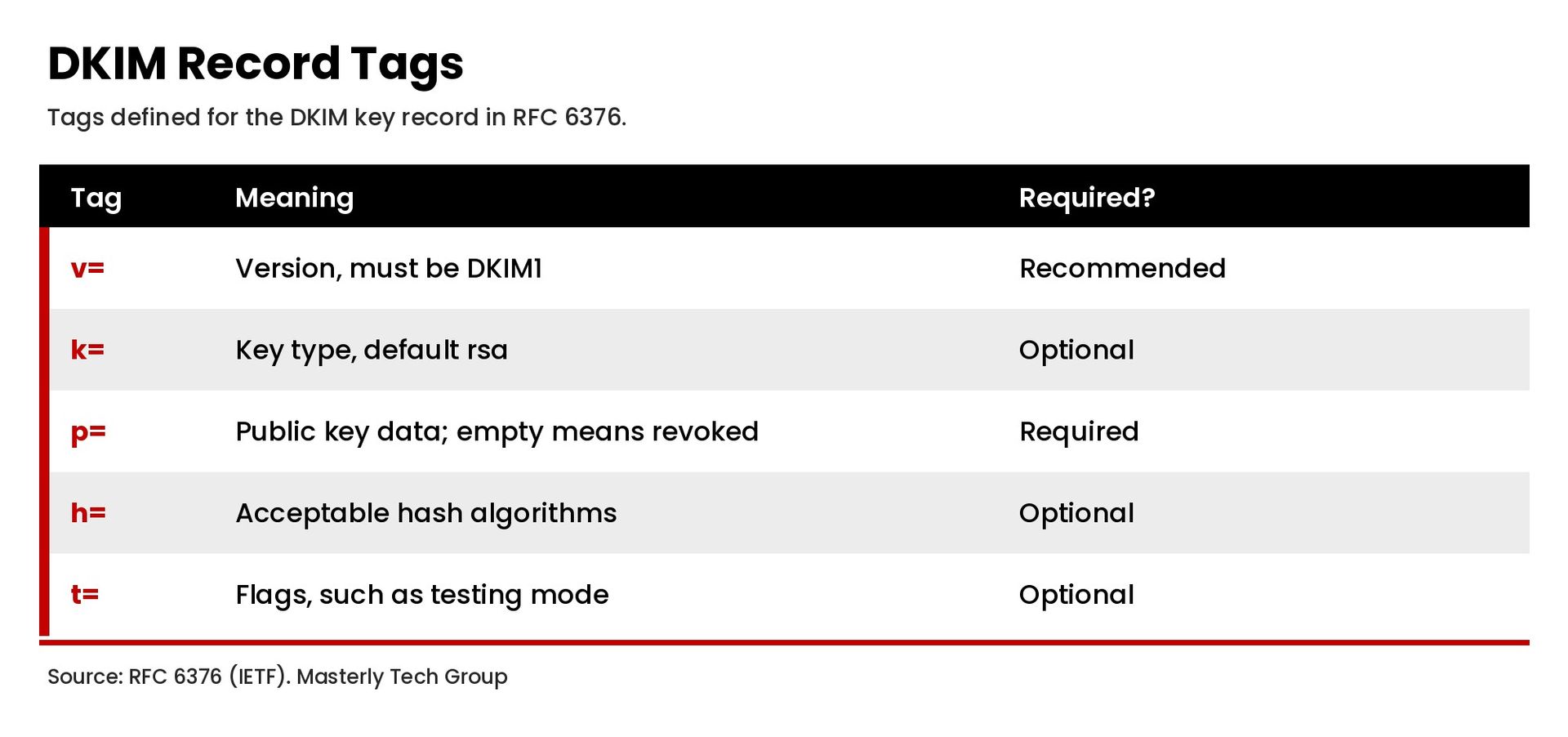
A DKIM record is a list of tag and value pairs separated by semicolons. RFC 6376 Section 3.6.1 defines these tags for the key record:
- v=
Version. Recommended. If present, it must be
DKIM1and appear first. - k=
Key type. Optional; the default is
rsa. RFC 8463 added Ed25519 as a second signing algorithm in 2018. - p= Public key data. Required. This is the long base64 string. An empty value means the key has been revoked.
- h= Acceptable hash algorithms. Optional.
- s= Service type. Optional.
- t=
Flags, such as
yfor testing mode orsto restrict subdomains. Optional. - n= Notes for humans. Optional and rarely used.
A typical DKIM TXT record value looks like this, with the key shortened:
v=DKIM1; k=rsa; p=MIIBIjANBgkqhkiG9w0BAQEFAAOCAQ8AMIIBCgKCAQEA...
The DKIM Signature Header
The DKIM signature header field is added to each signed message. It is not part of the DNS record, but you will see it when you view a message's full email header. Key tags include:
- v= the DKIM version.
- a=
the signing algorithm, such as
rsa-sha256. - d= the signing domain.
- s= the DKIM selector.
- h= the list of signed header fields, such as From, Subject, and Date.
- bh= a hash of the message body.
- b= the signature itself.
The d=
and s=
values together tell the receiving server exactly which DNS record to look up. If you want to find the selector your email provider uses, Google suggests sending a test message, viewing the message source, and locating the s=
value in the DKIM-Signature header.
DKIM Record Examples
Here is what DKIM records look like for common setups. Your provider supplies the actual values.
Google Workspace:
a TXT record with the host google._domainkey
and a value formatted as v=DKIM1; k=rsa; p=
followed by the key. Google's default prefix selector is google
.
Microsoft 365:
Microsoft uses CNAME records rather than TXT records for custom domains. According to Microsoft's DKIM documentation, you publish CNAME records with the hosts selector1._domainkey
and selector2._domainkey
, each pointing to a Microsoft-hosted value.
Marketing and CRM platforms: many email service providers also ask you to add CNAME records, so they can rotate keys on their side without you editing DNS again.
How to Set Up DKIM Step by Step
The DKIM setup process is similar across providers:
- List every service that sends email for your domain. Include your email host, CRM, marketing platform, help desk, and invoicing tools. Each one needs its own DKIM configuration.
- Generate the DKIM key in each service. In Google Workspace, a super administrator generates the key in the Admin console under Apps, Google Workspace, Gmail, Authenticate email. Google recommends a 2048-bit key if your domain provider supports it.
- Copy the record details.
You will get a host name, which includes the selector and
._domainkey, and a value, either a TXT record value with the public key or a CNAME target. - Add the record at your DNS provider. Sign in where your domain's DNS zone is managed, create the TXT or CNAME record, and save. Some DNS providers limit TXT record length, so a 2048-bit key may need to be split into multiple strings.
- Wait for DNS to update. Google notes it can take up to 48 hours for DKIM authentication to start working after you add the key.
- Turn on signing. In many services, including Google Workspace, you must click a button such as Start authentication to begin signing outgoing messages.
- Verify.
Send a message to an outside account and check the Authentication-Results line in the message header for
dkim=pass.
If you manage DNS in several places, our guide to domain management explains how to keep DNS configuration organized and secure.
How to Run a DKIM Record Check
There are a few ways to check a DKIM record:
- Read a message header.
Send an email to an account you control at another provider, open the full message header, and look for
dkim=passin Authentication-Results. In Gmail, use More, then Show original. - Use a DKIM record checker. Online DKIM record checker tools ask for your domain and selector, then confirm whether the record exists and the public key is valid.
- Look up the DNS record.
Query the TXT record at
selector._domainkey.yourdomain.comwith your DNS provider's dashboard or a command line DNS lookup tool.
A DKIM record check confirms the key is published. A message header check confirms that messages are actually DKIM signed and pass validation. Do both.
DKIM Key Length and Algorithms
Key lengths and the cryptographic algorithm you choose affect how secure your DKIM signature is. RFC 8301 updated DKIM's cryptographic requirements in 2018. It says signers must use RSA keys of at least 1024 bits and should use keys of at least 2048 bits. It also says the older rsa-sha1 signing algorithm must not be used for signing, leaving rsa-sha256 as the RSA standard. RFC 8463 later added Ed25519-SHA256 as an option, though RSA remains the most widely supported choice.
In practice, use a 2048-bit RSA key pair unless your DNS provider cannot store it. Longer keys make it much harder for an attacker to recover the private key and forge a DKIM signature on outgoing email.
DKIM Key Rotation
Keys should not stay in place forever. Rotating the DKIM key limits the damage if a private key is ever exposed. RFC 6376 recommends assigning new keys to new selectors rather than reusing a selector with a new key. A simple rotation looks like this:
- Generate a new key pair under a new selector.
- Publish the new public key in DNS.
- Switch the email server to sign with the new private key.
- Leave the old record in place for a short period so messages already in transit can still be verified.
- Revoke the old key by emptying its
p=value or removing the record.
Providers that use CNAME records, such as Microsoft 365, often handle rotation for you.
How DKIM Works With SPF and DMARC
DKIM, SPF, and DMARC each solve a different part of email authentication:
- SPF verifies which servers may send mail for a domain. See our guide to the SPF record.
- DKIM authenticates the message itself with a digital signature tied to the signing domain.
- DMARC checks whether SPF or DKIM passed for a domain that aligns with the visible From address, and tells receivers what to do when both fail. See our guide to the DMARC record.
Domain owners should implement SPF, DKIM, and DMARC records together, since each covers gaps in the others. DKIM is especially useful because it usually survives forwarding, while SPF often fails when a message is relayed by another server. For DMARC to pass on DKIM, the d=
signing domain must align with the From domain, meaning it is the same domain or, under relaxed alignment, a subdomain of the same organizational domain, which is why third party senders should sign with your domain rather than their own.
DKIM Technical Details Worth Knowing
A few technical details explain many DKIM questions:
- Canonicalization.
The
c=tag in the DKIM signature header field tells the receiving server how strictly to compare the message. The relaxed setting tolerates minor whitespace changes that some mail systems introduce. - Signed headers.
Only header fields listed in
h=are covered by the signature. The From header field must always be signed. - Body length.
The optional
l=tag can limit how much of the message body is signed. Most providers do not use it, since it can let someone append content to a DKIM signed message. - Multiple signatures. A message can carry more than one DKIM signature, for example one from your domain and one from your email service provider.
- Revocation.
Publishing an empty
p=value tells receivers that a public DKIM key is no longer valid.
Common DKIM Record Mistakes
- Missing records for third party senders. Every service that sends as your domain needs its own DKIM key.
- Copy errors. Extra spaces, missing characters, or quotes in the wrong place break the public key.
- Wrong host name.
Some DNS providers add the domain automatically, so entering the full name creates
selector._domainkey.example.com.example.com. - Never turning on signing. Publishing the DKIM record is only half the job; the service must also start signing.
- Outbound gateways that modify messages. Google warns that gateways that add footers or otherwise change messages can break DKIM signatures.
- Short or outdated keys. Replace 1024-bit keys with 2048-bit keys where your DNS provider allows it.
For more on keeping mail out of spam folders, read our guide to email deliverability.
Frequently Asked Questions
What is a DKIM record?
A DKIM record is a DNS TXT record, published at selector._domainkey.yourdomain.com
, that holds the public key receiving servers use to verify the DKIM signature on your email.
How do I find my DKIM record?
Find your selector in the DKIM-Signature header of a message you sent, then look up the TXT record at selector._domainkey.yourdomain.com
with a DKIM record checker or your DNS provider.
Can a domain have more than one DKIM record?
Yes. Each selector holds its own key, so a domain can publish multiple keys for different email service providers.
What is the difference between DKIM and SPF?
SPF verifies that the sending server is authorized for a domain. DKIM authenticates the message with a cryptographic signature that receivers check against the public key in DNS. Most domains should use both, plus DMARC.
Is DKIM required?
Not by law, but Google requires DKIM for bulk senders to personal Gmail accounts, and DKIM is needed for a strong DMARC setup.
How long does a DKIM record take to work?
Usually minutes to hours, but Google notes it can take up to 48 hours after you add the key.
Get Help With DKIM and Email Authentication
A correct DKIM record helps protect your domain and supports reliable delivery of legitimate email. If you want help reviewing DKIM, SPF, and DMARC for your domain, contact Masterly Tech Group.