Domain Management: What It Is and How to Keep Your Domains Secure
Domain management is the ongoing work of registering, renewing, configuring, and protecting the domain names a business owns. It covers who controls the registrar account, how DNS records point the domain to your website and email, when each domain expires, and what security settings stop someone from hijacking or losing it.
Most businesses think about their domain name once, when they buy it, and then forget it until something breaks. That is when the website goes offline, email stops working, or a renewal notice goes to a former employee's inbox. This guide explains what domain management includes, how the domain name system works, the DNS records every business should understand, and a simple process to keep your domains secure.

What Is Domain Management?
Domain management is the process of overseeing every domain name an organization owns, from registration through renewal and, when needed, transfer. A good domain management process answers a few basic questions at any moment:
- Which domains do we own, and what is each one used for?
- Which domain registrar holds each domain, and who has access to the account?
- When does each domain expire, and is auto-renew turned on?
- Where do the DNS records point, and who can change them?
- Are the contact details and mailing address on the registration current?
For a small business with one primary domain, domain management can take an hour a year. For companies that own dozens of domains for different purposes, such as brand protection, regional sites, campaigns, and old websites that redirect traffic, it becomes an essential part of IT and marketing operations.
How Does the Domain Name System Work?
The domain name system (DNS) is often described as the phone book of the internet. People type a domain name such as example.com into a browser, but computers locate servers using numeric IP addresses. DNS translates the name into the right address so users reach your website and email reaches your mail servers.
Every device connected to the internet has an IP address, and DNS is the system that connects users to the right one. A few terms help make sense of the structure:
- Top level domain (TLD). The part after the last dot, such as .com, .org, or .net. Some TLDs are restricted; for instance, .gov is reserved for government agencies in the United States ( get.gov).
- Second level domain. The name you register, such as "example" in example.com.
- Subdomain. A prefix added to your domain for a specific purpose, such as shop.example.com or mail.example.com.
- Name servers. The servers that hold your DNS records and answer questions about your domain. Your registrar, web hosting provider, or a separate DNS provider can host them.
What Is the Difference Between a Domain Registrar, a DNS Provider, and Web Hosting?
These three services are often bundled, but they do different jobs. Understanding the difference is the foundation of good domain management.
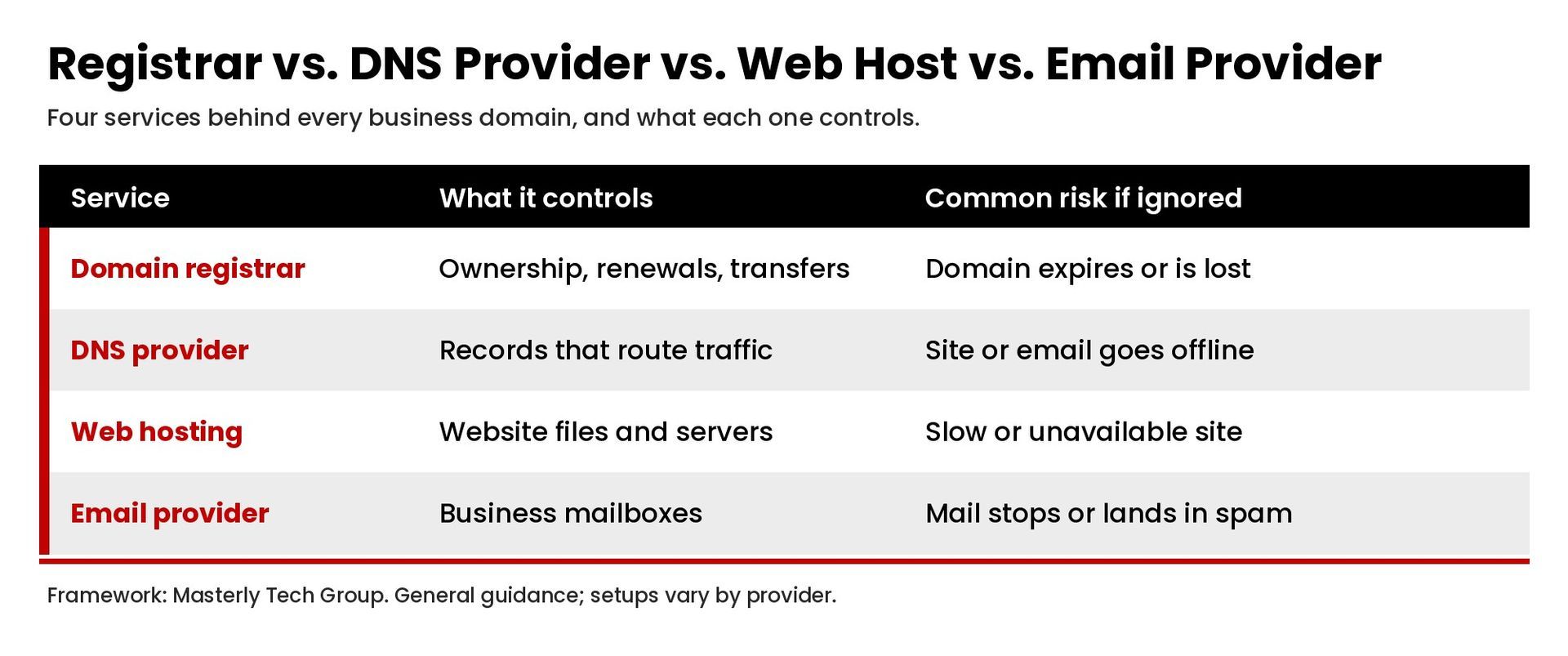
- Domain registrar. The company where you register and renew the domain name. The registrar account controls ownership, renewals, transfers, and which name servers the domain uses.
- DNS provider. The service that hosts your DNS records. This may be your registrar, your hosting provider, or a dedicated DNS service.
- Web hosting provider. The company whose servers store and deliver your website files. Your DNS records point the domain to these servers.
- Email provider. The service that hosts your business email. Its DNS records tell other mail servers where to deliver messages.
When the same company handles all four, management is simpler but you depend on a single account. When they are separate, you gain flexibility but need clearer documentation.
Which DNS Records Should Every Business Understand?
DNS management means maintaining the records that tell the internet where to send traffic. The most common DNS records are:
| Record | What it does |
|---|---|
| A record | Points a domain or subdomain to an IPv4 address |
| AAAA record | Points a domain to an IPv6 address |
| CNAME record | Points one name to another name, often used for subdomains |
| MX record | Tells mail servers where to deliver email for the domain |
| TXT record | Holds text used to verify ownership and publish email authentication such as SPF and DMARC |
| NS record | Lists the name servers responsible for the domain |
Changing a single record incorrectly can take a website offline or cause email to stop working, so restrict who can modify DNS and keep a record of every change.
Why Is Domain Management Important?
For most organizations, the domain is a core business asset with real value. It is where customers find your websites, where your email address lives, and often the sign-in name for other online services.
Losing control of it can affect every part of the business. Strong domain management protects against:
- Accidental expiration. If a domain expires, the website and email tied to it can stop working. Under ICANN's Expired Registration Recovery Policy, registrars must send renewal reminders approximately one month and one week before expiration, but those notices only help if they reach someone who acts on them ( ICANN).
- Losing ownership. When a domain is registered under a former employee or an outside vendor's account, proving domain ownership can be difficult.
- Cyber threats. Attackers target registrar accounts to redirect traffic, intercept email, or transfer domains away. Account security and registrar locks reduce that risk.
- Brand and search impact. A domain that changes or goes offline can hurt search engine optimization, break links, and confuse customers.
What Happens When a Domain Expires?
Expiration does not always mean the domain is lost immediately, but recovery gets harder and more expensive over time. For generic top level domains such as .com, ICANN policy says that if a registrar deletes an expired registration, the registry must offer a Redemption Grace Period of 30 days during which the domain may be restored, typically for an added fee ( ICANN). After that, the domain can become available for anyone to register.
The safest approach is to avoid this entirely with auto-renew, current contact details, and a calendar reminder well before each expiration date.
How Do You Manage Domains Step by Step?
Use this process to set up a clear domain management system.
1. Build a domain inventory
List every domain the business owns, the registrar, the expiration date, the DNS provider, what the domain is used for, and who has access. Include old domains that redirect to the primary domain, since they still need renewals.
2. Consolidate ownership
Make sure every domain is registered to the business, not an individual, and that the registrar account uses a shared company email address rather than one person's inbox. Where practical, consolidate domains with one registrar to reduce the number of accounts to manage.
3. Secure the registrar account
Turn on two-factor authentication, use a strong unique password stored in a company password manager, and limit access to the people who need it. Enable a registrar lock (often called a transfer lock) so the domain cannot be moved without your approval.
4. Turn on auto-renew and track expiration
Enable auto-renew, keep the payment method current, and set your own reminders. Many businesses renew important domains for several years at a time to reduce the risk of a missed renewal.
5. Keep contact details current
Review the registrant name, email, phone, and mailing address. Registrars use this information for renewal notices and transfer approvals, so outdated contact details create risk. Many registrars also offer privacy services that hide personal details from public lookups.
6. Document and control DNS changes
Keep a record of your current DNS records and require approval before changes. Before moving hosting or email providers, export the existing records so services do not stop working during the switch.
7. Plan for transfers carefully
Moving a domain between registrars is a normal process, but it has rules. ICANN's Transfer Policy allows registrars to deny a transfer requested within 60 days of a domain's creation or within 60 days after a previous transfer ( ICANN). Plan transfers around those timelines, and confirm DNS will keep working during the move.
How Do You Monitor Domains Over Time?
A proactive approach to domain management is far cheaper than recovering a lost domain. Monitor expiration dates, registrar account sign-in alerts, and DNS changes so you can identify problems early. Timely renewals, regular access reviews, and a quick check that each domain still appears to resolve to the right location keep websites and email online. Companies that own many domains often assign one person to review the inventory every quarter.
What Are Common Domain Management Mistakes?
- Registering the domain under a personal account. When that person leaves, the business can lose access.
- Letting a vendor own the domain. A web designer or agency may register the domain for you. Make sure it is in your name and you have login access.
- Ignoring old domains. Unused domains that still redirect traffic can expire quietly and break links.
- No record of DNS settings. Without documentation, a hosting or email migration can cause downtime.
- Weak account security. A registrar account without two-factor authentication is an easy target.
How Does Domain Management Fit Into Website Operations?
Domain management is closely tied to the rest of your website. A website redesign, a hosting change, or a migration to a new platform all involve DNS changes, and a mistake can affect traffic and search visibility. If you are planning a move, our website migration SEO services and website redesign services pages explain how we approach those projects, and our guide to WordPress maintenance covers ongoing upkeep after launch.
Frequently Asked Questions
What is domain management in simple terms?
It is the ongoing work of keeping your domain names registered, renewed, correctly configured, and secure, so your website and email keep working.
Who should manage a company's domains?
An owner or IT lead should control the registrar account, with access limited to a small group and documented in a shared company system.
Is DNS management the same as domain management?
DNS management is one part of domain management. Domain management also includes registration, renewals, ownership, contact details, transfers, and account security.
How often should I review my domains?
Review your domain inventory at least once a year, and any time you change hosting, email providers, or the people responsible for IT.
Get Help With Your Domains and Website
Domain management is easy to overlook until the website goes offline or email stops working. If you want help organizing your domains, cleaning up DNS, or planning a website move, contact Masterly Tech Group to talk through your setup.