
SPF Record: What It Is, Format, Examples, and How to Add One
An SPF record is a DNS TXT record that lists the mail servers and IP addresses allowed to send email on behalf of your domain. When a message arrives, the receiving server checks the sending domain's SPF record to verify the sender is authorized. SPF stands for Sender Policy Framework, and it is one of the three core email authentication methods, along with DKIM and DMARC.
Without a correct SPF record, your legitimate email is more likely to land in spam, and it is easier for attackers to send phishing messages that appear to come from your domain. This guide explains how an SPF record works, the SPF record format, examples, how to add one, the 10 DNS lookup limit, and how to fix common errors.

What Is an SPF Record?
An SPF record is a type of DNS TXT record published by the domain owner. It tells receiving mail servers which servers are authorized senders for the domain. The standard is defined in RFC 7208, published by the Internet Engineering Task Force ( RFC 7208).
Every SPF record starts with the version tag v=spf1, followed by a list of rules that identify authorized IP addresses, hostnames, and other domains, and ends with a rule that tells receivers what to do with mail from any other source.
Here is a simple example of an SPF record:
v=spf1 ip4:192.0.2.10 include:_spf.google.com ~all
In the v spf1 syntax, this record says: mail from the IP address 192.0.2.10 is authorized, mail sent through Google's servers is authorized, and mail from anywhere else should be treated as suspicious (a softfail).
How Does SPF Authentication Work?
SPF authentication happens in a few steps every time someone sends email from your domain:
- A message is sent. Your email servers or a service you use, such as a marketing platform, send messages on behalf of your domain.
- The receiving server checks the return path. The receiving server looks at the domain in the message's envelope sender, also called the return path or bounce address.
- A DNS lookup retrieves the SPF record. The receiving server queries DNS for that domain's TXT record beginning with v=spf1.
- The sending mail server is compared to the record. The server checks whether the sending server's IP address matches any authorized senders in the record.
- A result is returned. The SPF check produces a result such as pass, fail, softfail, or neutral, which the receiving server uses along with other signals to decide whether to deliver, filter, or reject the message.
SPF checks the envelope sender, not the "From" address users see in their inbox. That is why SPF works best with DMARC, which ties authentication results to the visible sender's address.
What Is the SPF Record Format?
An SPF record is made of mechanisms, qualifiers, and modifiers.
SPF mechanisms
Mechanisms define which senders match the record and determine how the receiving server will process the check. Many refer to specific IP addresses, while others point to other domains:
| Mechanism | What it matches |
|---|---|
| ip4 | A specific IPv4 address or range |
| ip6 | A specific IPv6 address or range |
| a | The IP addresses in the domain's A or AAAA records |
| mx | The IP addresses of the domain's MX (mail server) records |
| include | Another domain's SPF record, often used for email service providers |
| exists | Whether a specified domain resolves, used in advanced setups |
| ptr | A reverse DNS check; RFC 7208 says it should not be published |
| all | Every sender not matched earlier; always placed last |
SPF qualifiers
Each mechanism can carry a qualifier that sets the result when it matches. RFC 7208 defines four ( RFC 7208):
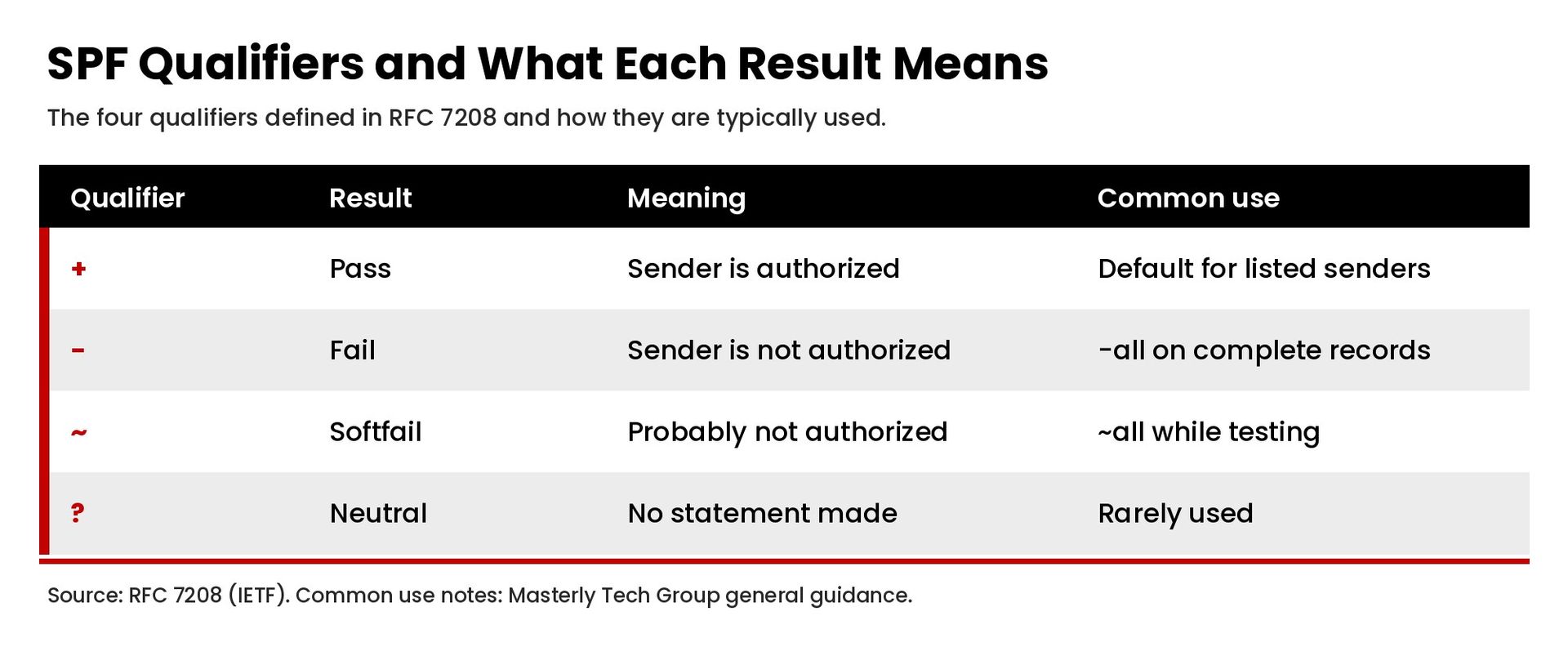
- + (pass). The sender is authorized. This is the default if no qualifier is shown.
- - (fail). The sender is not authorized. Used in -all for a strict policy.
- ~ (softfail). The sender is probably not authorized. Used in ~all, which many domains use while testing.
- ? (neutral). The domain makes no statement about the sender. A neutral result is treated like no policy.
SPF modifiers
Modifiers add information. The most common is redirect, which points to another domain's SPF record, and exp, which supplies an explanation for failures.
What Are Some SPF Record Examples?
Here are common SPF record examples for different setups. Replace the example values with your own providers and IP addresses.
Domain that only sends email through Google Workspace:
v=spf1 include:_spf.google.com ~all
Domain that uses Microsoft 365:
v=spf1 include:spf.protection.outlook.com -all
Domain that sends from its own mail server and one email service provider:
v=spf1 mx include:spf.example-esp.com ~all
Here, spf.example-esp.com stands in for the include value your email service provider publishes.
Domain that never sends email:
v=spf1 -all
Publishing v=spf1 -all on parked or unused domains tells receivers that no one is authorized to send mail for them, which helps prevent email spoofing. Always confirm the exact include value with each provider's documentation, since providers publish their own SPF instructions.
Why Is an SPF Record Important?
Spammers and attackers often forge the sender's address on email messages to make them look legitimate. An SPF record supports email deliverability and protects your domain:
- It helps prevent email spoofing. SPF makes it harder for attackers to send phishing attacks that appear to come from your domain.
- It improves inbox placement. Mailbox providers use authentication as a signal, and messages from authenticated senders are less likely to be marked as spam.
- It is now required by major providers. Google's sender guidelines require all senders to Gmail accounts to set up SPF or DKIM, and bulk senders, defined as those sending close to 5,000 or more messages a day to personal Gmail accounts, to set up SPF, DKIM, and DMARC ( Google).
How Do You Create and Add an SPF Record?
Follow these steps to create and add an SPF record for your domain.
1. List every service that sends email for your domain
Include your main email provider, website contact forms, CRM, marketing platform, help desk, billing system, and any other tool that can send email from your address. Missing a sender is the most common cause of SPF failures.
2. Find each provider's SPF value
Each email service publishes the include statement or IP addresses to add. Check their documentation for the current value.
3. Build one SPF record
Combine all authorized senders into one SPF record. For example: v=spf1 include:_spf.google.com include:spf.example-esp.com ~all. Each SPF record should be a single line of text.
4. Add the TXT record at your DNS host
Sign in to your DNS provider, such as your domain registrar or hosting company (for example, GoDaddy, Cloudflare, or your web host), open the DNS management page, choose TXT as the record type, and add a record with the host set to your root domain (often shown as @) and the value set to your SPF record. If you already have an SPF record, edit it instead of adding a second one. Our guide to domain management explains how registrars and DNS providers fit together.
5. Test the record
Validation is an important part of the process. Use an SPF lookup or SPF check tool to confirm the record is valid, then send a test message to an external account to confirm it was delivered and review the authentication results in the message headers.
6. Tighten the policy over time
Many domains start with ~all while they confirm all senders pass, then move to -all once they are confident. Pair SPF with DKIM and a DMARC policy for full protection.
What Is the SPF 10 DNS Lookup Limit?
RFC 7208 requires SPF implementations to limit DNS-querying terms to 10 during evaluation. The include, a, mx, ptr, and exists mechanisms and the redirect modifier each count toward that limit, while ip4, ip6, and all do not. If the limit is exceeded, the result is a permanent error, or permerror ( RFC 7208).
The same standard says implementations should limit "void lookups," DNS queries that return no records, to two.
To stay within the limit:
- Remove include statements for services you no longer use.
- Replace includes with ip4 or ip6 ranges where a provider publishes stable addresses.
- Avoid the ptr mechanism.
- Move some sending to a subdomain with its own SPF record, such as a marketing subdomain.
What Are Common SPF Record Errors?
- Multiple SPF records. A domain must have only one SPF record. RFC 7208 says that if more than one is found, the check returns a permerror. Merge them into one SPF record.
- Too many DNS lookups. Exceeding 10 lookups causes a permerror, so receivers may treat mail as unauthenticated.
- Missing senders. A forgotten email service provider will fail SPF.
- Syntax errors. Typos, missing spaces, or a missing v=spf1 tag break the record.
- Using +all. This authorizes every server on the internet to send email for your domain and defeats the purpose of SPF.
- Forgetting subdomains. SPF records are not inherited by subdomains, so a subdomain that sends mail needs its own record.
SPF vs. DKIM vs. DMARC: How Do They Work Together?
- SPF verifies that the sending server is authorized for the envelope sender's domain.
- DKIM adds a cryptographic signature that proves the message was not altered and was authorized by the signing domain.
- DMARC tells receivers what to do when messages fail SPF and DKIM alignment, and sends reports to the domain owner.
Together they form the foundation of email authentication. If your messages go through a CRM or automation platform, our guide to email automation explains how to build follow-up without hurting the customer experience.
Frequently Asked Questions
What does an SPF record look like?
An SPF record is a TXT record that starts with v=spf1 and lists authorized senders, for example: v=spf1 include:_spf.google.com ~all.
Can a domain have two SPF records?
No. A domain should publish only one SPF record. Multiple SPF records cause a permerror. Combine all senders into one record.
Should I use ~all or -all?
~all (softfail) is common while you confirm every sender is included. -all (fail) is stricter and is often used once the record is complete, especially on domains that do not send mail.
Does SPF stop all spam and phishing?
No. SPF is one layer of email authentication. Use it with DKIM and DMARC for stronger protection against email spoofing.
Get Help With Email Authentication
An incorrect SPF record can quietly send legitimate messages to spam or leave your domain open to spoofing. If you want help reviewing your DNS, SPF, DKIM, and DMARC setup, contact Masterly Tech Group to talk through your email and website systems.