
DMARC Record: What It Is, Tags, Examples, and Setup
A DMARC record is a DNS TXT record that tells receiving mail servers what to do with email that claims to come from your domain but fails authentication. It also lets you receive reports about who is sending email using your domain. For any business that sends invoices, proposals, or newsletters, a DMARC record is one of the most important DNS records to get right.
This guide explains what a DMARC record is, how DMARC works with SPF and DKIM, the tags a DMARC record contains, example records, how to create and publish one step by step, and what changed when the DMARC standard was updated in 2026.

What Is a DMARC Record?
DMARC stands for Domain-based Message Authentication, Reporting, and Conformance. A DMARC record is a DNS TXT record published at a special name, _dmarc
, under your domain. According to RFC 9989, the current DMARC standard, the domain owner of example.com would publish its DMARC record at _dmarc.example.com
, and a mail server checking mail from example.com would query that name.
A DMARC record does two jobs:
- Policy. It tells email receivers how the domain owner would like them to handle messages that fail DMARC: take no action, treat them as suspicious, or reject them.
- Reporting. It tells receiving servers where to send DMARC reports, so the domain administrator can see which servers are sending email on the domain's behalf.
DMARC is the reason spammers and phishers have a harder time spoofing a protected domain. Without it, anyone can put your domain in the From address of fraudulent messages, and receiving mail servers have no clear instruction from you about what to do. A published DMARC policy lets email servers determine whether unauthenticated messages that use your domain should reach the intended recipient's inbox at all. That makes DMARC an important part of email security for any business whose customers trust messages from its domain.
How DMARC Works With SPF and DKIM
DMARC does not authenticate email by itself. It builds on two other protocols:
- SPF (Sender Policy Framework) lets a domain list the mail servers allowed to send email for it. See our guide to the SPF record.
- DKIM (DomainKeys Identified Mail) adds a cryptographic signature to messages so the receiving server can verify they were not altered and were signed by the domain.
When a message arrives, the receiving email server runs SPF and DKIM checks. DMARC then asks one more question: does the domain that passed SPF or DKIM match, or align with, the domain in the visible From address? If at least one of SPF and DKIM passes and aligns, the message passes DMARC. If neither does, the message fails DMARC, and the receiving server can apply the domain's DMARC policy. In other words, email messages that fail authentication checks, such as mail that fails SPF and carries no valid DKIM signature for the From domain, are handled according to the DMARC policy you publish.
RFC 9989 recommends that domain owners use both SPF and DKIM as underlying authentication mechanisms for DMARC. Using both gives legitimate messages two chances to pass, which helps minimize false positives when one check fails, such as when a message is forwarded.
Alignment mode
DMARC alignment can be relaxed or strict:
- Relaxed (default): the authenticated domain and the From domain share the same organizational domain. For example, mail.example.com aligns with example.com.
- Strict: the domains must match exactly.
The adkim
and aspf
tags set the alignment mode for DKIM and SPF.
DMARC Record Tags Explained
A DMARC record is a list of tag and value pairs separated by semicolons. RFC 9989 lists these valid tags:
- v
(required): the version. It must be the first tag, and the only value is
DMARC1. A record without it is ignored. - p
(recommended): the policy for the domain:
none,quarantine, orreject. If it is missing from an otherwise valid record, the record is treated asp=none. - sp: the policy for existing subdomains.
- np: the policy for non-existent subdomains.
- rua:
where to send aggregate DMARC reports, usually a
mailto:address. The rua tag is optional, but without it you receive no data about who sends email for your domain. - ruf: where to send message-specific failure reports.
- fo: failure reporting options.
- adkim
and aspf:
DKIM and SPF alignment mode,
rfor relaxed orsfor strict. - t:
test mode,
yorn. Witht=y, receivers are asked to apply the policy one level below what is published. - psd: a flag used by public suffix operators. Most businesses do not need it.
The rua tag in practice
Most domain owners add a rua tag from the first day. For example, rua=mailto:dmarc-reports@example.com
sends aggregate reports to that address. Note that if the report address is on a different domain than the one publishing the record, the receiving domain must publish a DNS record authorizing it to accept those reports. Many third party reporting services handle this for you.
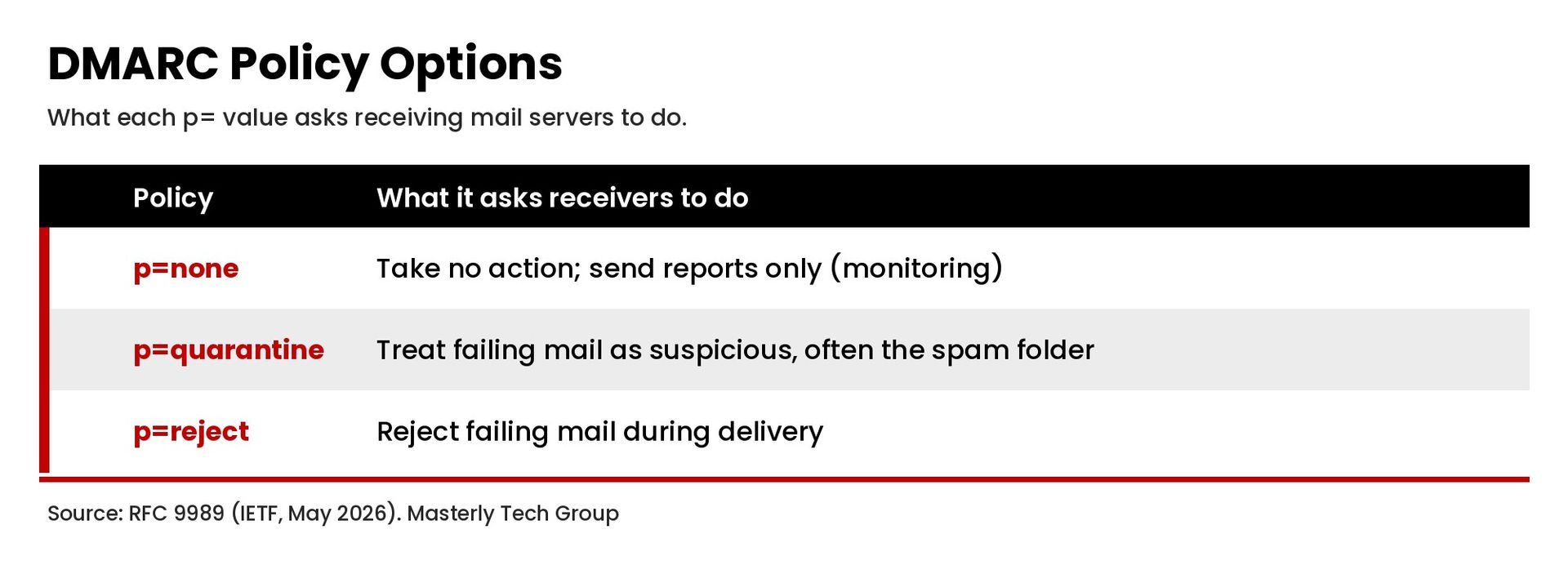
The three DMARC policy options
- p=none: monitoring mode. The domain owner offers no preference about handling, but still receives reports. This is where most domains start.
- p=quarantine: the domain owner considers failing mail suspicious. Receivers often send it to the spam folder instead of the inbox.
- p=reject: the domain owner considers failures a clear sign the use of the domain is not valid. Receivers may reject the message during delivery.
DMARC Record Examples
Here are common DMARC record examples. Replace example.com and the report address with your own.
Monitoring only:
v=DMARC1; p=none; rua=mailto:dmarc-reports@example.com
Quarantine failing mail:
v=DMARC1; p=quarantine; rua=mailto:dmarc-reports@example.com
Reject failing mail, with a stricter rule for unused subdomains:
v=DMARC1; p=reject; np=reject; rua=mailto:dmarc-reports@example.com
Each of these is published as a DNS TXT record at the host name _dmarc
.
How to Create a DMARC Record Step by Step
RFC 9989 Section 5.1 describes the actions a domain owner takes to participate in DMARC. In practice, choosing and rolling out a DMARC policy looks like this:
- Publish an SPF record that covers every service that sends email for your domain.
- Turn on DKIM signing in each email service, such as your email host, CRM, or marketing platform, using your own domain.
- Set up a mailbox for reports. Create an address to receive aggregate reports, or use a third party service that reads and summarizes them.
- Publish a DMARC record with p=none.
In your DNS provider, add a TXT record with the host
_dmarcand a value such asv=DMARC1; p=none; rua=mailto:dmarc-reports@example.com. - Collect and analyze DMARC reports. Review which servers send email for your domain and whether they pass SPF and DKIM checks.
- Fix unaligned mail streams. Update SPF and DKIM for any legitimate service that fails, so its messages are authenticated with your domain.
- Move toward enforcement.
When legitimate emails consistently pass, change the policy to
quarantine, then toreject.
If your domain's DNS is managed in several places, our guide to domain management explains how to keep records organized.
How to check or view a DMARC record
To view a DMARC record, look up the TXT record for _dmarc.yourdomain.com
using a DNS lookup tool, your DNS provider's dashboard, or a command line DNS lookup for TXT records. Many email platforms and admin consoles also include a DMARC check.
Understanding DMARC Reports
DMARC reports are what make the record useful.
- Aggregate reports are XML files sent by participating email receivers. They summarize how many messages each sending source sent using your domain, and whether those messages passed SPF, DKIM, and DMARC. Aggregate reporting is now defined in RFC 9990.
- Failure reports , sometimes called forensic reports, contain details about individual messages that failed. They are defined in RFC 9991. Fewer receivers send forensic reports, partly because they can include user data from the original message.
Because aggregate reports are XML, many businesses use a reporting tool to turn them into readable charts.
What Changed in the 2026 DMARC Standard
In May 2026, the IETF published RFC 9989, RFC 9990, and RFC 9991, which obsolete RFC 7489, the original DMARC specification. RFC 9989 moves DMARC to the Standards Track. For most domain owners the basics are the same, but a few details changed:
- Removed tags.
The
pct,rf, andritags were removed and are now listed as historic. - New tags.
The
nptag (non-existent subdomain policy),psdtag, andttag (test mode) were added. - Policy discovery. A DNS tree walk replaces the use of a public suffix list for finding the organizational domain.
If your current record includes pct
, rf
, or ri
, review it with your IT provider before making changes, since some receivers may still follow the older specification during the transition.
What Happens If You Do Not Have a DMARC Record?
Without a DMARC record, receiving servers have no instruction from you about failing mail, and you receive no reports about who is using your domain. Mailbox providers also increasingly expect it. Google's email sender guidelines require email senders who send more than 5,000 messages per day to Gmail accounts to set up DMARC for their sending domain, and note that the DMARC policy can be set to none. Yahoo's sender requirements also ask bulk senders to publish a valid DMARC policy with at least p=none, and strongly recommend including a rua tag so reports can be monitored during setup. Even if you send far less mail, these requirements show where mailbox providers are heading. Read more in our guide to email deliverability.
Common DMARC Record Mistakes
- More than one DMARC record
at
_dmarc, which can cause receivers to ignore your policy. - Moving to reject too early , before every legitimate sender passes, which can block real mail.
- Forgetting third party senders such as CRMs, invoicing tools, and marketing platforms. Check every account that sends on your behalf before tightening the DMARC policy.
- Never reading the reports
, which leaves a domain stuck at
p=noneindefinitely. - Typos in the record , such as missing semicolons or a wrong tag name.
- Confusing SPF signatures with DKIM. SPF checks the sending server, while DKIM adds the signature. Both should be in place, and your DNS records for each should be reviewed together.
Frequently Asked Questions
What is a DMARC record?
A DMARC record is a DNS TXT record at _dmarc.yourdomain.com
that tells receiving mail servers how to handle messages that fail SPF and DKIM alignment, and where to send reports.
How do I create a DMARC record for my domain?
Make sure SPF and DKIM are set up, then add a TXT record with the host _dmarc
and a value such as v=DMARC1; p=none; rua=mailto:you@yourdomain.com
in your DNS provider. Review reports before moving to a stricter policy.
What happens if I don't have a DMARC record?
Receivers get no policy from you, you get no reports, and your domain is easier to spoof. Some large mailbox providers also require DMARC for bulk senders.
Which DMARC policy should I start with?
Start with p=none and a rua tag so you can see reports without affecting delivery. Move to quarantine, then reject, once your legitimate mail consistently passes.
How do I view a DMARC record?
Look up the TXT record for _dmarc.yourdomain.com
with a DNS lookup tool or a command line DNS lookup.
Get Help With Your DMARC Record
Setting up SPF, DKIM, and DMARC correctly protects your domain and helps legitimate messages reach the inbox. If you want help reviewing your email authentication, contact Masterly Tech Group.