
Email Deliverability: How It Works and How to Improve It
Email deliverability is the ability of your emails to reach the recipient's inbox instead of the spam folder or being blocked altogether. Email deliverability refers to more than whether a message was accepted by the receiving server. A message can be delivered and still land in spam, where few people ever see it. Strong email deliverability means consistent inbox placement for the messages your customers expect and want.
For service businesses and professional firms, email deliverability issues are expensive. Proposals, invoices, appointment reminders, and newsletters that land in spam quietly cost revenue and trust. This guide explains how email deliverability works, how mailbox providers and spam filters decide where a message goes, the role of SPF, DKIM, and DMARC, the email deliverability metrics to watch, and a practical checklist to improve deliverability.

What Is Email Deliverability?
Email deliverability measures whether your email message reaches the inbox. It is different from email delivery:
- Email delivery (or delivery rate) measures whether the recipient's mail server accepted the message rather than bouncing it.
- Email deliverability measures where the accepted message ends up: the primary inbox, a promotions tab, or the spam folder.
You can have a high delivery rate and still have poor inbox placement. That is why deliverability problems often go unnoticed. The email service provider reports that messages were "delivered," but engagement keeps falling because recipients never see them.
Why Email Deliverability Matters
Every email marketing campaign, sales follow-up, and transactional message depends on deliverability. When deliverability issues appear, the effects ripple across the business:
- Successful email marketing campaigns become impossible when messages land in spam.
- Transactional emails, such as password resets, receipts, and appointment confirmations, may not reach customers.
- Poor engagement signals feed back into sender reputation, which makes future inbox placement even harder.
- Sales and support teams lose conversations they never knew were missed.
Good email deliverability protects your email marketing efforts and every other message your domain sends.
How Does Email Deliverability Work?
When you send an email, the receiving mail server and the mailbox provider evaluate the message before deciding where to place it. Mailbox providers evaluate several categories of signals.
1. Authentication
The receiving server checks whether the message is really from the domain it claims to be from. Email authentication protocols, including SPF, DKIM, and DMARC, answer that question. Messages that fail authentication are much more likely to be filtered or rejected.
2. Sender reputation
Mailbox providers track sender reputation over time. Sender reputation includes IP reputation (the reputation of the sending IP address) and domain reputation (the reputation of the domain in your From address and authentication). A positive sender reputation earns the benefit of the doubt. A poor sender reputation sends even legitimate messages to spam.
3. Engagement
Modern spam filters analyze how recipients interact with your mail. Opens, replies, moving a message out of spam, and adding you to contacts are positive signals. Deleting without reading, ignoring messages, and reporting spam are negative signals. Mailbox providers treat engagement as strong evidence of whether recipients want your mail.
4. Content and formatting
Spam filters also examine the email message itself: subject lines, links, images, HTML formatting, and whether the message follows technical standards. Content matters less than reputation and authentication, but misleading subject lines, broken HTML, and suspicious links can still trigger spam filters.
5. List quality
Sending to invalid addresses, old lists, or spam traps tells mailbox providers you do not manage your list carefully. Hitting spam traps and high bounce rates damage your sending reputation quickly.
How Mailbox Providers Evaluate Senders
Mailbox providers such as Gmail, Outlook, and Yahoo, along with corporate mail servers, all run their own filtering systems, so inbox placement can differ from one inbox provider to another. Still, mailbox providers evaluate the same core questions:
- Sender identity. Is the sender who they claim to be? SPF, DKIM, and DMARC answer this, and authentication failures are a red flag.
- Sending reputation. What does the history of this domain and IP address say about the sender? Sender reputation plays the largest role in most placement decisions.
- Recipient behavior. Do people open, reply, and keep these messages, or do they delete them and report spam complaints?
- Message quality. Is the email message well formed, honest, and consistent with what this sender usually sends?
When the recipient's mail server receives a message, it checks authentication first, then applies reputation and content signals. A message that passes all of them reaches the recipient's inbox. A message with weak signals may get spam folder placement, or land in the junk folder in Outlook. A sender with a long record of problems may be blocked outright. Understanding how inbox providers think is the first step to fixing deliverability issues.
SPF, DKIM, and DMARC: The Foundation of Deliverability
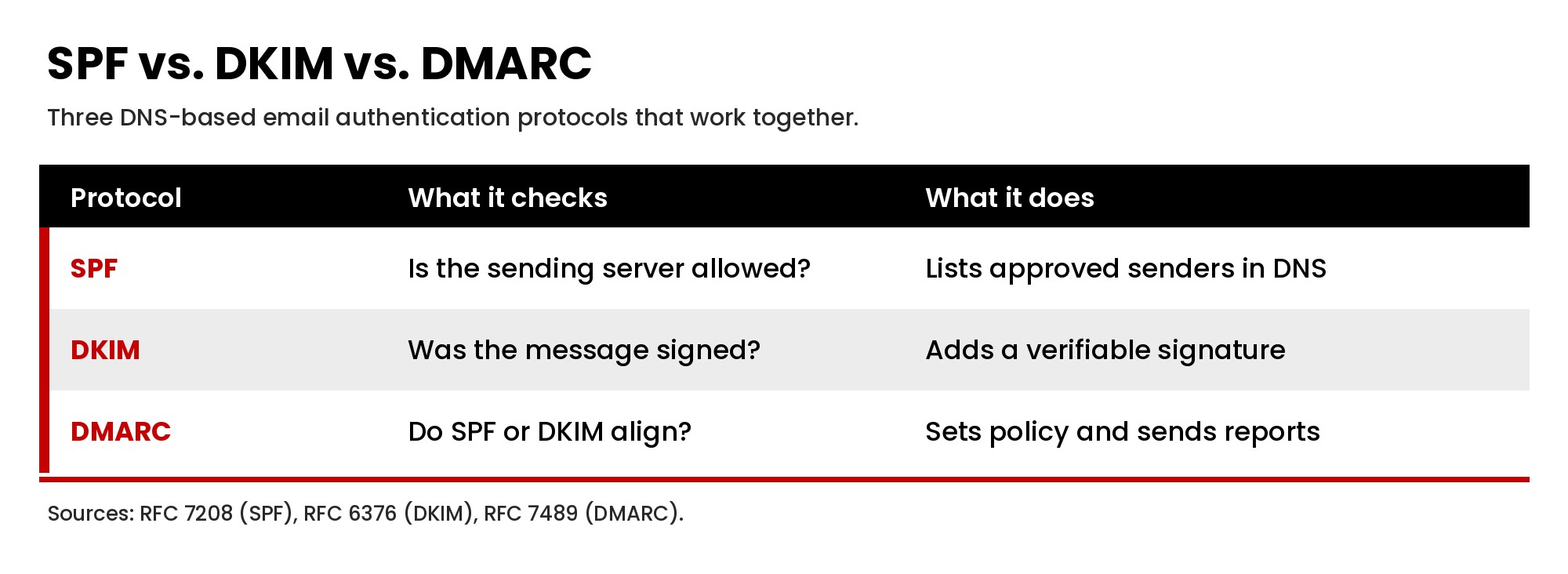
SPF, DKIM, and DMARC are the three email authentication protocols every business domain should have in place. Together, SPF DKIM and DMARC prove that a message really comes from your domain, protect your sender identity from spoofing, and give mailbox providers a reason to trust your mail.
Sender Policy Framework (SPF)
Sender Policy Framework is a DNS record that lists the servers and services allowed to send email for your domain. When a receiving server gets a message, it checks whether the sending IP address is authorized by your SPF record. Our guide to the SPF record covers the format, examples, and the common errors that break it.
DomainKeys Identified Mail (DKIM)
DomainKeys Identified Mail adds a digital signature to each email message. The receiving mail server uses a public key published in your DNS to confirm the message was not altered in transit and was authorized by the signing domain. Most email service providers let you set up DKIM with your own domain rather than theirs, which builds your own reputation.
Domain-based Message Authentication, Reporting, and Conformance (DMARC)
Domain based message authentication, reporting, and conformance (DMARC) tells receiving servers what to do when a message fails SPF and DKIM checks, and it sends you reports about who is sending mail using your domain. DMARC is defined in RFC 7489. A DMARC policy can be set to none (monitor), quarantine, or reject. Most organizations start with a policy of none, review the reports, fix legitimate senders that fail, and then move toward enforcement.
Why SPF, DKIM, and DMARC matter more now
Major mailbox providers now require authentication. According to Google's email sender guidelines, all senders to Gmail accounts must set up SPF or DKIM, and senders who send more than 5,000 messages per day to Gmail accounts must set up SPF, DKIM, and DMARC. Bulk senders must also align the From domain with SPF or DKIM, and marketing and subscribed messages must support one-click unsubscribe with a clearly visible unsubscribe link in the message body. If your SPF, DKIM, and DMARC records are missing or broken, email deliverability problems are almost guaranteed.
Authentication also depends on accurate DNS. If you are not sure who controls your DNS records, start with our guide to domain management.
Sender Reputation: IP Reputation and Domain Reputation
Sender reputation is the trust score mailbox providers assign to you as a sender. It is built from your sending history, and it is the single biggest factor in consistent inbox placement.
IP reputation
IP reputation is tied to the sending IP address. If you use a shared IP from your email service provider, you share reputation with other senders on that IP. A dedicated IP address gives you full control of your own reputation, but it requires enough consistent volume to build one. Many small and mid-sized senders are better served by a reputable provider's shared pool than by a dedicated IP address with low volume.
Domain reputation
Domain reputation follows your sending domain regardless of which IP you use. Mailbox providers increasingly weight domain reputation over IP reputation, which is why proper authentication on your own domain matters so much.
What builds a good sender reputation
- Sending to people who opted in and expect your mail.
- Keeping spam complaints low.
- Consistent sending volume without sudden spikes.
- Low bounce rates and no spam traps.
- Recipients who open, reply, and engage.
What causes a poor sender reputation
- Spam complaints from recipients who did not expect your mail.
- Sending to purchased or scraped lists.
- High volumes of invalid email addresses.
- Hitting spam traps.
- Sudden large sends from a new domain or IP.
Single Opt-In vs. Double Opt-In
How people join your list affects email deliverability for as long as they stay on it. With single opt-in, a subscriber is added as soon as they submit a form. With double opt in, the subscriber must click a confirmation link in an email first.
Double opt in reduces invalid email addresses, typos, and fake signups, and it lowers the risk of spam trap hits because addresses are confirmed by a real person. It also produces a list of people who clearly want your email marketing. Single opt-in grows a list faster but usually requires more list cleaning. For businesses that have struggled with deliverability problems, double opt in is often worth the smaller list.
Email Deliverability for Bulk Senders
Bulk senders face stricter rules. Google's sender guidelines define bulk senders as those sending more than 5,000 messages per day to Gmail accounts, and those senders must meet additional requirements, including SPF, DKIM, and DMARC, From domain alignment, and one-click unsubscribe. Bulk senders should also:
- Spread large sends over time rather than sending everything at once.
- Segment by engagement and send most often to the most engaged subscribers.
- Monitor spam complaints daily during major campaigns.
- Use a reputable email service provider with strong infrastructure and support.
Even if your business is below the bulk sender threshold today, following bulk sender practices protects your sender reputation as your email marketing grows.
Email Deliverability Metrics to Monitor
You cannot improve deliverability without measuring it. These email deliverability metrics show whether you have a problem and where it comes from.
- Delivery rate. The percentage of messages accepted by receiving servers. Low delivery rates point to list problems or blocks.
- Bounce rate. Hard bounces (invalid addresses) and soft bounces (temporary problems). High hard bounce rates damage reputation.
- Spam complaint rate. The share of recipients who mark your message as spam. Google advises keeping spam rates reported in Postmaster Tools below 0.10% and avoiding ever reaching 0.30% or higher, according to its sender guidelines.
- Inbox placement rate. The percentage of delivered messages that reach the inbox instead of spam. Inbox placement tests with seed lists estimate this.
- Engagement metrics. Replies, clicks, and conversions show whether recipients value your mail. Google notes that it does not track open rates, so treat open rates as a rough signal at best.
- Unsubscribe rate. A rising unsubscribe rate can be an early warning sign before spam complaints climb.
The Role of Your Email Service Provider
Your email service provider handles the infrastructure that sends your email marketing: the mail servers, sending IPs, bounce processing, and feedback loops with mailbox providers. A good email service provider makes it easy to authenticate your domain, manage bounces automatically, honor unsubscribes, and see deliverability data. When choosing or reviewing an email service provider, ask how it handles shared and dedicated IPs, whether it supports custom DKIM on your own domain, and what deliverability reporting it provides.
Many businesses use several email service providers at once, for example one for newsletters, one inside the CRM, and one for transactional email. Each one must be included in your SPF record and set up for DKIM, or DMARC will flag its messages. Inventorying every sender is one of the most useful steps you can take to improve deliverability.
Email Deliverability Tools
Several email deliverability tools help you monitor sender reputation and diagnose deliverability issues:
- Google Postmaster Tools. Google Postmaster Tools shows spam rate, domain reputation, IP reputation, and authentication results for mail sent to Gmail users. Every business sending meaningful volume to Gmail should set up Google Postmaster Tools.
- Microsoft SNDS. Microsoft's Smart Network Data Services provides data about IP reputation for mail sent to Outlook.com users.
- Reputation lookups. Services such as Sender Score from Validity report on IP reputation. A low sender score is a sign to investigate your list and complaint data, and blocklist checkers show whether your IP or domain appears on major blocklists.
- Mail tester tools. A mail tester checks a single message for authentication, formatting, and content issues before you send a campaign.
- Inbox placement tests. Seed-list tools send your campaign to test inboxes across providers to estimate inbox placement.
- DMARC report analyzers. Tools that read DMARC aggregate reports and show which sources are sending on your behalf and whether they pass.
How to Improve Email Deliverability: A Practical Checklist
1. Authenticate every sending source
Set up SPF, DKIM, and DMARC for your domain and for every service that sends email for you: your email platform, CRM, help desk, billing system, and website forms. Missing one source is one of the most common causes of deliverability problems.
2. Build lists with clear consent
Only email people who opted in. Never buy lists. Use confirmed opt-in for newsletters when practical, and set clear expectations about what subscribers will receive and how often.
3. Clean your list regularly
Remove hard bounces immediately, verify new addresses, and suppress invalid email addresses. Regular list hygiene keeps bounce rates low and protects against spam traps.
4. Re-engage or remove inactive subscribers
Inactive subscribers drag down engagement metrics. Run re engagement campaigns for people who have not engaged in several months, then remove those who still do not respond. A smaller, engaged list delivers better than a large, inactive one.
5. Make unsubscribing easy
A visible unsubscribe link and one-click unsubscribe reduce spam complaints because frustrated recipients can leave without hitting the spam button. Under the federal CAN-SPAM Act (often written CAN SPAM), commercial emails must include a working opt-out method and a valid physical postal address, and opt-out requests must be honored within 10 business days, according to the FTC's CAN-SPAM guide.
6. Write honest subject lines and clean content
Use subject lines that accurately describe the message. Avoid excessive capitalization, misleading claims, and spam trigger words such as exaggerated free offers or false urgency that make a message look like a scam. Keep HTML clean, use a reasonable balance of text and images, and make sure every link goes to a reputable domain.
7. Warm up new domains and IPs
If you are sending from a new domain or a new dedicated IP address, start with small volumes to your most engaged recipients and increase gradually. Sudden large sends from a sender with no history look like spam to modern spam filters.
8. Send consistently
Consistent volume and timing help mailbox providers learn your pattern. Large spikes after long gaps are a common trigger for filtering.
9. Segment and personalize
Send relevant messages to the right segments rather than every message to everyone. Relevance drives engagement, and engagement drives consistent inbox placement.
10. Separate transactional and marketing mail
Many businesses use a subdomain or separate stream for marketing so a marketing reputation problem does not affect receipts, password resets, and other critical messages.
11. Monitor and act on the data
Check Google Postmaster Tools, bounce and complaint rates, and DMARC reports regularly. Monitor sender reputation monthly at a minimum and after any major campaign.
Common Email Deliverability Issues and How to Fix Them
- Sudden drop in inbox placement. Check authentication first, then spam complaints, then recent list changes or volume spikes.
- Messages failing DMARC. Identify the sending source in your DMARC reports and add proper SPF and DKIM for that service.
- High bounce rate. Clean the list, verify addresses at signup, and suppress hard bounces automatically.
- Rising spam complaints. Review how subscribers joined, make unsubscribing easier, and reduce frequency for less engaged segments.
- Listed on a blocklist. Find the cause, fix it, and follow the blocklist's removal process.
- Messages in the junk folder at one provider only. Check that inbox provider's own tools, such as Microsoft SNDS for Outlook, and review engagement for recipients at that domain.
- Gmail placing mail in spam. Review spam rate and domain reputation in Google Postmaster Tools and confirm you meet Google's sender requirements.
How Spam Filters Decide
Spam filters decide by combining many signals from mail servers, authentication results, and recipient behavior rather than any single rule. A legitimate sender with good authentication, a positive sender reputation, and engaged recipients can send a message with a few imperfect words and still reach the recipient's inbox. A sender with a poor sender reputation may land in the spam folder no matter how clean the content is. That is why fixing deliverability usually starts with authentication and reputation, not with rewriting copy.
Frequently Asked Questions
What is email deliverability?
Email deliverability is the ability of your emails to reach the recipient's inbox rather than the spam folder or being blocked by the receiving server.
What is a good email deliverability rate?
There is no single universal benchmark, because inbox placement varies by provider, industry, and list. Focus on trends in your own data: low bounce rates, spam complaints below the thresholds mailbox providers publish, and steady or improving engagement.
Do SPF, DKIM, and DMARC guarantee inbox placement?
No. Authentication proves you are who you say you are. Inbox placement still depends on sender reputation, engagement, and list quality.
How long does it take to fix deliverability problems?
It depends on the cause. Authentication fixes can take effect quickly. Rebuilding a damaged sender reputation takes consistent good sending over time.
Get Help With Email Deliverability
Email deliverability sits where DNS, email platforms, CRM automation, and marketing practices meet. If your messages are landing in spam, or you are not sure whether SPF, DKIM, and DMARC are set up correctly across every tool that sends for you, our team can review your setup and recommend fixes. See how we approach email automation, or contact Masterly Tech Group to talk through your email systems.