
CRM Integration: Connecting Lead Capture, Follow-Up, and Client Data Without Creating More Manual Work
A potential customer submits a form on your website. Someone on your team receives an email, enters the person's information into another system, creates a sales opportunity, schedules a reminder, and tries to make sure the lead receives a response.
Every manual step creates another place where the process can break.
The form may work perfectly, yet the lead never reaches the right person. A salesperson may update a record while another system still shows old information. An appointment may be scheduled without updating the pipeline. A lead may receive duplicate messages because two systems do not know what the other has already done.
Professional CRM integration services are designed to address those disconnected handoffs. The goal is to create a better connection between your website, lead capture, CRM records, sales pipeline, calendars, communications, and reporting so information can move through the business with less unnecessary duplicate entry.
For businesses investing in their digital presence, that connection matters. Masterly Tech currently provides custom website design, website optimization, digital advertising, conversion tracking, analytics, and other digital services focused on attracting and converting prospective customers.
When Your Website Generates Leads but Your Systems Create More Work
A website can do its job and still expose a larger business problem.
Imagine a prospect completes a consultation form.
The website records the submission. An email reaches an employee. That employee copies the contact information into the CRM. Someone assigns the opportunity. Another person sends an email. The prospect then schedules a meeting through a separate calendar system.
There are now several versions of the same customer journey.
If one step is missed, the process becomes incomplete.
The business does not necessarily need another form or another software subscription. It needs the systems involved in the customer journey to work together appropriately.
That is the problem CRM integration services should solve.
CRM Integration Services Should Connect the Customer Journey
Good integration is not about connecting software simply because a connection is technically possible.
The connection should support a business purpose.
For many companies, that purpose begins when a prospect takes action on the website and continues as that person moves through the sales or client-development process.
The website might generate the inquiry. The CRM may become the central crm system for customer data. A pipeline tracks progress. A calendar handles appointments. Email supports communication. Reporting helps management understand what happened.
Each system has a role.
The integration architecture determines how information moves between them. Good data integration should connect different systems and relevant other business applications into a more unified system. Clearer data flows between systems improve access to up to date information for decision making.
Start With the Business Handoff
Consider what should happen when a prospect requests a consultation.
Does the contact need to become a CRM record?
Should a sales opportunity be created?
Which team member should receive the inquiry?
Should the prospect receive a confirmation?
Does the person need an opportunity to schedule an appointment?
Which information needs to appear in reporting?
Those are business questions before they are technical questions, and they should reflect your actual business processes.
A professional integration project should connect technology to the actual customer journey instead of forcing employees to work around disconnected business processes.
The goal is to connect the data sources involved in the handoff, not just the tools themselves.
Lead Capture Should Be More Than an Email Notification
Website lead capture through web forms is often the first connection between digital marketing and the sales process.
Masterly Tech currently builds conversion-focused websites and describes using contact forms, calls to action, landing pages, and email sign-up forms to help businesses capture prospective customers.
But capturing information is only the first step.
A form submission sitting in an inbox can still require manual handling.
An integrated process can be designed so approved information moves to the appropriate destination based on the client's systems and requirements, replacing manual processes and improving data accuracy.
This can help create a clearer handoff between marketing activity and the people responsible for responding to inquiries.
Lead information may also come from various sources such as landing pages or Google Ads before entering the CRM.
It can also reduce dependence on employees remembering to transfer information from one system to another.
Pipeline Integration Helps Keep Opportunities Connected to Leads
A lead becomes more useful when the business knows what is happening with it.
CRM sales integration can help identify leads using buyer intent signals.
That is where pipeline integration becomes important.
Depending on the CRM and sales process, a business may need to distinguish between a new inquiry, a qualified opportunity, an appointment, an active proposal, or another meaningful stage.
The website should not determine the entire sales process.
But information generated through the website may need to enter that process correctly.
Without a clear connection, sales teams may maintain separate spreadsheets, inboxes, notes, and CRM records, creating data silos across multiple systems. Management then has difficulty determining which source reflects the current status.
Integration can reduce those fragmented handoffs when the underlying systems support the required connections.
When integrating CRM with pipeline stages, teams can support personalized customer experiences by seeing each opportunity more clearly.
Data Synchronization and Data Accuracy Help Reduce Conflicting Information
Duplicate data creates more than inconvenience.
It can create uncertainty.
A customer's phone number is changed in one system but not another. A lead's status changes in the CRM while a separate marketing tool still treats the person as a new prospect. An appointment is rescheduled but another record contains the original time.
Data synchronization is intended to help relevant systems exchange appropriate information. Depending on the systems involved, businesses may sync data through real-time synchronization, where changes update by date as they happen, batch synchronization at set intervals such as nightly, or hybrid synchronization across on-premises and cloud sources. Some setups use two-way synchronization so changes flow in both directions, while others require multi-way synchronization across multiple systems at the same time.
That does not mean every piece of data should automatically be copied everywhere.
Businesses need to determine which system should be the authoritative source for particular information and which data actually needs to move, so records stay in sync and teams have up to date information.
More Integration Is Not Always Better
Connecting every field to every system can create unnecessary complexity, especially as more connections and multiple applications can increase compatibility issues.
A better integration architecture identifies what information each platform needs and what should happen when information changes. Data mapping involves standardizing field names and formats across systems.
For example, a marketing system may need a contact's email address and status but not every internal sales note.
A calendar may need appointment details without becoming the main customer database.
Clear data responsibilities can make integrations easier to understand and maintain.
Calendar Integration Can Reduce Scheduling Handoffs
Scheduling is another common point of friction.
A prospect submits a request. An employee replies asking for availability. Several messages follow. Someone finally books a meeting and then manually updates the CRM.
Appropriate calendar integration can make scheduling part of a connected customer journey.
The exact workflow depends on the company's calendar, CRM, website, and scheduling technology. Depending on the stack, support for google calendar may also be part of the setup.
For some businesses, the desired experience may allow qualified prospects to select an available appointment after completing an inquiry. In some setups, synced calendar events are created automatically, with editing rules determined by the connected system or app. Another company may require an employee to review the lead before scheduling becomes available.
The technology should support the business process rather than dictate it, especially when scheduling also needs to work with other services beyond the primary calendar connection.
Automated Follow-Up Should Support Human Relationships
Fast, consistent communication matters when someone has taken the time to contact a business.
That makes automated follow-up useful in the right situations.
For example, a system might confirm that an inquiry was received or trigger an approved communication associated with a defined workflow, including marketing automation when that workflow calls for it.
The same connected data can support more consistent marketing efforts and better-timed marketing campaigns without treating every lead the same way.
But automation should not turn every prospect into an identical sequence of messages regardless of context.
The purpose is to reduce avoidable administrative work and improve consistency while preserving appropriate human involvement.
A complex question may require a real person. A high-value opportunity may need individualized attention. A customer with an existing relationship should not necessarily receive the same communication as a brand-new lead.
Effective integration helps determine where automation belongs and where people need to remain involved.
CRM Integration Should Connect With Conversion Tracking
A business should ideally understand more than how many people visited its website.
It should be able to examine whether marketing activity is leading to meaningful actions.
Masterly Tech currently provides conversion tracking and analytics within its digital advertising services and states that its team monitors website traffic, conversion rates, and marketing-funnel performance in relevant campaigns.
CRM connections can add another important layer when technically appropriate.
Website analytics may show that a form was submitted. CRM data may help the business understand what happened afterward. Integrated reporting can pull from various sources and other data sources to create a more unified view. When systems support it, tying social media and Google Ads outcomes back to CRM activity can improve decision making.
Those are different questions.
Connecting marketing activity with downstream business information can create a more useful view of the customer journey, subject to the capabilities, configuration, privacy requirements, and data available within the client's systems.
Poor Integrations Can Damage the Customer Experience
Integration problems are not always invisible to customers.
A prospect submits information and receives no response.
Someone schedules a consultation and then receives a message asking them to schedule one.
A customer provides information twice because the second system did not receive it.
A sales representative calls without knowing that another employee already spoke with the prospect. With crm integration, teams have access to previous customer interactions, which can improve customer service.
From inside the company, these may appear to be technical problems.
To the customer, they can look like organizational problems. Service integration can also use customer cases to assess customer health and support faster case resolution.
That makes integration part of the broader brand experience.
A polished website creates an expectation. The process after someone clicks "submit" should support that expectation, and companies using integrated
CRMs often see increased sales and better customer service.
Your Website and CRM Should Serve Different but Connected Roles
A business website attracts, informs, and converts visitors.
A CRM helps the organization manage relationships and customer information. The website and CRM can serve different but connected roles within the broader crm system.
Neither should be expected to replace the other.
The stronger approach is to determine where the website's responsibility ends, where the CRM's responsibility begins, and what information needs to pass between them.
Masterly Tech currently provides custom website design and development focused on functionality, user experience, SEO, and conversions. Its services also include website optimization, hosting, analytics, digital advertising, cybersecurity, and other digital solutions.
That makes the website an important place to evaluate how leads enter the broader business process and whether that flow also needs to connect with other business applications.
Professional CRM Integration Starts With the Systems You Actually Use
There is no universal CRM integration that works for every business. The average organization uses over 900 applications, and only about 28% of them are integrated.
One company may need a simple website-to-CRM connection.
Another may have several forms, multiple pipelines, calendars, email tools, payment systems, advertising platforms, reporting requirements, multiple applications, and third party software.
The appropriate architecture depends on the technologies involved and what their APIs, native integrations, permissions, and other technical capabilities support.
Existing processes matter too.
Replacing manual work with poorly planned automation can simply create faster mistakes.
The objective should be a reliable workflow that fits the organization, and timelines can range from days for simple connections to several months for more complex environments.
Done-for-You Digital and Project Management Solutions From Masterly Tech
Business owners should not have to become integration architects simply to make their website and customer systems work together.
Masterly Tech provides professional website design and development alongside website optimization, digital advertising, conversion tracking, technical SEO, hosting, cybersecurity, and related digital services. Its website confirms that Masterly Tech serves businesses across multiple industries and works with clients in Texas, throughout the United States, and internationally.
For a business seeking CRM integration services, the first priority should be understanding the current website, CRM, lead sources, pipeline, calendars, communications, reporting needs, business applications, other business applications, and other systems involved.
Some projects may rely on pre built connectors or native integrations, while others require custom apis or custom integrations through an integration platform.
The specific integrations available and appropriate for a project need to be confirmed after reviewing the client's technology and requirements. A cost effective solution for small businesses may differ from the right approach in more complex environments. This avoids promising connections that a particular CRM, website platform, or third-party system may not support.
For related website work, businesses can review Masterly Tech's Website Design and Development services covering custom websites, website optimization, hosting, conversion tracking, and related digital capabilities.
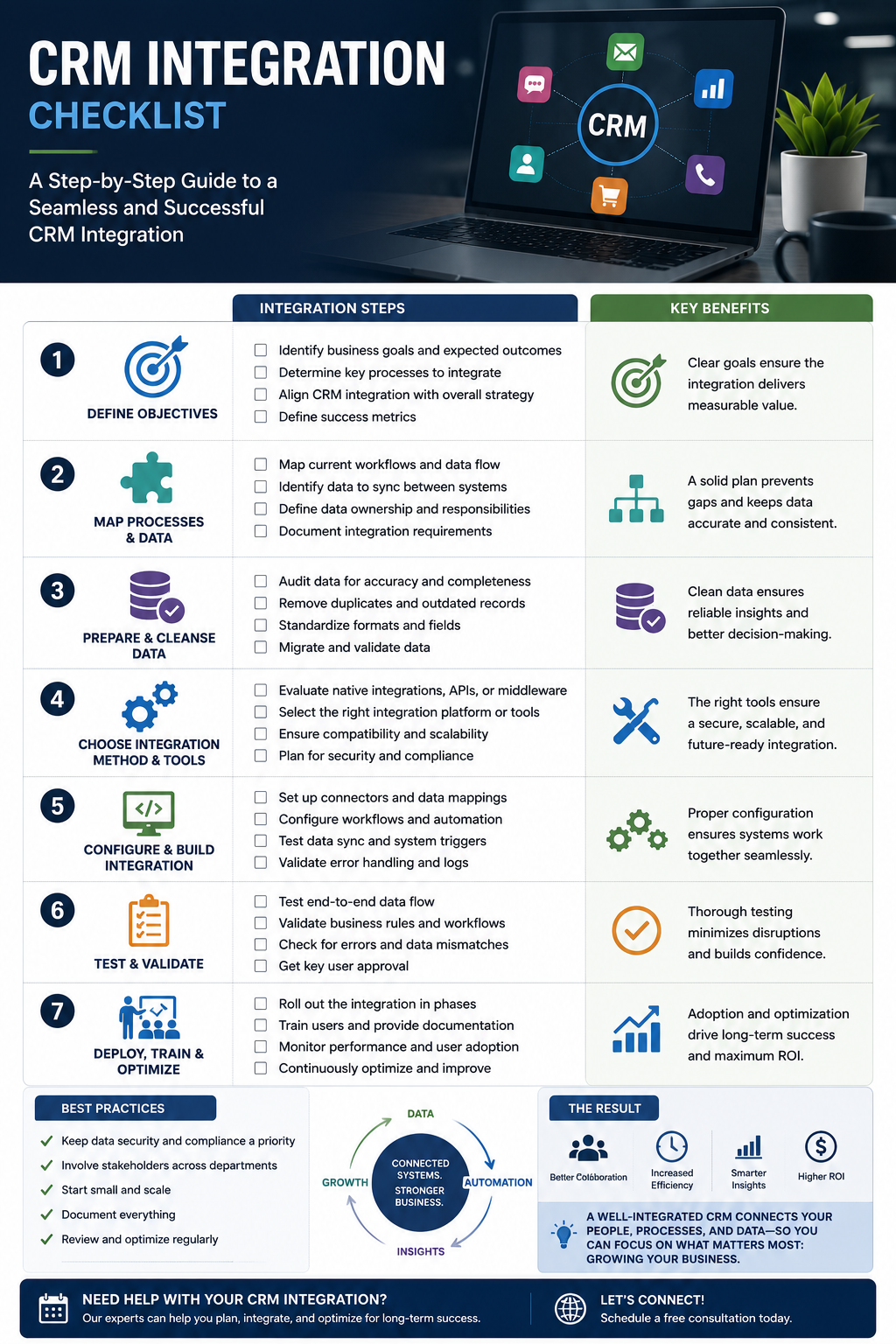
Frequently Asked Questions About CRM Integration Services
What are CRM integration services?
CRM integration services connect a CRM with other business systems so appropriate information can move between them. Depending on the project, this may involve websites, forms, calendars, email tools, pipelines, payments, or reporting platforms, helping integrate data from different systems into a more unified view when appropriate.
Can CRM integration connect website lead capture to our CRM?
Potentially. Lead capture forms can often connect with CRM platforms, and when the technology supports it, leads from web forms and landing pages can flow into the CRM, but the available integration depends on the website, CRM, form technology, and technical requirements.
What is pipeline integration?
Pipeline integration connects relevant lead or customer information with the stages a business uses to manage opportunities. The exact workflow depends on the CRM and sales process.
What is data synchronization?
Data synchronization allows selected information to remain aligned between connected systems. A professional integration should determine which data needs to sync, whether that flow is one-way, two-way, or multi-way based on the systems and workflow, and which system serves as the primary source.
Can a CRM integrate with a business calendar?
Many CRM and scheduling platforms provide calendar integration capabilities. Compatibility and functionality can vary for google calendar and other services depending on the specific platforms involved.
Can CRM integration support automated follow-up?
Yes, when supported by the connected technology. Automated follow-up may include approved confirmations, notifications, or workflow communications based on defined triggers.
Can CRM integration eliminate all manual work?
Not necessarily. Some tasks require employee judgment or direct customer interaction. The goal is to reduce unnecessary manual handoffs and manual processes where reliable integration makes sense.
Does every CRM work with every website?
No. Integration capabilities vary. The website platform, CRM, APIs, third-party applications, permissions, data security, compatibility issues, and technical requirements should be reviewed before determining the appropriate solution.
Request a Masterly Tech CRM Integration Consultation
Your website should not generate leads only to create more administrative work for your team.
Professional CRM integration services can help connect lead capture, pipeline integration, calendar integration, communication tools, data synchronization, automated follow-up, and reporting into a more coordinated customer journey.
Masterly Tech provides website design, development, optimization, conversion tracking, analytics, hosting, cybersecurity, and related digital services designed around the needs of businesses.
Integrated CRM systems can reduce workflow disruption from data silos—a problem 82% of companies report—and may shorten sales cycles by 10% when the right systems are connected.
Call Masterly Tech at (888) 209-4055 or visit MasterlyTechGroup.com to request a CRM integration consultation. Masterly Tech's current website confirms this phone number.










