Appointment Reminder Texts: Templates, Timing and Consent Basics
An appointment reminder text is a short text message that tells a client the date, time, and location of a scheduled visit and gives a simple way to confirm, cancel, or reschedule. Service businesses, clinics, and professional firms use appointment reminder texts, along with phone calls or email reminders, to reduce no shows and keep the calendar accurate. Results vary by practice, and this article does not claim a specific reduction figure.
This guide covers what belongs in an appointment reminder text, when many businesses send the first reminder, appointment reminder templates you can adapt, and high-level consent and opt-out basics. For official rules and industry practices, it links the Federal Communications Commission's consumer guide on unwanted robocalls and texts and the CTIA Messaging Principles and Best Practices(May 2023). It is general information about client communication, not legal advice, and it does not promise a lower no show rate or any particular result.
Table of contents:
- What an appointment reminder text includes
- Why businesses use SMS reminders and how they compare with phone calls and email
- Consent and opt-out basics, including Reply STOP
- Timing, including a common 24 hours reminder
- Appointment reminder templates
- Automated appointment reminders in a CRM
- Frequent questions

What an Appointment Reminder Text Is
An appointment reminder text is one of several reminder texts a business may send around a booked visit. The message should identify the company name or business name, state the appointment details (date, time, and location), and tell the client how to confirm or say they need to reschedule. A confirmation text, sent when the appointment is first booked, is different: it records the booking. A later reminder message is there for reminding the person before the visit.
SMS appointment reminders are also called text message reminders or SMS reminders. Automated reminders, including automated appointment reminders from a CRM, go out on a schedule once the appointment is on the calendar. Staff can still send a personal, one-off reminder when the situation calls for it.
The same idea applies across many kinds of visits: a dental clinic cleaning, a law firm consultation, a spa appointment, or a service call. The important details stay the same even if the wording changes.
Why Businesses Send Appointment Reminders
Missed appointments waste staff time and can mean lost revenue because that slot often cannot be filled at the last minute. Appointment reminders will not eliminate no shows, and this article does not cite a no-show reduction figure. They are still one of the most practical ways to prompt a client who might otherwise forget, and to open the slot when someone needs to reschedule.
Text messages are convenient for many customers and clients because a single reply can confirm the visit or start a reschedule. Email reminders remain useful for longer prep instructions or attachments. Phone calls still matter when a visit is high stakes, the client prefers a call, or the number on file may not accept SMS. Many businesses use more than one channel rather than replacing every phone call with a text.
Customer satisfaction and the overall customer experience depend on tone as much as timing. A friendly reminder that names the business and leaves an easy way to respond is easier to act on than a vague ping with no appointment details.
Consent and Opt-Out Basics
Consent and opt-out rules for robotexts are a matter of federal communications law and carrier practices. This section is a high-level summary of published FCC and CTIA materials. It is not legal advice, and a business should have qualified counsel review its own consent language, forms, and messaging program.
The FCC's consumer guide, last reviewed on February 27, 2026, states that FCC rules ban text messages sent to a mobile phone using an autodialer unless the phone owner previously gave consent to receive the message or the message is sent for emergency purposes. The same guide states that commercial texts require written consent, and that for informational texts, consent may be oral. It also states that a person may opt out of any robocall or robotext at any time and in any reasonable manner, even after earlier consent. FCC rules apply even if the mobile number is not on the National Do Not Call Registry.
The CTIA Messaging Principles and Best Practices (May 2023) are industry guidelines, not a statute. They state that they do not constitute or convey legal advice. In Exhibit II, CTIA lists appointment reminders, welcome texts, and alerts as examples of informational messaging, and describes promotional messages (including a coupon or similar call to action added to an otherwise informational text) as a separate category that should have express written permission. CTIA also says message senders are expected to obtain a consumer's consent to receive messages generally, obtain express written consent specifically for marketing messages, and give consumers the ability to revoke consent.
On opt-out, CTIA says senders should support more than one way to opt out, including phone call, email, or text, and should honor requests. It recommends standardized "STOP" wording in the message, and it also says requests in ordinary language, such as stop, end, unsubscribe, cancel, quit, or "please opt me out," should be read and acted on, apart from a word that would cause an accidental opt-out. After an opt-out, CTIA describes sending one final confirmation message for that campaign and then sending no further messages in that program.
A practical way to apply those points, without treating this list as a legal checklist, is:
- Collect a mobile number only for the messaging program the person agreed to, and keep a record of when and how consent was given.
- Identify the business in the message and keep reminder texts informational. Do not add a sale, coupon, or other promotional offer to an appointment reminder unless the person has agreed to marketing texts.
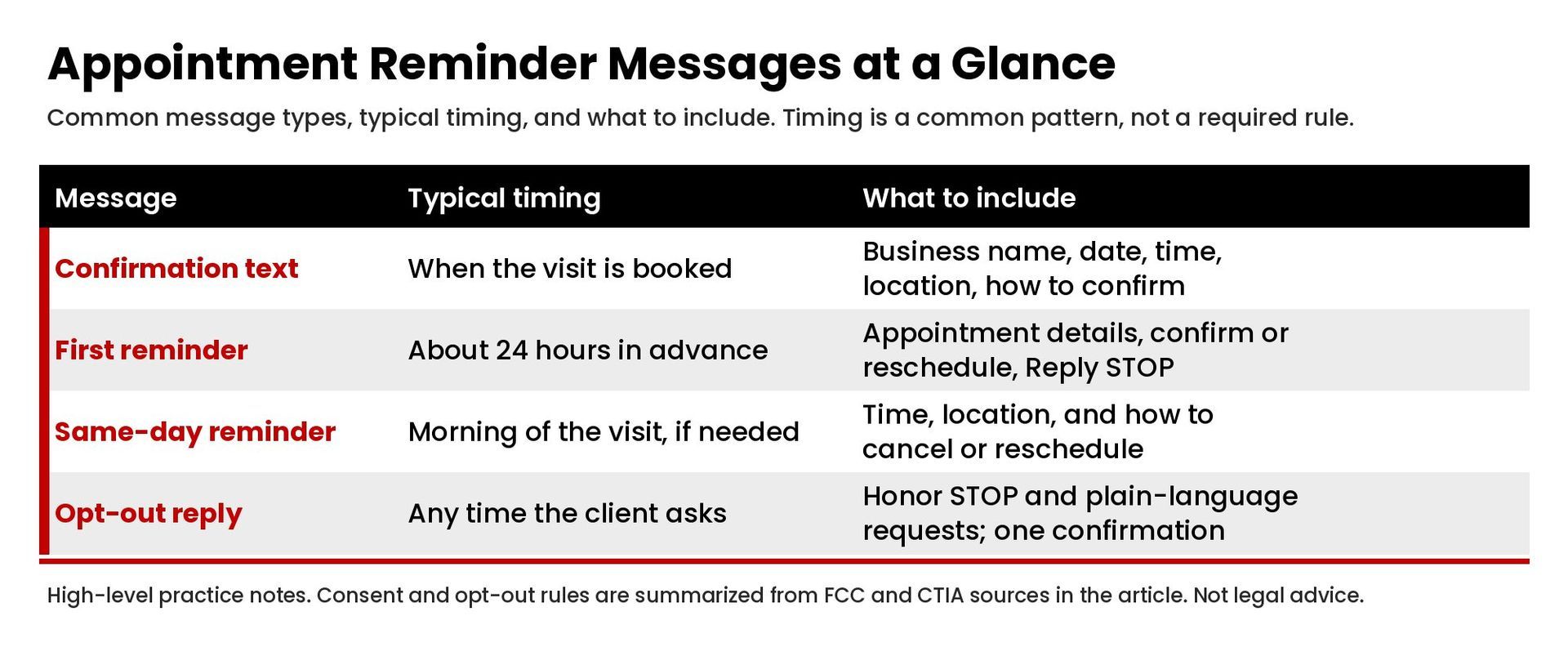
- Include a clear opt-out path, typically "Reply STOP to opt out," and honor a single reply that uses STOP or equivalent everyday language.
- Stop further reminder texts for that program after the opt-out, aside from any one-time confirmation that the request was received.
- Healthcare providers and other regulated practices have additional privacy rules. This article does not address whether a particular reminder is HIPAA compliant, and it does not offer healthcare legal advice.
When to Send Appointment Reminder Messages
There is no single official timetable. A pattern many businesses use is:
- A confirmation text at booking, so the date and time are agreed in writing on the client's phone.
- A first reminder about 24 hours in advance, or the afternoon before a morning visit.
- An optional same-day or "tomorrow" friendly reminder when the visit is easy to forget or has prep instructions.
A 24 hours reminder is a common choice because it leaves time to fill the slot if the client needs to reschedule, without reminding so early that the message is ignored. A week-ahead text can help for longer appointments or events that need planning, but a long string of reminder texts can feel like noise. If you already called to confirm, a short text can still be useful as a written record of the appointment details.
Whatever schedule you pick, keep it consistent, show it at opt-in when the program is recurring, and make cancel and reschedule requests easy to handle the same day they arrive.
Appointment Reminder Templates
These appointment reminder templates use a friendly tone, name the business, include the appointment details, and give a way to confirm or reschedule. Replace the brackets. Add "Reply STOP to opt out" on messages in a recurring SMS program. These are examples, not required legal forms.
Confirmation text after booking
Hi [Name], this is [Company name]. Your appointment is confirmed for [Day], [Date], at [Time] at [Location]. Reply YES to confirm, or reply if you need to reschedule. Reply STOP to opt out.
Standard 24 hours reminder
Hi [Name], a friendly reminder from [Business name]: you have an appointment tomorrow, [Date], at [Time] at [Location]. Reply YES to confirm, or reply if you need to reschedule. Reply STOP to opt out.
Quick reminder on the morning of the visit
Good morning [Name], a quick reminder from [Company name]: we will see you today at [Time] at [Location]. If you need to reschedule, reply to this text or call [Phone]. Reply STOP to opt out.
Dental clinic visit with prep instructions
Hi [Name], this is [Dental clinic name]. Reminder: your visit is [Date] at [Time]. Please arrive a few minutes early and bring [prep instructions, such as an insurance card and a list of medications]. Reply YES to confirm, or reply if you need to reschedule. Reply STOP to opt out.
Law firm consultation
Hi [Name], this is [Law firm name]. This is a reminder of your consultation on [Date] at [Time] at [Location]. If you need to reschedule, reply to this message or call [Phone]. Reply STOP to opt out.
Spa appointment
Hi [Name], a friendly reminder from [Spa name]: your appointment is [Date] at [Time]. If you need to reschedule, reply here or call us. Reply STOP to opt out.
Client needs to reschedule
Hi [Name], [Business name] here. We received your request and have released the [Date] at [Time] appointment. Reply with a few times that work, or call [Phone], and we will get you back on the schedule.
After a failed phone call
Hi [Name], [Business name] tried to reach you by phone about your appointment on [Date] at [Time]. Reply YES to confirm, or reply if you need to reschedule. Reply STOP to opt out.
Keep each reminder message short. Put longer prep instructions, parking notes, or forms in a follow-up email or a link only if your program and consent cover that kind of message, and never surprise the client with a promotional offer inside a reminder.
How to Write a Good Reminder Message
A good appointment reminder text answers four questions in a few lines: who is writing, when and where the visit is, what the client should do next, and how to opt out or get help.
Use the business name the client will recognize, not only a short code or an unfamiliar number. State the date and time clearly, including the time zone if you serve more than one area. Name the location or say if the visit is virtual. If the client must bring something or follow prep instructions, say so in plain language.
Write in a friendly tone without slang or pressure. "Friendly reminder" and "quick reminder" are useful labels when they are accurate. Ask for a confirmation when you will act on it. If a single reply of YES updates the calendar, say that. If the client should call to reschedule, give the phone number.
Do not hide opt-out language. "Reply STOP to opt out" is the wording CTIA recommends as the standard instruction. If a client writes cancel, quit, or unsubscribe instead, treat it as an opt-out request for that messaging program, consistent with the CTIA guidance summarized above.
Automated Appointment Reminders in a CRM
Automated appointment reminders work best when the booking, the mobile number, the consent record, and the reminder schedule live in the same system. A CRM can send appointment reminders at a set time, log replies, and stop messages after an opt-out, as long as those workflows are built on purpose. That is part of building follow-up that moves qualified prospects without over-automating, and it depends on building the process before migrating the data rather than turning on texts after a messy import.
Reminder texts are only one part of a cleaner lead-to-client workflow. They should stay on scheduled visits. They are not a substitute for a missed-call text-back or an after-hours answering process, and those tools should not be used to send promotional messages under the banner of a reminder. If you are redesigning how appointments move from inquiry to visit, our page on sales automation services explains how we approach that kind of workflow work.
Test the templates, the 24 hours timing, and the STOP path before sending appointment reminders to your full list of customers and clients. Confirm that cancelled visits do not still trigger a reminder, and that a number which opted out is not reused from an old spreadsheet.
Common Mistakes With Reminder Texts
- Sending SMS reminders to a number you were given only for a callback, with no appointment-text consent.
- Leaving off the business name, date, or location, so the client cannot tell the message apart from spam.
- Adding a promotion, review request, or coupon to an informational reminder.
- Ignoring a cancel or STOP reply, or continuing to text after the client opted out.
- Sending too many reminder texts for the same visit, or reminding after the appointment has already been cancelled.
- Using a tone that is hard to read, or so casual that a professional visit feels careless.
Frequently Asked Questions
Can I send appointment reminders via text?
Businesses commonly do, when the client has agreed to receive that kind of message on the number on file. The FCC consumer guide summarized above discusses consent for autodialed texts to a mobile phone, and it distinguishes written consent for commercial texts from oral consent that may be enough for informational texts. Whether a particular program is allowed depends on the facts and on current law. This article cannot decide that for you.
Can you provide an example of an appointment reminder?
Yes. A straightforward 24 hours example is: "Hi Jordan, a friendly reminder from Riverstone Studio: you have an appointment tomorrow, May 12, at 2:00 p.m. at 200 Main Street. Reply YES to confirm, or reply if you need to reschedule. Reply STOP to opt out." Additional appointment reminder templates appear earlier in this article.
Can you provide a sample text message for a professional meeting reminder?
Yes. "Hi Morgan, this is Harrington & Cole. This is a reminder of your meeting on Tuesday, May 12, at 10:00 a.m. at our office, 400 Oak Avenue, Suite 200. If you need to reschedule, reply to this message or call (888) 555-0100. Reply STOP to opt out." Use your own company name, address, and phone number. The sample number above is a fictional placeholder, not a Masterly number.
How do I write an appointment reminder? What makes a good reminder message?
Name the business, state the appointment details, tell the client how to confirm or reschedule, keep a friendly tone, and include a clear opt-out instruction such as Reply STOP. That is the core of how to write a good reminder message. The writing section above walks through each of those points.
How do I text to reschedule an appointment?
From the client's side, the easiest path is the one you printed in the reminder: a reply that says they need to reschedule, or a call to the number in the message. From the business side, staff or the CRM should release the old slot, offer new times, and send a fresh confirmation text when the visit is rebooked.
Are text appointment reminders HIPAA compliant?
This article does not give HIPAA advice and does not say whether any particular text is HIPAA compliant. Healthcare providers should follow their privacy and security rules, limit what the message contains, and get advice from their own counsel or compliance team before they send appointment reminders by SMS.
Get Help With Appointment Reminders and CRM Follow-Up
If you want help designing appointment reminder texts, connecting them to your calendar, or tightening consent and opt-out handling in your CRM, contact Masterly Tech Group to talk through your setup.