Legal CRM: What Law Firms Should Decide First
A legal CRM is software a law firm uses to organize people, matters, and the work that happens between the first inquiry and later follow up. In a general sales setting, CRM software is often built around a pipeline of deals. In a firm, the record usually has to support a matter, a conflict check, client communication, documents, time, and in many cases billing. That is why a law firm CRM, including law firm CRM software built for matters rather than deals, is not just a rebranded sales tool.
This article explains what to decide before you compare legal CRM software. It does not rank products, and it does not offer legal advice. The American Bar Association Model Rules of Professional Conduct are a model. Your licensing jurisdiction adopts its own rules, and those rules control. If you want help connecting this work to your systems, start with CRM consulting or CRM implementation. Firms that are also tightening how inquiries arrive can review law firm marketing.

Table of contents:
- What a legal CRM is, and how it differs from generic CRM software
- Client intake: the path from inquiry to a matter
- Case management, documents, and whether you need one system
- Client data, access controls, and confidentiality
- Time, billing, and trust accounting
- Client communication, follow up, and reporting
- CRM for law firms: how to compare products
- Implementation and working together after you buy
What a Legal CRM Is, and How It Differs From Generic CRM Software
Many law firms already have pieces of this picture: a shared inbox, a spreadsheet of prospective clients, a list of former clients, a document folder, and a separate billing tool. A legal CRM tries to put those pieces in one system, or at least in one platform that other tools can use together. Practice management software may include case management, document management, and billing. Some products market themselves as legal CRM software, some as practice management, and some as both. The label matters less than the work the system must support.
A generic CRM may be strong at lead generation, pipeline stages, and marketing automation. Those functions can still help law firms, especially at the inquiry stage. They are not enough if the same record later has to hold case details, conflict results, fee arrangements, and files that must stay confidential. A legal specific product is designed around matters and professional duties. A general product can sometimes be configured to do the same work, but only if you decide the required records and access rules first.
The people who will use the system also differ from a company's sales teams. At many law firms, partners, associates, paralegals, intake staff, and billing staff may all need a role in the same matter. Solo practitioners may need a simpler setup. Large firms may need tighter permission groups and more reporting. Write down who must enter data, who must approve a new matter, and who should only see a limited record.
Client Intake: The Path From Inquiry to a Matter
Client intake is often where a legal CRM earns its keep, or where it fails. Weak client intake hides unanswered inquiries. Clear client intake gives the rest of the file a clean start. An inquiry can arrive from a web form, a phone call, a referral, or a walk-in. If those sources land in different inboxes, law firms cannot see which prospective clients or other potential clients were answered, which were declined, and which became matters. The first decision is not which form vendor to buy. It is the path: who receives the inquiry, what is collected, what is checked, and when a person becomes one of the firm's clients.
Intake Forms, Web Forms, and How You Capture Leads
Intake forms should collect only what law firms need at that stage. Customizable intake forms help when practice groups need different questions, for example a family-law inquiry versus a business dispute. Web forms on the website should post into the legal CRM, not into a personal email box. If you also use landing pages for a campaign, those pages should send the same fields into the same record, or staff will spend the afternoon on data entry.
Personal injury law firms often feel this pressure first because the volume of inquiries can be high. The same design applies to other practices. Decide how you capture leads, how you qualify them, and how you record a decline. Lead scoring can help staff prioritize, but it is only useful if the scores match your actual criteria. A high score that ignores a conflict, a jurisdiction problem, or a fee mismatch will waste time.
Referral partners should have a clear path too. Record the referral source on every inquiry, including referral partners, advertising, and direct web traffic. Marketing channels can be compared later only if that field is required and consistently used. Client acquisition reports are otherwise guesswork.
Once law firms agree to the work, the record should move from an inquiry to a matter without being retyped. Clients should not have to repeat the same facts because the inquiry never reached the matter file. Existing clients who return with a new issue should be matched to the prior record, not entered as a new person. That handoff is also where signed clients should be distinguished from people who only asked a question. If the status change is informal, reporting on conversion will be unreliable.
Case Management, Documents, and Whether You Need One System
Case Management Alongside the Relationship Record
Case management is the work after a matter is open: deadlines, tasks, notes, parties, and status. Some legal CRM software includes this. Other law firms keep a CRM for relationships and a separate system for matters. Either model can work. The risk is a split record. If staff must look in two places to see the last client communication and the next filing date, something will be missed.
Law firms should write down what case management must include for each practice group. Case management for a litigation file may emphasize deadlines, discovery, and court dates. Case management for a transactional file may emphasize checklists, counterparties, and closing tasks. If case management fields differ by practice, the legal CRM should support those differences without creating a second unofficial process. Poor case management usually shows up as missed dates, repeated questions to clients, and status updates that no one trusts. Strong case management gives lawyers, staff, and clients a current picture of the matter. Case management also has to connect to calendaring, or the calendar and the matter record will drift apart. Before you buy, watch a case management workflow in a demo: open a matter, assign a task, record a note, and find that matter again as if you were covering for a colleague. If case management takes too many clicks, staff will keep notes in email. Law firms with several offices should also ask whether case management permissions can be limited by office, practice, or matter team. Case management reporting should show open matters, idle matters, and upcoming deadlines, not only a count of files. Treat case management as a daily habit, not as a place to store documents after the work is finished.
Ask whether one system can hold both the relationship and the matter, or whether two tools must share data through a reliable integration. "One platform" is a useful goal when it reduces duplicate records. One platform is a poor goal when it forces law firms to accept weak billing or weak document tools just to keep everything in one product. One platform also only helps if every team actually works in it.
Document Management and Document Automation
Document management belongs in the same discussion. Matter files, executed agreements, discovery, and correspondence should be stored with access rules that match the matter. If documents live on a shared drive with no matter-level permissions, the CRM will not solve the confidentiality problem for law firms or for their clients. If documents live in the CRM or a connected repository, decide who can upload, edit, and export.
Document automation can save time on routine letters, engagement paperwork, and status updates. Standard matter checklists can also save time for staff who would otherwise rebuild the same task list. Used carefully, templates save time without replacing a lawyer's review. It should pull from clean fields, not from informal notes. If the fields are messy, the templates will produce messy documents. Treat automation as a later step, after the intake fields and matter fields are stable.
Contact management belongs here as well, and it should be limited to a single official record for each person and organization, with roles that show how that contact relates to one or more matters.
Client Data, Access Controls, and Confidentiality
Client Data the Firm Must Be Able to Protect
Client data in a legal CRM is not just a mailing list of clients. It can include client information such as names, addresses, financial facts, case facts, medical or family details, and communication history. Model Rule 1.6 of the ABA Model Rules of Professional Conduct states that a lawyer shall not reveal information relating to the representation of a client except as the rule allows, and Rule 1.6(c) requires a lawyer to make "reasonable efforts to prevent the inadvertent or unauthorized disclosure of, or unauthorized access to, information relating to the representation of a client." The full text of Rule 1.6 is published by the ABA. Your state rule may be worded differently, but the operational point is the same: access to client details should be limited to the people who need it to serve those clients.
Competence now includes technology. Comment [8] to Model Rule 1.1 says that, to maintain the required knowledge and skill, a lawyer should keep abreast of changes in the law and its practice, "including the benefits and risks associated with relevant technology." Choosing a legal CRM is one of those technology decisions. You do not have to become a security engineer. You do have to understand, or get help understanding, where the records live, who can see them, how they are backed up, and what happens if a vendor or a staff account is compromised.
The ABA Standing Committee on Ethics and Professional Responsibility addressed electronic communication in Formal Opinion 477R (2017). As summarized in the ABA's later practice guidance, a lawyer generally may transmit information relating to a representation over the internet when the lawyer has made reasonable efforts to prevent inadvertent or unauthorized access, and special precautions may be required when a client agreement, a law, or the nature of the information calls for a higher degree of security. See the ABA discussion of securing protected client information in a virtual practice. When you evaluate CRM platforms, ask how data is encrypted, how logins are protected, whether you can require multifactor authentication, and whether a departing employee's access can be ended the same day.
Formal Opinion 483 (2018) addresses what lawyers should do after an electronic data breach or cyberattack. ABA practice guidance on that opinion explains that duties include monitoring for a breach, stopping a breach and restoring systems, and determining what happened, and that current clients may need to be informed when material confidential information is compromised or the representation is significantly impaired. Read the ABA's ethics of incident response overview. A legal CRM should support that work with exportable records of clients and matters, and a clear vendor incident process. It cannot replace a firm plan.
Permissions, Logs, and Supervision
Permissions should follow the matter, not just the office. A person working on one case for some clients should not automatically see files for other clients. Conflict walls, if your firm uses them, must be enforceable in the software, not only in a memo. Audit logs should record who viewed, changed, exported, or downloaded a record. Audit trails of those actions help a managing partner review a problem and help the firm reconstruct events if a record is questioned later.
Vendors and staff both matter. If a vendor can access client data to provide support, ask how that access is authorized, logged, and limited. If intake staff work from home, ask whether they can download a full export to a personal device. These are practical questions, not theoretical ones.
Billing Integration, Trust Accounting, and Time Records
Time and money are part of the matter record for law firms. Billing integration should let billable hours, expenses, and invoices connect to the same clients and matters that intake created. If time is entered in one tool and invoices are created in another, staff will reconcile by hand. That is slow, and it creates avoidable errors.
Some law firms ask whether they can keep using a general accounting tool, including QuickBooks, beside a legal CRM. Many law firms do use a separate accounting system. The question to ask the vendor is not "Do law firms use QuickBooks?" The question is whether the legal CRM can exchange the records you need, and whether trust activity stays within the rules that apply to your firm.
Trust accounting is not a CRM feature you can improvise. Model Rule 1.15 requires a lawyer to hold property of clients or third persons separate from the lawyer's own property, to keep complete records, and to deposit unearned fees into a client trust account until they are earned. State versions of this rule, plus IOLTA and recordkeeping requirements, vary. If your legal CRM or practice system will hold trust balances, receipts, or disbursements, have your bookkeeper and, where needed, counsel confirm that the workflow matches your jurisdiction. Do not assume a marketing page about "trust accounting" is enough.
Monthly billing and annual billing also belong in this decision, but at the vendor-contract level. Some legal CRM software is billed monthly. Some plans are billed annually. A plan that is billed annually may lower the list price and also lock the firm into a longer term. A plan that is billed monthly may be easier to exit and may cost more over a year. Ask what happens if you add users midterm, whether unused seats are billed monthly anyway, and whether a move from a plan that is billed monthly to one that is billed annually changes features or export rights. Get those answers in writing before you compare list prices.
Client Communication, Follow Up, and Reporting
Client communication should be visible on the matter so clients are not asked the same question twice. Calls, emails, texts, and portal messages with clients ought to appear in one communication history, or at least be linked there. If a lawyer cannot see what intake already told the person, the firm will repeat questions or contradict itself.
Follow Up After the First Reply
Follow up is where many inquiries die. Automated follow up can send a confirmation, a request for documents, or a reminder to finish an intake form. It should not pretend to be a legal conclusion, and it should stop when the person declines or when a lawyer needs to take over. Decide the cadence in advance. Then measure whether staff actually complete the manual steps the automation cannot do.
Reporting should help law firms see the path from inquiry to matter, not only a count of new files. It should also show which clients are waiting on a reply. Custom reporting is useful when you need a view that a default dashboard does not provide. Advanced reporting can break results down by practice group, referral source, or staff member. Advanced analytics are optional. Most firms get more value from a short list of accurate numbers than from a dashboard no one trusts. If the fields are incomplete, no report will fix that.
Essential features for this part of the work usually include shared inboxes or call records, task assignments, templates, and a way to see overdue follow up. If those essential features are missing, campaign tools will not fix the gap. Marketing extras, such as broad campaign tools, may be useful later. They should not distract from a clean inquiry record.
CRM for Law Firms: How to Compare CRM Platforms
Core Features Versus a Longer Feature List
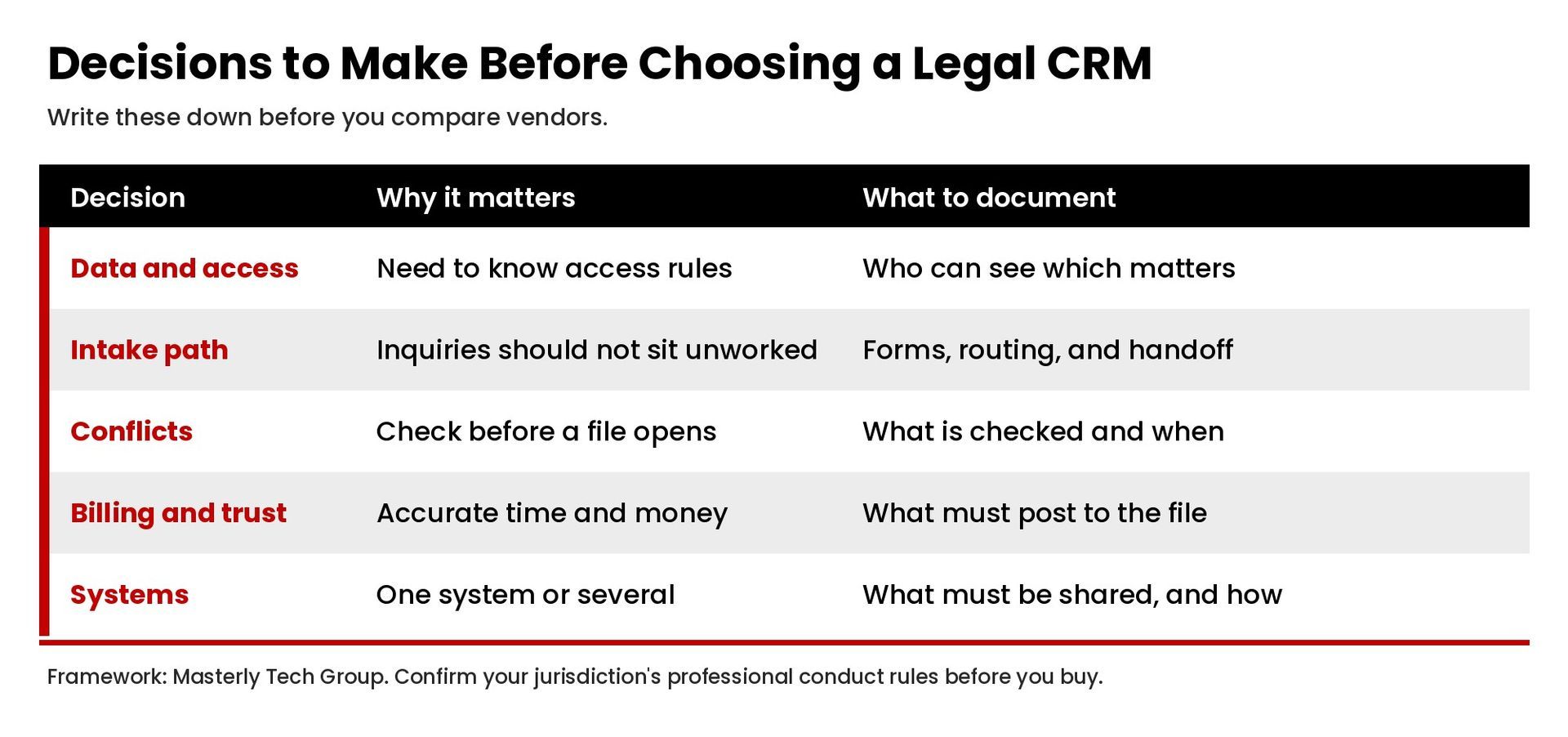
When people search for a CRM for law firms, or for a law firm CRM in general, the results often look like a contest. Ignore the ranking format. Make a list of core features law firms must have on day one, then a shorter list of useful add-ons. Key features commonly include intake, conflict checks, matter records, permissions, calendaring, documents, time, and reporting. Those key features should be visible in a demo, not only on a marketing page. CRM features that only support advertising or website chat can wait if the matter record is not solid.
What Best Legal CRM Software Should Mean for Your Firm
"Best legal CRM software" is a phrase vendors use. There is no single best CRM for every practice. The best CRM for your firm is the one that supports your process, your access rules, and your billing reality. Best CRM lists also go stale as products change. The right CRM for a high-volume personal injury intake desk may be a poor fit for a small corporate practice. Write the firm's goals in plain language: shorter intake time, fewer duplicate records, cleaner conflict checks, clearer reporting, or a better experience for clients. Then ask each vendor to show those workflows in a live demo with your sample data, not a slide deck.
It is reasonable to look at well-known products while you compare. Clio Manage is one practice-management platform firms often evaluate. Law Ruler is another product often discussed for intake-heavy practices. Mentioning them here is not an endorsement, and this article does not review their current features or pricing. If you evaluate Law Ruler, Clio Manage, or any other tool, judge it against the decisions in this article, not against a generic "best" list.
Pricing Plans, Free Versions, and the Learning Curve
Pricing plans vary by user count, modules, and contract length. Ask whether the plan offers intake, documents, and billing in the base fee or as add-ons. Ask whether the product is billed monthly, billed annually, or offered both ways, and what you lose if you pick the lower price. Some vendors advertise a free tier. A free version can be useful for a test, but it may limit users, records, or exports of clients and matters. A totally free CRM is uncommon for a firm that needs permissions, audit records, and a complete export of client data. Do not put live client data into a trial until you understand data ownership, deletion, and where the records are hosted.
The learning curve matters as much as the feature list. If the interface requires a specialist for ordinary data entry, staff at law firms will keep using email and spreadsheets, and clients will feel the delay. Ask who will train the team, how long a typical rollout takes, and what reports you will review in the first 90 days. A slower start that staff will actually use is better than a wide launch that people abandon.
Implementation and Improved Collaboration
Buying the software is the smaller part of the work. Implementation is where law firms map fields, clean old lists of clients, set permissions, and retire the spreadsheets they no longer want. Masterly Tech Group's CRM implementation article focuses on building the process before you migrate data, which is the same order this page recommends. If your current records are inconsistent, fix the definitions first. Data quality is the difference between a system people trust and a system people work around.
Improved collaboration comes from a shared, current record, not from a new chat tool. When intake, lawyers, and billing can see the same clients, the same matter status, and the same next step, handoffs get shorter and clients get clearer updates. The CRM should help the firm manage clients day to day, manage clients across intake and billing, and manage relationships without hiding the matter work behind a personal inbox. If a partner cannot find last week's promise to a client, the system is not doing its job, and clients lose confidence in the process.
Be cautious about vendor claims that a new platform will automatically produce more clients, attract more clients through marketing alone, or increase profitability. Those results depend on whether qualified inquiries are answered, whether conflicts and fees are handled clearly, and whether law firms can do the work they accept for their clients. A legal CRM can make that path visible. It cannot invent demand. Marketing automation and advertising reports can support the front of the path, but they should not be the reason you accept a weak matter record.
Before you sign, confirm that you can export your data, that the vendor will not treat your records as its own marketing list, and that you know who shares data with whom. If the vendor uses subprocessors, get a current list and a description of the purpose. Then assign an owner inside the firm who will review users, permissions, overdue follow up, and records for clients each month.
If you want help deciding what your legal CRM must support before you buy or migrate, contact Masterly Tech Group or call (888) 209-4055. We can walk through intake, access, billing, and the handoff into the tools you already use.