Review Request Text: How to Ask Customers for Reviews by SMS
A review request text is a short SMS that asks a customer to leave a review after a real visit or job. For local businesses, that usually means a Google review on the company's Google Business Profile, sent with a Google review link or, in person, a QR code that opens the same review page.
This article explains how to ask for reviews by text without violating Google's prohibited and restricted content rules or turning the message into a sales pitch. It includes SMS templates, timing after service completion, and the difference between a genuine request and practices Google does not allow, including incentives and review gating. Official Google pages on tips to get more reviews and creating a Google link or QR code are cited throughout. The article is general information, not legal advice, and it does not promise more reviews, higher ratings, or any particular response rates.
Key takeaways:
- Ask every customer who had a real experience, not only happy customers or only people likely to leave positive reviews.
- Do not offer incentives, such as payment or free or discounted goods or services, in exchange for a review, a changed review, or the removal of negative reviews.
- Send a direct review link, keep the message short, and include an opt out path such as Reply STOP.
- Keep review requests separate from appointment reminder texts.

What a Review Request Text Is
A review request text is one way to ask for reviews after the work is done. The message should name the business, thank the person for the visit or specific purchase, and give a direct link to the review form or review profile, not a vague request to "find us online." Google's own help page on requesting reviews explains that you can create a Google review link or QR code from your Business Profile, a free tool on the profile itself, and share it in thank-you emails, on receipts, at the end of a chat, or in the store. A text can carry that same official link if the customer has agreed to receive that kind of message.
The goal is honest feedback, including positive feedback and negative reviews, because consumer reviews, online reviews, and other public review posts are useful only when they reflect a genuine experience. Future customers find those reviews when they compare local options. Google states that a mix of positive and negative feedback often feels more trustworthy, and that businesses may solicit content that represents a genuine experience without trying to influence the rating or the contents of the review.
Google Rules That Shape Every Review Request
Google's Business Profile and Maps policies are the first filter for any review request text, SMS templates, or email templates you use.
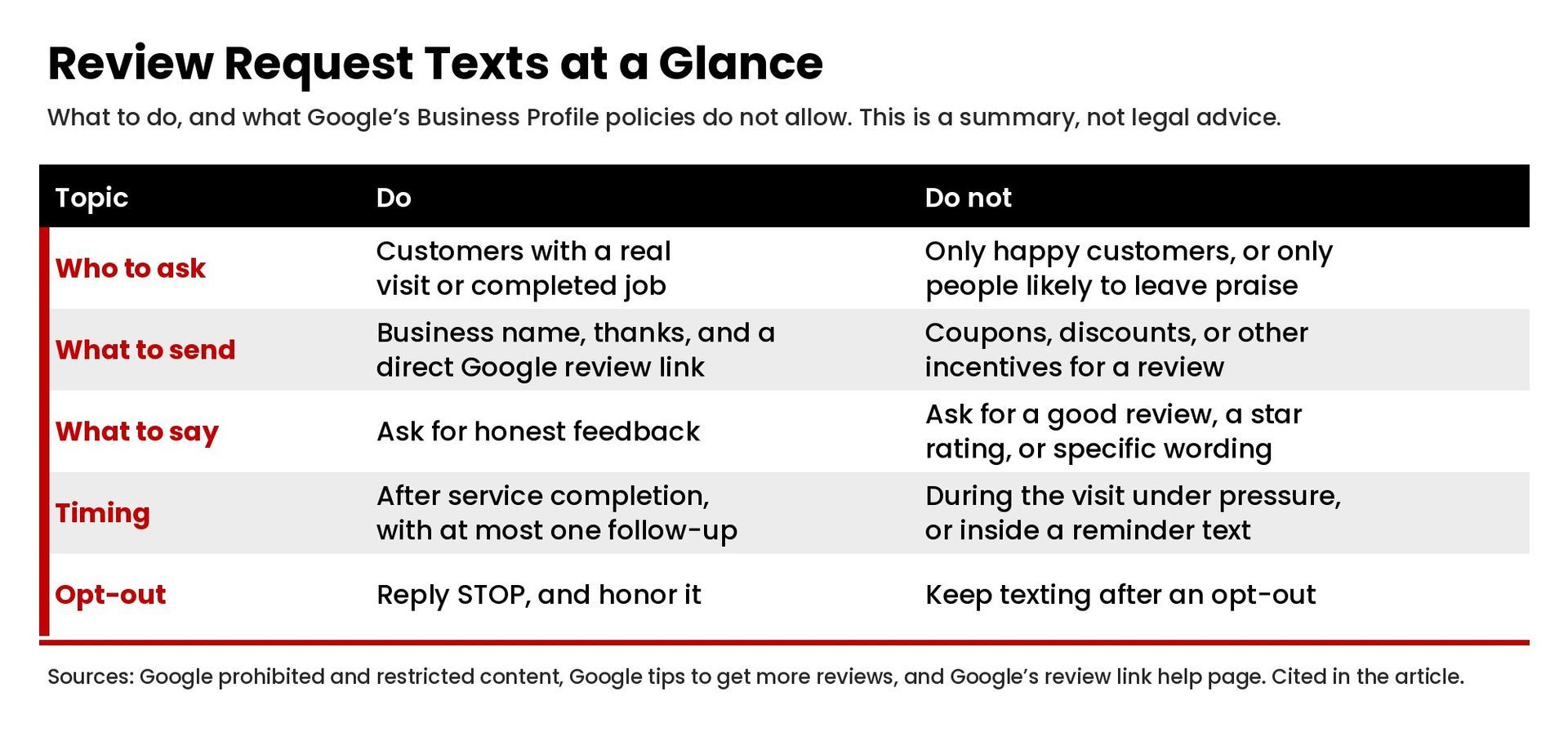
Google does not allow merchants or users to offer incentives, such as payment, discounts, or free or discounted goods and/or services, in exchange for posting any review or for the revision or removal of a negative review. That ban is stated in Google's prohibited and restricted content policy and is repeated in the tips and review-link help pages. Do not offer incentives in a review request text, a follow-up, or a later conversation about a review that already exists.
Google also does not allow merchants to discourage or prohibit negative reviews, or to selectively solicit positive reviews from customers. That second practice is commonly called review gating: for example, sending only satisfied customers or only happy customers to the public Google review page, while routing everyone else to a private form. Do not write a review request that asks only for a good review, a particular sentiment, or specific wording, and do not pressure someone to leave a review while they are still on the premises.
What Google does allow is asking customers to leave reviews that represent a genuine experience, without incentives and without trying to influence the rating or the review text. Google's tips page also encourages businesses to reply to reviews, value all reviews, and keep public replies professional rather than promotional.
Consent and Opt-Out for Review Request Texts
A review request text is not the same as an informational appointment reminder. It is a request that the customer take a public action. This section is a high-level summary, not legal advice.
The FCC consumer guide on unwanted robocalls and texts(reviewed February 27, 2026) states that autodialed texts to a mobile phone require prior consent unless the message is for emergency purposes, that commercial texts require written consent, and that a person may opt out of a robotext at any time and in any reasonable manner. The CTIA Messaging Principles and Best Practices(May 2023) treat promotional messages as a separate category from informational messages such as appointment reminders, and they recommend standardized "STOP" wording while also honoring everyday language such as stop, end, unsubscribe, cancel, or quit.
Practical points that follow from those sources, without treating this list as a legal checklist, include:
- Do not add a Google review link to an appointment reminder text. Keep the reminder about the visit, and send review requests only after the appointment completed or the job is finished, under the messaging program the customer agreed to.
- Identify the business name in the message and include a clear opt out instruction, typically "Reply STOP to opt out."
- Honor a single reply that opts out, and do not keep sending review requests to that number for that program.
When to Send Review Requests
There is no official Google timetable for SMS. A common pattern for local businesses is to send the first review request after service completion, often the same day or the next morning, once the customer has had a chance to see the result. A gentle reminder, or one polite reminder, can follow if there was no reply and the person has not opted out. One follow up is enough for most situations. Repeated review requests start to feel like pressure.
If you also ask in person, keep it light: share the QR code or say the text will include a direct link, and do not require a rating before the customer leaves. Google's policy says merchants should not require or pressure users to leave ratings or write reviews while on the premises, and should not request that specific content be included.
Review Request Text Templates
These copy paste templates are starting points, not generic template language you should send unchanged, and not a way to ask only for a good review. Replace the brackets, use your real Google review link, and include Reply STOP on recurring SMS programs. Your opinion matters is implied by the ask; you do not need to script the customer's words.
Same day after service completion
Hi [Name], this is [Business name]. Thank you for coming in today. If you have a moment to leave us a review on our Google Business Profile, here is a direct review link: [Google review link]. Reply STOP to opt out.
Next-day follow up
Hi [Name], [Business name] here. Thank you again for your visit yesterday. If you would like to leave a review, here is our Google review link: [link]. Reply STOP to opt out.
One polite reminder
Hi [Name], a friendly reminder from [Business name]: if you have a few words of honest feedback about your recent visit, you can leave a review here: [Google review link]. Reply STOP to opt out.
After a specific purchase or service call
Hi [Name], this is [Business name]. Thank you for choosing us for [specific purchase or job]. If you would like to leave a review on Google Maps, here is a direct link: [link]. Reply STOP to opt out.
In-person follow-up that points to the same link
Hi [Name], [Business name] here. As mentioned at the desk, here is the Google review link for our Business Profile: [link]. Thank you. Reply STOP to opt out.
Do not add a coupon, a discount, a gift card, or any other incentive to these messages. Do not say "only if you had a great experience" or "leave us a 5-star review." Ask for an honest review, then read reviews when they appear and reply where a public response would help other customers or potential buyers understand what you do.
A short review request email can use the same ideas, with a clear subject line such as "Please consider leaving a review for [Business name]," a sign-off no stronger than "Thank you" or "Warm regards," and the same official link. Addressing the person as a valued customer is fine; assuming customers love the visit, or asking them to say that they did, is not. The email is not a substitute for following Google's rules, and it is not a place to offer incentives either.
How to Write a Good Review Request
A good review request text does four things: it names the business, it refers to a real visit, it gives a direct review link that opens the review form, and it leaves the customer free to write, or not write, whatever reflects their experience.
Use a short, plain message rather than a long pitch. "Can you take a quick review minute?" is less useful than "Here is our Google review link." A quick Google review helps future customers only when the person can open the link without hunting through Google Maps search results. That is why a direct review link, created from the Business Profile, is better than asking someone to search for the company name.
Write to customers as people who already used the service, not as a list you are trying to convert. Avoid language that asks for a particular sentiment. "Please share your honest feedback" is consistent with Google's rules. "Please leave a good review so we can reach new customers" is not, because it tries to influence the rating and the contents of the review.
If you send a follow up, keep it to one reminder and stop after an opt out or a reply that the person is not interested. Response rates vary, and this article does not treat any rate as a target.
How Review Requests Fit a CRM and Follow-Up Plan
Review requests work better when they are part of a planned follow up, not an ad-hoc text from a personal phone. The customer record, the consent record, the official Google review link, and the send time after service completion should live in the same system. That is a client-journey question as much as a message-writing question, which is why it helps to design the client journey before you configure the software and to keep follow-up from becoming over-automated.
Reputation work also sits beside local search, not in place of it. If reviews are part of a broader visibility plan, our page on local SEO and reputation management for healthcare practices explains that side of the work for one business type. The same policy rules apply whether you are a clinic, a shop, or another small business: ask for genuine reviews, do not gate them, and do not pay for them. Brand reputation and online reputation both suffer when a shortcut violates the platform's rules.
Test the SMS templates, the link, and the STOP path before you send review requests to a full list. Confirm that a customer who opted out of texts does not still receive a review request, and that a reminder-text program cannot be reused as a review-request program without a clear, separate consent record.
Common Mistakes
- Asking only happy customers or only people who already left positive reviews on another site.
- Using review gating, even with friendly wording, to keep negative reviews off Google.
- Offering a discount, gift, or other incentive for a review, a revision, or a takedown.
- Sending a review request before the appointment or job is finished, or tacking it onto a reminder text.
- Leaving out the business name or sending people to a search page instead of a direct review link.
- Asking the customer to mention a staff member or to include specific content.
- Ignoring opt out requests, or sending many follow-up texts after silence.
Frequently Asked Questions
How do I request a review from a customer?
Thank the person for a real visit or job, give a direct Google review link or QR code from your Business Profile, and ask for honest feedback. Do not offer incentives and do not ask only for positive reviews. The templates above show how that looks in a review request text.
How do I send someone a link to write a review?
Create the official link in your Google Business Profile, as Google describes in its help article on review links and QR codes, then paste that direct review link into the text, email, receipt, or chat. Do not invent a shortened URL that hides where the person is going.
What should I say when requesting a review? How do I write a feedback message?
Name the business, refer to the visit, include the link, and leave the wording of the review up to the customer. A simple line such as "If you would like to leave a review, here is our Google review link" is enough. You can ask for customer feedback or valuable feedback without asking for a particular sentiment.
How do I politely ask for a good review?
You should not. Google does not allow merchants to selectively solicit positive reviews or to try to influence the rating or the contents of the review. Ask all customers with a genuine experience for an honest review, then reply in public when a response would help.
How do I politely ask someone to review a document via email?
That is a different task from a public Google review. If you need written comments on a document, say so directly in email and send the file or a private link. Do not use a Google review request for internal document review, and do not treat an internal ask as a substitute for Google's review policies.
Get Help With Review Requests and CRM Follow-Up
If you want help building review request texts into a CRM follow-up process, or tightening how appointment reminders and review requests stay in their own lanes, contact Masterly Tech Group to talk through your setup.