
Client Intake Software: What to Set Up Before You Automate
Client intake software, including legal client intake software used by law firms, is the system a firm uses to collect facts from a new inquiry, qualify that inquiry, and turn a qualified person into a matter record. It is not only a form. It is the path from first contact to a file that the rest of the team can use. A weak path leaves staff retyping the same answers, and it leaves a client waiting.
This article explains how to design the client intake process before you automate it. The software should follow that intake process, not the other way around. It does not rank products, and it does not offer legal advice. If you are also choosing a broader matter system, start with the legal CRM guide, then look at CRM implementation and CRM integration. For the journey before tools multiply, see CRM consulting.

Table of contents:
- What client intake software is, and what it is not
- What a client intake process must include
- What should be on a client intake form
- When the client intake form should be completed
- Conflict checks, the engagement letter, and the initial consultation
- Client data and how it moves into other systems
- Legal software, case management, and workflow automation
- Client onboarding and the client experience
What Client Intake Software Is, and What It Is Not
Client intake software collects the answers a firm needs when a prospective client or other potential client first reaches out, then routes those answers to the right person. Intake tools may include a website form, document requests, scheduling, signing tools, and a simple status view. Intake software can stand alone, or it can be a module inside legal software or practice management software. The label matters less than whether a team member can find the record, see what is missing, and move the matter forward without starting over.
Patient intake is a different category. Medical offices collect medical history and insurance details under health-privacy rules that do not map one-for-one onto a law firm file. This page is about professional-services intake, with a focus on legal client intake and on legal client intake software built for that work. If your work is clinical, treat patient intake as its own project.
For law firms, client intake software will not fix an unclear offer, a slow response habit, or a conflict check that happens too late. It can make those gaps visible. That is useful, but only if someone owns the follow up.
What a Client Intake Process Must Include
A client intake process is the sequence of steps from the first inquiry to a decision: accept the work, decline it, or refer it. Client intake is the work those steps describe. Many law firms already have pieces of a process: a web form, a phone script, an email folder, and a checklist on someone's desk. Other law firms rely on a shared inbox and hope someone sees it. The question is whether those pieces form a structured process that the entire team can follow.
The Firm's Client Intake Process, Step by Step
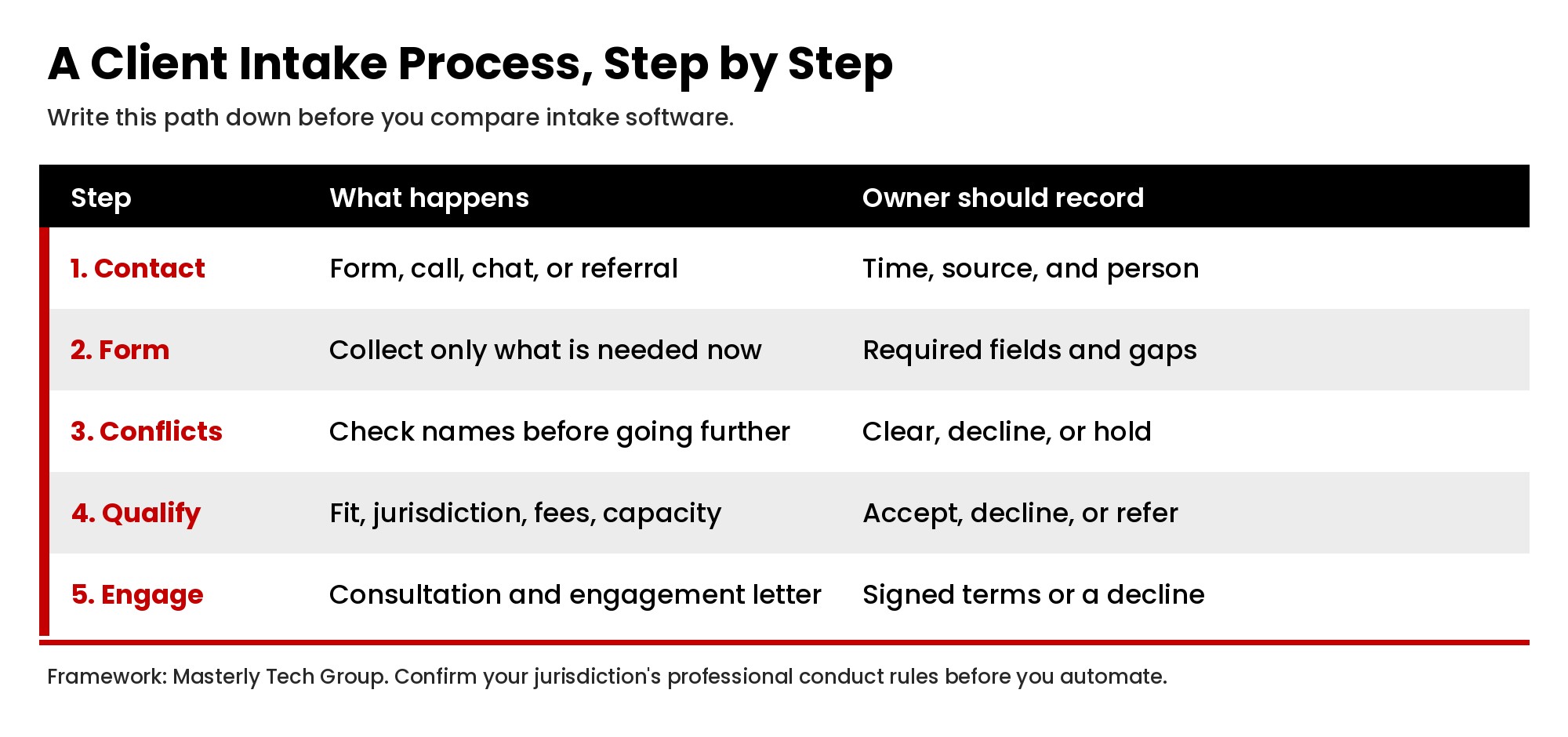
Law firms should write the firm's client intake process on one page before they compare vendors. A clear firm's client intake process usually includes:
- Initial contact, whether by form, phone, chat, or referral.
- A complete intake form, or a short first form plus a longer second form.
- A conflict check before a substantive conversation goes too far.
- A qualification review: jurisdiction, practice areas, fee fit, and capacity.
- The initial consultation, if you offer one.
- An engagement letter, fee agreement, or a written decline.
- A handoff into the matter system so the new file is ready for work.
The firm's client intake process should also name owners. Who reads a new form submission after hours? Who calls the prospective client if a field is blank? Who can decline a matter? If the firm's client intake process leaves those answers implied, staff will invent their own path, and the record will be uneven.
A slow intake process shows up as unanswered forms, repeated phone calls, and a prospective client who has already hired someone else. Lost opportunities often come from delay, not from a missing feature. A solid intake process is visible, timed, and reviewed. Successful law firms are often described that way in marketing. Judge your own path by whether a potential client gets a timely, accurate reply, not by a vendor story.
What Should Be on a Client Intake Form
A client intake form is used to collect essential information at the right stage, not to collect every fact the file might ever need. What should be on a client intake form depends on the practice, but most law firms need some mix of the following:
- Basic contact information: name, preferred phone, email, and mailing address.
- How the potential client found the firm, including a referral source.
- A short description of the issue, date range, and other parties, enough to run conflict checks.
- Jurisdiction, language needs, and any deadline the potential client already knows.
- Fee or funding questions you must ask before you invest more time.
Key information that can wait, such as a full document list or a long timeline, belongs on a second form or in the onboarding process. If the first intake form is too long, a potential client may abandon it. If the intake form is too short, staff will spend the first call gathering facts that a form could have collected.
Online Intake Form and Digital Forms
An online intake form should post into the intake software, not into a personal inbox. Digital intake forms and other digital forms reduce handwriting errors and make the answers searchable. Customizable intake forms help when practice groups need different questions. Customizable forms with conditional logic can show a field only when it applies, which keeps the form shorter for the person filling it out. Those dynamic forms help a prospective client skip questions that do not apply.
Online forms should be usable on a phone, because many people start there. The client fills in what they know, then submits. If the client fills only part of the form, the record should still be saved so staff can follow up. Form submissions need a timestamp, a source, and an owner. A new intake form should not overwrite an older one unless you mean to replace it.
Paper forms still appear in some offices. If law firms keep them, plan how the answers get into the same record as the website form. Otherwise you will have two intake files for the same potential client.
Legal Client Intake Form Design
A legal client intake form has to support conflict checks and later matter work, not only marketing. That design is part of the legal client intake process, not a separate marketing form. Legal client intake questions about other parties, prior counsel, and related entities should be asked early enough to be useful. A generic sales form that only asks for a name and a budget will not support legal client intake. Review each legal client intake form with the people who open files, not only with the people who run ads.
When the Client Intake Form Should Be Completed
When should the client intake form be completed? In most practices, a short form should be completed before or immediately after the first contact, and a fuller form should be completed before the initial consultation or before the engagement letter is signed. The client intake form is not a one-time event if the matter later changes. If a new party appears, the client may need to complete forms again for a new conflict check.
Ask a simple operations question: can work begin if the intake form is incomplete? If the answer is no, the intake workflow should block the next step until required fields are present. If some work can begin, mark which fields are required now and which can wait. That is how you keep the intake process moving without collecting noise.
Conflict Checks, the Engagement Letter, and the Initial Consultation
Conflict checks belong in the client intake process, not after a lawyer has already heard the whole story. The intake form should collect the names needed to search, and someone should record the result on the same record. If a conflict appears, the potential client should receive a clear, timely message. Do not leave that message to chance.
The initial consultation should start from the intake data, not from a blank pad. At law firms, the lawyer should be able to see what the client already provided, what is missing, and whether a conflict check cleared. If the consultation is scheduled from the intake software, the appointment should carry the record with it.
If law firms accept the work, the engagement letter should use the same names, scope, and fee terms that the intake record already holds. E signature tools can help the client sign that letter without a trip to the office, but only if the signed file is stored with the matter and the status updates automatically. A signed letter that sits in someone's email is not a closed loop.
Client Data and How It Moves Into Other Systems
Client Data Should Be Entered Once
Client data should be typed once, then reused. Duplicate data entry happens when the same client information is retyped from the form into a calendar, then into a billing system, then into a matter record. Double data entry creates mismatches, and mismatches create avoidable calls back to the client. The practical goal is to reduce manual data entry, not to claim you can eliminate manual data entry in every situation. Some facts will always need a person to review them.
Intake data should flow into the practice management system, or into the legal CRM, with field names that match. If the intake software and the matter system cannot share a record, staff at law firms will keep a shadow spreadsheet. Accurate information in the first record is what makes later reporting useful. Client information that is wrong at intake will be wrong in every later system. If a field is wrong at intake, every downstream system will inherit the error.
Legal Software, Case Management, and Workflow Automation
Legal software and case management tools used by law firms often advertise intake as a feature. Legal client intake software can be a module in that stack, or a separate product that hands the record over. That can work well when the intake record becomes the matter record. It works poorly when intake lives in one product and case management lives in another with no reliable handoff. Clients cases should open with the same names, parties, and facts the client already gave. If case management starts from a blank file, you have paid for intake software and then ignored it.
Workflow automation can assign a task, send a confirmation, or notify the right person when a form arrives. Used that way, workflow automation can reduce errors and cut manual work. It should not hide a decision that a lawyer needs to make, and it should not replace the human touch on a sensitive call. Automation is a follow-through tool, not a substitute for judgment.
A practice management system, a billing system, and intake software can work together if you decide which system is the source of truth for each field. Moving forward with three tools that each "own" the client record is how law firms end up with conflicting addresses and unpaid invoices.
Client Onboarding and the Client Experience
Client onboarding begins when the firm accepts the work. The onboarding process should tell the client what happens next, what to send, and who to call. The client onboarding experience is often the first real test of whether intake was complete. If the client has to repeat answers during onboarding, the intake process failed even if the form was submitted.
Client satisfaction later in the matter often traces back to this stage. A clean client onboarding path, a working client portal, and a short welcome note can make the client feel oriented. For law firms, a client portal is useful when the client can upload documents, see the next appointment, and complete forms without emailing a staff member. It is less useful if no one on the staff side checks what arrived.
The client experience should stay consistent whether the inquiry started online or by phone. First contact should be logged. Follow up should be logged. New clients should enter the same structured process as a returning client with a new matter. New clients should also receive the same conflict and engagement steps. Law firms sometimes treat a warm referral more casually than a web lead. The record still has to be complete.
Key features to compare, once the process is written, usually include: customizable forms, conflict-check fields, routing, a client portal, e signature tools, and a clean export into the matter and invoice tools. Do not start with a list of attractive extras. Start with whether the software can run your intake process for the client in front of you, which is the test most law firms actually need.
Intake software will not, by itself, produce new clients, and it will not replace a clear offer to new clients. It can help law firms answer a potential client faster, keep essential information in one place, and hand a complete record to the people who will do the work. If you want help mapping that path before you buy or connect tools, contact Masterly Tech Group or call (888) 209-4055.