
CRM Software for Small Business: What to Choose Before Building Automations Around It
A small business can buy powerful CRM software for small business and still end up with a system that creates more work. In practice, that software is meant to organize customer and lead information, track interactions, manage opportunities, and support the way your business actually handles sales and client relationships.
Leads may land in the wrong place. Sales stages may not match how the company actually sells. Employees may keep using spreadsheets because the CRM feels too complicated. Automations may send the wrong follow-up because the underlying process was never clearly defined.
The problem is often not the software itself.
It is choosing CRM software for small business before understanding how leads, sales, clients, and internal handoffs should move through the business. For small business owners and teams trying to choose a CRM that fits their real sales, lead management, and client workflows, the better decision starts with operational fit, not feature lists.
A modern small business CRM can centralize customer information, track leads, manage opportunities, and help teams see customer interactions in one place. Current CRM guidance from major platforms also emphasizes choosing a system that fits the company's specific needs rather than starting with features alone.
This page looks at how to choose that fit: mapping lead management, designing sales pipelines, defining client workflows, evaluating essential CRM features, integrations, automation, reporting, permissions, and deciding when professional help makes sense. When the system does not match the business, adoption drops, automations become unreliable, and lead and client management gets harder instead of easier.
Masterly Tech helps businesses think through that operational fit before building automations and integrations around a system that may not match how the business actually works.
CRM Software for Small Business Should Fit the Operation First
CRM selection often begins with a feature list.
Does it have automation?
Does it include dashboards?
Can it connect to email?
Does it offer artificial intelligence tools?
Those questions matter, but they come later.
The first question should be:
How does our business actually move someone from inquiry to customer?
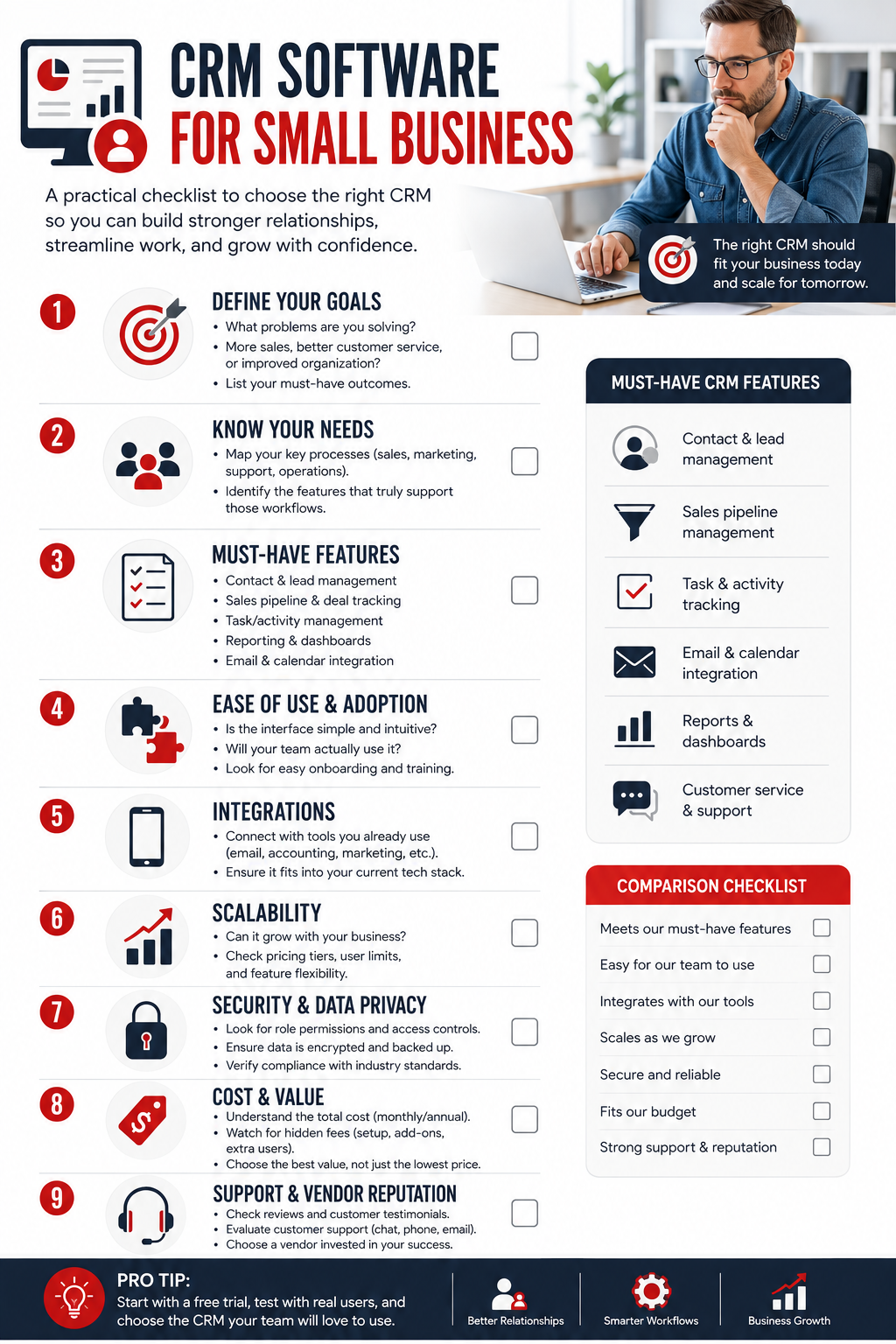
Choosing a CRM system means balancing workflow, budget, and future growth.
That process determines what the CRM needs to support.
For example, a professional service business may receive leads through website forms, phone calls, referrals, and email. Some inquiries may need immediate follow-up. Others may need qualification before they enter the main sales pipeline.
Feature questions still matter, especially since cloud-based crm solutions are often preferred for scalability and accessibility.
If the CRM forces every inquiry through the same process, employees may begin working around the system rather than using it, which is why ease of use is critical for adoption and a simple crm often works better than an annoying crm.
The better approach is to map the real operation first.
Customer Relationship Management Is More Than Contact Storage
At its simplest, customer relationship management software gives a business a structured place to manage information about leads, customers, communications, and opportunities, turning scattered customer data into a usable contact database with the right customer details and history in one place.
That alone can be valuable.
But the real benefit comes from creating a reliable record of what is happening across the customer journey, which supports stronger customer relationships and more personalized customer service through contact tracking features.
A strong system can help answer questions such as:
- Who owns this lead?
- When did someone last follow up?
- What stage is the opportunity in?
- What information has already been collected?
- What needs to happen next?
- Has the client moved from sales into delivery?
- Which opportunities are stalled?
Salesforce's current small-business CRM guidance similarly describes CRM systems as a way to track leads, customer interactions, and opportunities across the customer lifecycle, and shows how a dedicated CRM supports customer management by keeping prospective customers and current clients centralized in one place.
The goal is visibility.
A business should not need to search through inboxes, personal notes, spreadsheets, and memory to understand what is happening with a prospect or client.
Map Lead Management Before Comparing CRM Features
Strong lead management starts before automation.
Imagine that five new inquiries arrive today.
One comes from a paid campaign.
One comes from organic search.
One comes from a referral.
One is an existing client asking about another service.
One is clearly not a fit.
Should all five enter the same pipeline?
Probably not.
That is why CRM selection should begin with the logic behind the lead process.
Define How Leads Enter the Business
Identify the major sources that create new inquiries.
This might include website forms, scheduling tools, telephone calls, referrals, social campaigns, social media, advertising, or other channels.
The CRM should be able to support those entry points without creating unnecessary manual work.
Define Who Owns the Lead
Every qualified inquiry should have a clear next owner, especially for a sales team or small teams sharing lead responsibility.
That may be a salesperson, account manager, business owner, intake team member, or another designated role.
A system cannot solve unclear ownership if the business has never decided who should be responsible.
Define What Happens Next
After a lead arrives, there should be a clear next step, whether that is triggered manually or by sales automation once the process is clearly defined.
That might be qualification, a call, a consultation, a proposal, or another defined action. Some CRM tools can use lead scoring, follow ups, and task reminders to keep qualified opportunities moving, and AI in CRMs automates lead scoring and task reminders while helping automate routine tasks rather than replace judgment.
Once these decisions are clear, it becomes easier to compare CRM features based on actual needs.
Your Sales Pipeline Should Reflect How You Really Sell
Many CRM platforms provide customizable pipelines.
That does not mean a business should copy a generic pipeline and assume it fits.
A sales pipeline should represent meaningful stages in the company's actual sales process, and effective sales tracking should show deals, stages, and expected close dates.
For example, one business might need:
New Inquiry Qualified Consultation Scheduled Proposal Sent Decision Pending Won Closed
Clearer pipeline visibility helps forecast revenue, spot bottlenecks in the sales cycle, and help teams close deals.
Another company may need a completely different structure.
The number of stages matters less than whether each stage has a clear meaning, especially in longer sales cycles.
A useful pipeline helps employees understand where an opportunity stands and what should happen next.
Current CRM guidance also emphasizes pipeline visibility as a core benefit because it gives teams a clearer view of where deals sit in the sales process.
CRM Features Should Solve Specific Problems
Feature lists can make nearly every platform sound impressive.
Instead of asking which CRM has the most CRM features, ask which features solve your operational problems.
Contact and Account Management
Can the system organize the people and organizations your business works with in a way that fits your sales model?
Pipeline Management
Can your team clearly track opportunities through the stages that matter? A centralized sales hub can make pipeline management easier for small teams juggling multiple opportunities.
Activity Tracking
Can employees see important calls, emails, meetings, notes, and next steps without searching across several systems? The best setups keep these communication tools, including calls and email history, inside the CRM. That also makes mobile access more useful for teams meeting clients outside of the office, with mobile accessibility for call logging or updating records on the go.
Task Management
Can the CRM create clear responsibility for follow-up work, including support for routine tasks and automated reminders, without adding unnecessary complexity? Many small businesses value that kind of automation because it keeps responsibility for next steps clear; in fact, 64% of small business leaders value automation capabilities in CRMs.
Reporting
Can leadership see useful information about lead flow, pipeline movement, activity, outcomes, dashboards tracking sales performance and lead conversion rates, plus marketing analytics and customer insights, without building reports from scattered data?
Permissions
Can access be managed appropriately for different employees or teams, with permission controls that limit access appropriately and, where supported, use data encryption to help protect customer data and support compliance?
The right set of features depends on the business.
More features are not automatically better.
Client Workflow Matters After the Sale
Businesses often evaluate CRM tools almost entirely around sales.
That can create another problem after a deal closes.
What happens when a prospect becomes a client?
Does the CRM need to hand information to another system?
Does an internal team need to be notified?
Does someone need to create a project, schedule onboarding, or begin another delivery process?
A well-designed client workflow considers what happens after the sale as well as before it, including when service teams need selected customer information and not just sales records.
This does not mean every client-delivery process belongs inside the CRM.
It means the CRM should fit into the larger operational journey.
The sales process and the service process should not feel like completely disconnected systems, and some platforms include service tools to support handoff and ongoing customer relationships.
CRM Integrations Should Reduce Duplicate Work
Most businesses already rely on existing tools.
Email, calendars, forms, accounting systems, scheduling platforms, marketing tools, websites, and other applications may all need to interact with the
CRM, but app integration only matters where it reduces duplicate work.
That is where CRM integrations become important.
The goal should not be to connect every tool simply because an integration exists.
A useful integration should solve a real operational need.
For example:
A website form may need to create or update a CRM record.
A scheduling tool may need to record a booked meeting.
An email integration may help keep communication history connected to the right contact and sync with platforms to track opens, clicks, or campaign activity when that information matters.
A client delivery system may need selected information after a sale closes.
Modern small-business CRM guidance consistently treats integrations with existing email, calendar, marketing, and business tools as an important selection factor, and they often connect marketing campaigns with customer management processes across systems.
The right integrations reduce duplicate entry and broken handoffs.
Poorly planned integrations can create duplicate records, conflicting data, and confusing automation.
Do Not Automate a Bad CRM Process
Automation can make a good process faster when you use built-in tools to automate repetitive work only after the underlying process is sound.
It can also make a bad process fail faster.
Suppose every new inquiry is automatically assigned to the same person, even though different services have different owners.
The automation works perfectly.
The process is still wrong.
Or imagine an automated follow-up that begins immediately after every form submission, even when some forms are for existing clients rather than new prospects.
Automation should handle routine tasks, not create errors faster.
Again, the technology may be working exactly as configured.
The underlying business logic is the problem.
Masterly Tech's current CRM automation guidance focuses on what happens after a lead enters the pipeline and stresses that automation should follow the customer journey rather than simply automate whatever the software can do.
That principle should begin during CRM selection.
Choose the operating structure first.
Then automate it.
Reporting Should Help Leaders See What Is Actually Happening
A CRM can produce large amounts of data.
The question is whether leadership can use it.
A small business may need to understand:
How many new leads are coming in?
Where are they coming from?
How many are moving forward?
Where do opportunities stall?
Who owns each opportunity?
How long are deals staying in particular stages?
What happens after a lead becomes a client?
Those questions should influence CRM selection.
If the reporting structure depends on fields nobody updates or stages nobody understands, the dashboard may look impressive without being useful.
Reporting quality begins with clean processes and consistent data entry.
Permissions and Ownership Become More Important as the Team Grows
A founder may begin with full access to everything.
That becomes less practical as more employees use the system.
Different roles may need different levels of visibility or editing access.
A salesperson may need to manage assigned leads.
A manager may need broader pipeline reporting.
A service employee may need selected client information without access to every sales record.
The specific permission structure depends on the organization and platform.
The important point is that permissions should be considered before the CRM becomes a central part of the business. Permission planning should also scale reasonably as the business grows and more users need access.
A Practical Framework for Choosing a Small Business CRM
Before selecting CRM software for small business, evaluate the system across six operational areas.
1. Lead Flow
How do new inquiries enter the business, and where should they go? In a crm for small teams, that often differs from enterprise tools because lean teams usually need simpler intake and ownership rules.
2. Sales Process
What stages represent the actual sales pipeline?
3. Client Workflow
What needs to happen when someone becomes a customer?
4. Reporting
What information does leadership actually need to see?
5. Permissions
Who should be able to view, edit, assign, or manage different records?
6. Integrations
Which systems genuinely need to exchange information with the CRM, and can it work with your existing tools now without forcing you into switching platforms later?
A platform that fits these areas is generally a stronger candidate than one selected only because it has the longest feature list.
When a Small Business Needs Professional CRM Selection Support
CRM selection becomes harder when multiple departments, lead sources, workflows, and systems are involved.
Professional support may be useful when small businesses comparing multiple CRM solutions with different pricing, growth paths, and a free plan often need clearer guidance, especially since many tools for small businesses serve teams from 20 to 500 employees:
- The business has outgrown spreadsheets
- Multiple employees are handling leads differently
- Existing CRM data is unreliable
- The current pipeline does not match the sales process
- Leadership cannot get useful reporting
- The company is planning new CRM integrations
- The team wants automation but has not mapped the process
- Several CRM platforms appear capable of doing the same thing, including hubspot crm, zoho crm, Pipedrive, less annoying crm, monday crm, and Freshsales
Examples range from free crm and budget friendly crm options to a more customizable crm, so support can help match the system to team size and future growth; this might mean HubSpot’s unlimited-growth free offering, Zoho’s free edition for up to 5,000 records, Freshsales for up to three users, Less Annoying CRM with flat pricing, or Pipedrive as an inexpensive crm with AI-powered insights when weighing the best crm.
These are not simply software questions.
They are operational questions.
The right CRM should support how the business works rather than forcing the business to work around the CRM.
Masterly Tech Helps Connect CRM Decisions to the Larger Digital System
Masterly Tech works at the intersection of websites, digital marketing, lead capture, and the systems that help businesses manage what happens after an inquiry, helping connect CRM decisions to the larger digital system across sales, service, and marketing teams when those teams share customer information.
That makes CRM selection part of a larger conversation.
A website may generate the lead.
The CRM determines how that lead is organized.
The sales process determines what happens next.
The client workflow determines how the relationship moves forward.
Automation and integrations should connect those stages only after the business has decided how they should work.
For companies that already have a CRM and need to improve what happens after a lead enters the system, Masterly Tech also publishes guidance on CRM automation and workflows, with AI capabilities able to support customer interactions and analytics once the underlying process and integrations are clear.
Recommended internal link: Link the phrase CRM automation and workflows to Masterly Tech's existing CRM Automation article. It supports the next stage of the buyer journey without competing with this page's primary crm software for small business selection intent.
Frequently Asked Questions About CRM Software for Small Business
What is CRM software for small business?
CRM software for small business is technology used to organize customer and lead information, track interactions, manage opportunities, and support customer relationship processes
.
What should a small business look for in a CRM?
A small business CRM should fit the company's lead flow, sales process, reporting needs, permissions, client workflow, and required integrations, and many cloud-based crm solutions are preferred because they are scalable and accessible. The right CRM should balance workflow fit, budget, ease of use, and future growth, with reasonable pricing and scalability considered as the company grows.
What CRM features matter most?
Important CRM features depend on the business, but common needs include contact management, pipeline tracking, activity history, task management, reporting, permissions, integrations, sales automation, and marketing automation when the business actually needs them. That aligns with what small teams value most: 63% of small business leaders say CRM improves customer service, and 64% value automation capabilities.
What is a sales pipeline in a CRM?
A sales pipeline represents the stages an opportunity moves through from initial inquiry toward a business decision.
How does a CRM help with lead management?
A CRM can organize lead information, ownership, activity, status, and follow-up so teams have a clearer view of what should happen next.
Are CRM integrations important?
Yes, when they connect systems that genuinely need to share information. CRM integrations should reduce duplicate work and improve handoffs rather than add unnecessary complexity.
Should a business automate its CRM immediately?
Not necessarily. It is usually better to define the process first, then automate repetitive steps that are already clear.
Can Masterly Tech help evaluate CRM software for small business?
Masterly Tech can help businesses assess how CRM requirements fit their broader website, lead-generation, marketing, and workflow environment based on the agreed project scope.
Discuss CRM Selection and Implementation Strategy With Masterly Tech Group
Choosing CRM software for small business should not begin with whichever platform has the most features, because the best CRM is the one that fits your workflow, budget, and growth path.
It should begin with your operation.
Your lead flow, sales pipeline, client workflow, reporting requirements, permissions, and CRM integrations should help determine which system is the right fit.
Masterly Tech can help you evaluate those needs before your team invests time building automations around a CRM that does not match the way your business actually works, and can also help you compare other small business CRMs without pushing you into a platform you will outgrow and need to replace later.
Call Masterly Tech at (888) 209-4055 or visit masterlytechgroup.com to discuss CRM selection and implementation strategy with Masterly Tech Group.










