
Marketing Automation Software: What a Growing Business Should Decide Before Choosing the Platform
Your business may be generating enough leads to grow, but the follow-up process can still break down.
A prospect fills out a form. Another calls. Someone responds to an ad. A third person downloads a resource. Their information enters different systems, and suddenly your team is trying to figure out who owns each lead, what happens next, and whether anyone followed up.
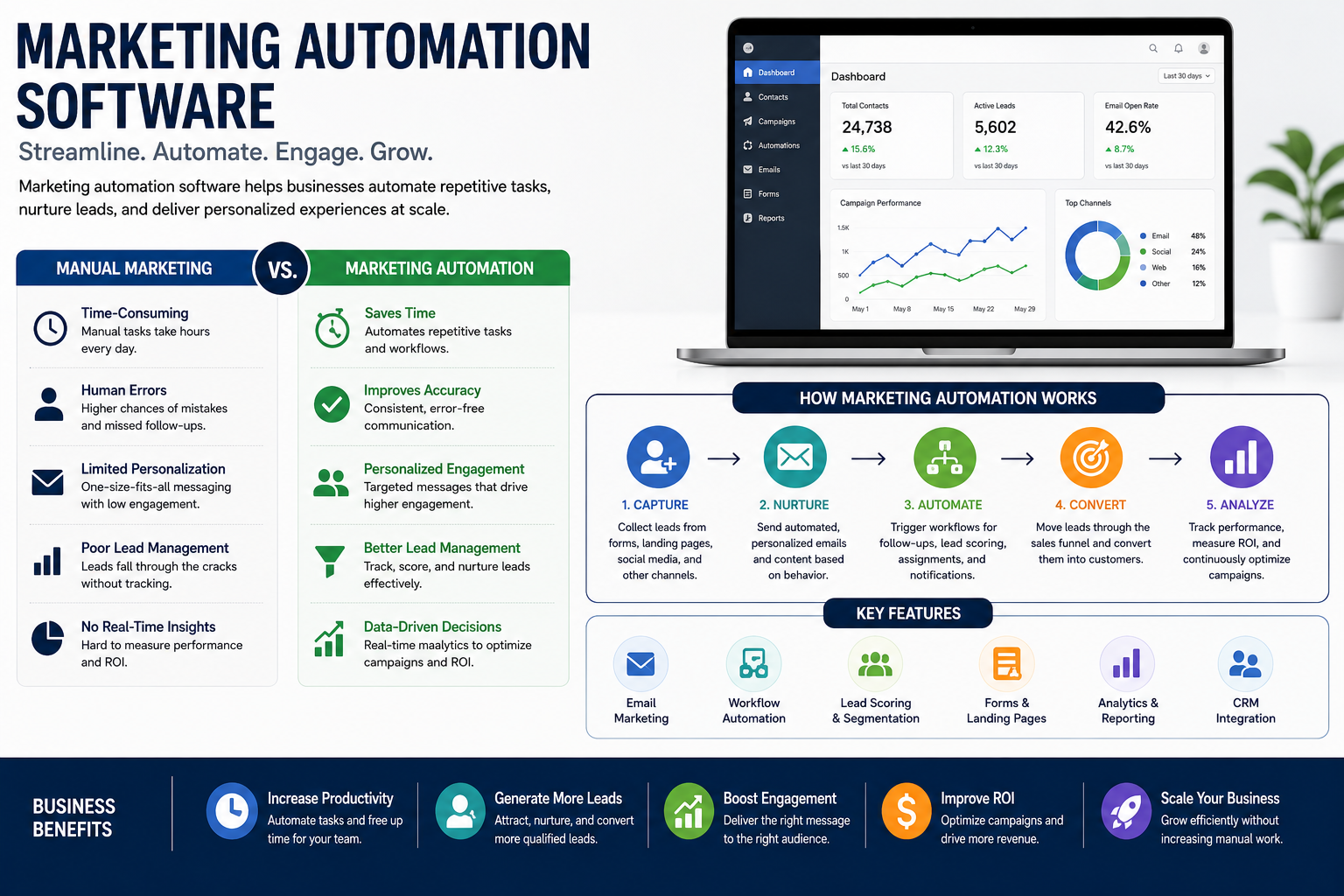
That is when companies start looking at marketing automation software—technology that helps businesses automate defined marketing and lead-management activities such as follow-up, segmentation, notifications, workflows, and CRM updates. It can automate routine tasks, repetitive tasks, and other manual processes, and newer platforms may add artificial intelligence or AI workflow automation tools to extend those automation capabilities.
But choosing the platform first can create a new problem.
Software can send messages, create tasks, update records, and move contacts through defined workflows. It can automate tasks that are rule-based and repetitive, but it cannot decide what your customer journey should look like, how lead flow should work, which manual tasks should stay with your team, or which leads need a human response.
For a growing business, the better decision starts before the software search. If you are evaluating marketing automation software or planning an implementation, this is where to start: define the customer journey and lead process first, then look at CRM integration, platform fit, and where Masterly Tech can help design the right automation architecture.
What should happen after someone shows interest in your business?
Once that question is clear, it becomes much easier to decide what technology you actually need.
Marketing Automation Software Should Support Your Customer Journey
Modern marketing automation software can connect marketing activity with lead management and sales processes. Depending on the platform, it may support lead generation, segmentation, email campaigns, automated follow-up, reporting, CRM updates, and workflow-based communication across multiple channels.
These capabilities can help reduce repetitive work and make follow-up more consistent. Modern marketing automation software and AI workflow automation tools can use artificial intelligence to automate tasks, reduce manual effort, and help marketing teams act on customer data as prospects move through the sales funnel.
But automation should follow the customer journey, not define it.
Think about a potential customer who visits your website and requests information.
What happens next?
Does the lead go into your CRM?
Who receives it?
How quickly should someone respond?
What information should the prospect receive?
When should the lead enter lead nurturing?
What should happen if the prospect books a call?
What if they do not respond?
What if they become a customer?
These decisions create the foundation for your automation strategy. Automation can improve manual processes and help nurture leads, but it still depends on people to design the right process.
Your automation platform should then support that structure.
Why Choosing the Software Too Early Creates Problems
Many companies compare platforms by looking at features for marketing teams.
One system has more workflow options for email campaigns. Another has stronger reporting and data analytics. Another has more integrations for lead generation and handling customer data across multiple channels. A different platform offers more automation tools for connecting existing systems and syncing data with existing tools.
The feature list can be impressive.
But a long list of features does not guarantee a better marketing process or stronger business processes.
If your sales stages are unclear, automation can make the confusion happen faster, even when platforms promise to streamline workflows.
If lead ownership is inconsistent, more automated notifications will not solve the underlying issue.
If your CRM contains duplicate or incomplete information, workflows may act on unreliable data instead of helping you integrate data across existing systems.
If your customer journey has not been defined, it becomes difficult to know which messages should be sent and when.
The problem is not necessarily the platform.
The problem may be that the business is trying to automate a process that has not been designed clearly enough.
Define Your Lead Flow Before Comparing Automation Tools
Before committing to a platform, decision-makers should have a clear picture of the path a prospect follows.
A simple framework is:
Capture → Qualify → Nurture → Convert → Retain
Many companies compare platforms by looking at features first, especially how a workflow builder connects existing systems, third-party applications, and data analytics, before confirming those tools actually support the right business processes. It is also common to create workflows too early, before the team agrees on how leads should move from one stage to the next. That usually leads to automated workflows that save time in one area while creating handoff problems somewhere else. A clear marketing workflow helps teams decide what should happen, when it should happen, and who owns each step.
For example, duplicate or incomplete CRM information is often a sign that the business needs to integrate data and sync data correctly across existing systems, not just switch tools. Once the underlying process is defined, automated reporting helps measure campaign performance and ROI.
Capture
How does someone become a lead?
They may come through a website form, advertisement, phone call, landing page, social media posts on social media platforms, or another marketing channel across multiple platforms.
The important question is whether the information enters your systems in a useful and consistent format.
A simple framework is: businesses often use a workflow builder to create workflows and map automated workflows around this marketing workflow structure.
Qualify
Not every lead should receive the same response.
Your process may need to separate prospects by service interest, location, company size, urgency, source, or another business factor, especially when leads arrive from email, web forms, chat, calls, social media platforms, or responses to social media posts as part of larger business workflows shaped by your business rules.
The exact criteria depend on your organization.
Nurture
Some prospects are ready to talk immediately.
Others need more information before they are ready to take the next step.
A thoughtful lead nurturing process gives those prospects relevant communication without making every lead follow the same sequence.
The exact criteria depend on your organization. In most cases, those decisions are set by business rules inside broader workflows, including how teams time and manage email campaigns.
Convert
When a prospect becomes ready, the automation should help move the opportunity through the sales funnel to the right person or next stage.
That may include creating a task, updating a CRM record, sending an alert, or changing the workflow to automate tasks, while a thoughtful lead nurturing process may also include automated email campaigns tailored to prospect readiness.
Retain
The customer journey does not necessarily end after the sale.
Depending on the business model, there may be opportunities for follow-up, additional services, renewals, education, or relationship building.
This is why automation strategy should look beyond the first conversion.
CRM Integration Is More Important Than Having More Tools
Businesses often use several systems at once.
There may be a website platform, CRM, email system, scheduling tool, advertising platform, analytics software, and other applications.
When these systems do not communicate properly, employees may have to move information manually.
That creates extra work and can make it harder to see what is happening with a customer.
Strong CRM integration can connect marketing activity with the customer record and the sales process. Masterly Tech's current content emphasizes connecting digital marketing with CRM workflows, lead routing, follow-up, pipeline management, and client journey automation rather than treating automation as a collection of isolated features.
The goal is not to connect every possible application.
It is to make sure the systems that matter can share the information your business actually needs.
Good Marketing Workflows Know When to Involve a Person
One of the biggest misconceptions about automation is that every customer interaction should happen automatically.
That can create a poor experience.
Many businesses rely on existing tools and existing systems across multiple platforms, including third-party applications such as Google Sheets, and use marketing automation software to coordinate that work. When these systems do not communicate properly, teams spend more time syncing data and reducing manual data entry becomes harder than it should be.
Imagine a high-value prospect submits a detailed inquiry. The business immediately sends the same generic sequence it sends to every contact.
The workflow may be technically correct.
The customer experience may still be wrong.
Good marketing workflows should define where automation is helpful and where a person should take over. That matters even more when complex workflows involve multiple handoffs, or when advanced workflows include rules that affect timing, ownership, or escalation. Some teams also use ai workflows to route requests before a salesperson steps in.
For example, automation may handle:
- Immediate confirmation
- Lead assignment
- Internal notifications
- Routine follow-up reminders
- CRM updates
- Basic nurturing sequences
An ai assistant can also support internal triage without replacing direct human communication. In some cases, ai agents are better used behind the scenes to classify requests or trigger the next action. Teams may also layer in ai tools for enrichment or summarization, while keeping final decisions with staff. The right ai features should speed up operations, not remove oversight where context matters most. This is often where ai powered workflows help with consistency while still leaving room for review.
A person may need to handle:
- Complex questions
- High-value opportunities
- Sensitive situations
- Custom proposals
- Detailed consultations
If you connect your CRM through Zapier, it can act as an integration layer between systems; Zapier connects over 9,000 apps for automation.
Automation works best when it supports human judgment instead of trying to replace it.
Your Customer Journey Is Part of Your Brand
Customers may never see your automation platform.
They do experience the results.
They notice when nobody follows up.
They notice when three people contact them about the same request.
They notice when they keep receiving messages about something they already completed.
They notice when marketing and sales seem disconnected.
Those experiences affect how organized and trustworthy your business feels.
Masterly Tech's published CRM automation guidance makes the same point: software should help reduce manual gaps, improve lead management, and create a stronger customer experience without removing people from customer relationships.
That makes automation more than a technology decision.
It is part of the customer experience.
What to Look for in an Automation Platform
Once your customer journey and process are clear, platform evaluation becomes much more practical.
Workflow flexibility
Your system should be able to support the types of triggers, conditions, and actions your actual process requires. Platform evaluation may differ for small businesses versus companies looking for broader business process automation. Look for drag and drop interfaces that make it easier to build custom workflows without unnecessary technical expertise. That matters if you need complex workflows today, advanced workflows later, or want to keep the learning curve manageable with a drag and drop builder.
CRM integration
The platform should fit the way your business stores and manages customer information, with drag and drop setup for simpler use, though advanced workflows can still require more technical expertise. In this area, enterprise grade security matters, and role based access control can help limit access to the right data and functions. Support for custom workflows is also worth weighing against the platform’s learning curve.
Lead nurturing
Look for ways to support different types of prospects rather than forcing everyone into the same communication path. If you’re coordinating follow-up across multiple channels, the platform should keep messaging and handoffs consistent without adding manual work. Businesses handling sensitive data may also need enterprise grade security and role based access control in the same platform.
Reporting
You need enough visibility to understand what is happening across the customer journey, especially when lead nurturing works best across multiple channels rather than a single path, and strong data analytics makes that easier to measure. For example, some tools support channel combinations such as Omnisend automating email, SMS, and push notifications, while Brevo automates four marketing channels including SMS.
Automation tools
The best tools are not necessarily the ones with the most features. They are the ones that support the workflows your business actually needs, whether you are comparing AI workflow automation tools or broader marketing automation software with data analytics, a free plan for testing, paid plans for scaling, and automated reporting that helps measure campaign performance and ROI. Some ai workflow automation platforms are built for technical teams and let you use your own API keys when you need deeper customization.
Ease of maintenance
Your team will need to review, update, and improve the system as your business changes.
A platform should make that work manageable rather than creating another layer of complexity.
When the Real Problem Is Strategy, Not Software
There are signs that buying new marketing automation software may not solve the issue.
Your team knows leads are arriving, but nobody agrees on who owns them.
Your CRM has multiple stages that mean different things to different people.
Marketing and sales use different definitions for qualified leads.
Your nurturing messages do not match the customer's position in the buying process.
Your team relies on spreadsheets to understand what happens after a lead comes in.
Employees manually move information between systems.
You have many automation tools, but no clear automation architecture.
These are process problems.
More software may simply add another layer.
Masterly Tech already publishes separate resources on CRM consulting, CRM automation, and workflow automation, including guidance on fixing the lead and client journey before adding more automation.
That distinction matters for a growing business.
Masterly Tech: Design the Automation Architecture Before Implementation
Masterly Tech helps businesses connect digital marketing with the systems that support lead management and conversion. The company currently offers digital marketing services across areas including SEO, website development, advertising, analytics, and industry-specific marketing such as dental marketing.
Its automation-focused work is built around the business process rather than simply adding software features. Masterly Tech's published material addresses lead routing, CRM workflows, follow-up, nurturing, sales pipelines, workflow automation, customer journey automation, and the automation capabilities that support those processes across channels. It also looks at how those processes connect with your existing tools.
That makes the right starting point a conversation about your process.
Masterly Tech can help businesses examine:
Lead flow: Where leads originate and what should happen when they arrive.
CRM structure: How contacts, opportunities, stages, and ownership should be organized.
Workflow logic: Which events should trigger automated actions.
Lead nurturing: How different prospects should be handled based on their position in the customer journey.
Integration needs: Which systems need to share information.
Measurement: What the business needs to see to understand whether its process is working.
The objective is not to automate everything.
If the process is unclear, automated processes will not streamline workflows in a useful way. Employees manually move information between systems through manual data entry and other manual effort. These are process problems.
It is to build an automation structure that fits the way your business actually operates.
A Better Way to Compare Marketing Automation Software
Do not begin with, “Which platform has the most features?”
Begin with, “What does our customer journey require?”
Then evaluate each platform against that answer. In practice, software selection usually comes after process design, because different existing tools have different automation capabilities.
A suitable system should support your lead flow, CRM structure, marketing workflow, customer communications, reporting, and integration needs. For example, HubSpot’s Marketing Hub integrates with its CRM and CMS, ActiveCampaign is known for advanced email marketing automation features and offers multilingual workflow automations, and Klaviyo specializes in e-commerce marketing automation.
This approach also makes it easier to identify what should remain human.
That matters because customers do not experience your software.
They experience the business behind it.
Use AI and Workflow Automation to Improve Operational Efficiency
Modern businesses are looking beyond traditional robotic process automation to find faster ways to manage repetitive work and connect business systems. AI workflow tools can help teams streamline processes, improve data visibility, and enhance efficiency across marketing, sales, service, and operations. Depending on the platform, businesses may have access to integration templates, large collections of connected applications, or plans that support unlimited workflows and unlimited premium apps. Newer AI systems can also understand requests written in natural language, while technologies such as retrieval augmented generation can help AI work with information from approved business sources. These tools can support digital workers that handle defined, repeatable tasks, giving sales reps and other employees more time for work that requires judgment and human interaction. However, automation should still be designed around the needs of your target customers, internal processes, and business goals. The objective is not to automate everything. It is to create a connected system that improves operational efficiency while making the customer experience clearer and more consistent.
Frequently Asked Questions About Marketing Automation Software
What is marketing automation software?
Marketing automation software is technology that helps businesses automate defined marketing and lead-management activities, such as follow-up, segmentation, notifications, workflows, and CRM updates.
What is an automation platform?
An automation platform provides the technology used to create and manage automated actions based on defined triggers, rules, or customer events. In practice, marketing automation software helps businesses run automated workflows and, in some cases, supports broader business process automation tied to marketing and lead management through a workflow builder with drag and drop interfaces.
What is lead nurturing?
Lead nurturing is the process of staying relevant to prospects who are not yet ready to become customers, using planned communication and follow-up based on their situation or stage.
What are marketing workflows?
Marketing workflows are structured sequences that determine what happens when specific customer or lead events occur. Lead scoring helps identify high-potential prospects for sales teams so nurturing can be prioritised. They can include communications, tasks, notifications, and CRM updates, with business rules defining the logic behind each action.
Why is CRM integration important?
CRM integration helps marketing and customer information move between connected systems so teams can maintain a more consistent view of the customer journey. It also supports syncing data between platforms so updates do not have to be entered manually in multiple places. When that information includes customer data in one connected flow, marketing workflows can use business rules to decide which action, message, or handoff should happen next.
Should every marketing task be automated?
No. Automation is best used for repeatable, rule-based work, while artificial intelligence can help interpret patterns and support decisions when situations are less predictable. Syncing customer data into a more centralized view can improve the understanding of customer interactions, and AI features still work best with human involvement when judgment, relationships, or complex customer needs are involved.
How do I know which marketing automation software is right for my business?
Start with your customer journey, lead flow, CRM structure, workflow needs, reporting requirements, and integration priorities, including how well each option fits your existing systems and the level of technical expertise your team has in-house. Even when platforms include artificial intelligence or AI features, keep people involved where judgment and relationships matter. Then compare platforms against those business requirements, the likely learning curve, and what your team can realistically maintain.
Can Masterly Tech help before we choose the software?
Yes. Masterly Tech can help businesses evaluate the lead and client journey, CRM structure, workflow needs, fit with existing systems, the team’s technical expertise, expected learning curve, and automation strategy before implementation. Its published automation work focuses on building custom workflows around how organizations actually operate.
The Best Automation Starts Before the Software
The right marketing automation software can reduce repetitive work, improve follow-up, and help connect marketing activity with the customer journey.
But software cannot decide what your business should automate.
That decision starts with your process.
Before choosing a platform, define how leads enter your business, how they are qualified, who owns them, how lead nurturing should work, what information belongs in the CRM, and where human interaction matters most.
Then choose the technology that can support that architecture.
Masterly Tech can help businesses evaluate and structure those decisions before implementation, with automation work that connects lead flow, CRM workflows, follow-up, nurturing, pipeline management, and customer journey strategy.
Discuss the Automation and CRM Architecture With Masterly Tech Group Before Implementation
Before committing to marketing automation software, discuss your lead flow, customer journey, CRM integration, marketing workflows, and automation priorities with Masterly Tech Group.
Call (888) 209-4055 to discuss the automation and CRM architecture with Masterly Tech Group before implementation.










