
Website Audit Checklist: What to Review Before You Spend More on SEO, Ads, or a Redesign
What Is a Website Audit Checklist and Why You Need One
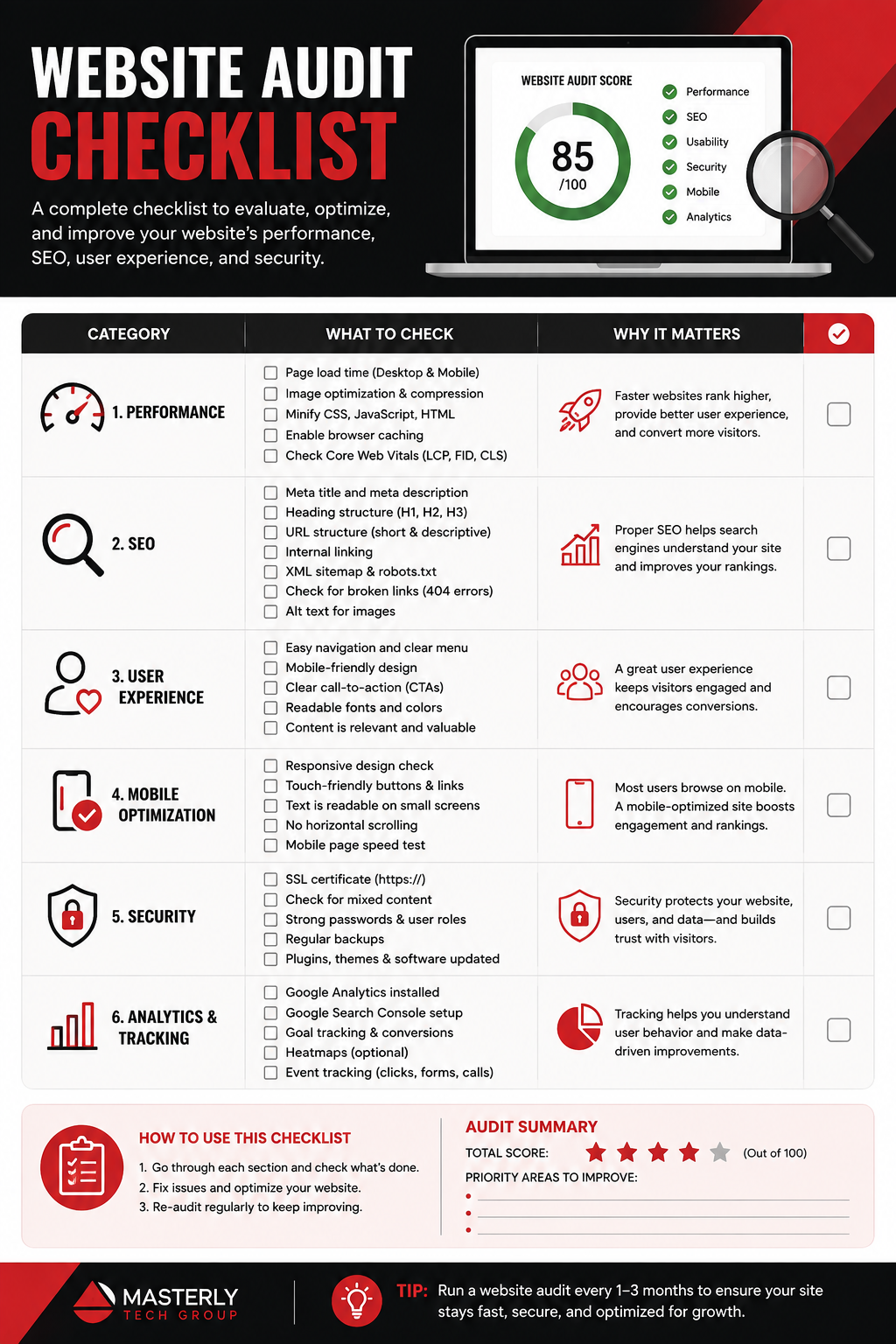
A website audit analyzes site performance and search visibility across every layer that matters - technical infrastructure, content, user experience, accessibility, and SEO. If your site is losing traffic or failing to convert visitors into leads, the cause is almost always a cluster of hidden issues that no single tool or quick scan will catch, and they often surface only when you review the right details across multiple areas of the site. A comprehensive audit addresses technical health, SEO, and user experience in one structured process, giving you a clear path from diagnosis to fix and a clear report of what to fix first.
The problem is real: roughly 68% of websites have at least one critical technical SEO issue actively harming their revenue or visibility, according to Rankeo's audit data. Broken redirect chains, misconfigured canonical tags, slow load times, blocked resources, and poor mobile friendliness silently erode rankings while you invest in content and backlinks that never deliver full ROI. In 2026, AI crawlers add another risk - if your web pages aren't discoverable by non-traditional bots, your site may be excluded from AI-generated summaries entirely. About 41% of B2B sites unintentionally block at least one major AI bot in their robots.txt right now.
Regular audits are essential because your website is never static. Algorithm updates shift ranking signals, accessibility standards evolve, new devices and browsers emerge, and every redesign or feature launch can introduce fresh technical issues. A one-off audit resolves current problems, but new ones surface constantly. This checklist gives you the systematic framework to identify, prioritize, and fix issues before they compound - keeping your entire site healthy, optimized, and competitive across search engines.
Why Website Owners Trust This Audit Checklist
This isn't a surface-level scan. It covers 175+ critical checkpoints across technical SEO, on-page optimization, content quality, user experience, and accessibility - every dimension that determines whether your site ranks, converts, and serves your target audience.
- Used by 10,000+ website owners and digital marketers since 2023 - from solo business operators to enterprise teams running full site audit cycles on large e-commerce properties.
- Updated quarterly to reflect the latest Google algorithm changes, Core Web Vitals thresholds, WCAG accessibility standards, and AI readiness requirements that matter in 2026.
- Balances automated tool recommendations with manual check procedures - because automated scans catch broken links and missing meta tags efficiently, but only manual testing reveals real usability problems, content gaps, and accessibility barriers that tools miss.
- Organized by priority and audit type so you can run a quick 30-point health check monthly or deploy the complete 175-point enterprise audit when the situation demands it.
5 Essential Types of Website Audits in Your Checklist
No single audit type gives you the full picture. Technical issues block crawling; poor content fails to engage users; weak UX kills conversions; inaccessible design excludes visitors and creates legal risk. Each audit type targets a different failure layer, and they work together: there's no point optimizing page titles if search engines can't crawl the page, and there's no value in perfect indexing if the content doesn't match user intent.
A general SEO audit checks site optimization for search engines at a high level. A technical SEO audit identifies backend and technological issues. A content SEO audit focuses on content quality and gaps. A performance audit evaluates page speed and Core Web Vitals. A UX audit assesses user experience and site functionality. An accessibility audit ensures content is usable for everyone. Start with technical foundations, then layer on-page SEO, content, UX, and accessibility - in that order; note that this helps you avoid wasting time on lower-priority fixes before foundational problems are resolved.
Technical SEO Audit Checklist
A technical SEO audit assesses server configuration and website architecture - every element that determines whether search engines can find, crawl, render, and index your web pages correctly. Technical SEO audits identify issues like 404 errors, non-indexed pages, broken redirects, and rendering failures that prevent your content from appearing in search results at all.
Crawlability and indexing:
- Verify robots.txt isn't blocking important pages or AI crawlers
- A valid XML sitemap is essential for indexing - confirm it's accurate, submitted, and updated
- Check for noindex tags on pages that should be indexed; a comprehensive audit can fix non-indexed pages in search results
- Review canonical tags to prevent duplicate content issues
- Audit crawl budget on larger sites using log file analysis
- Confirm Google Search Console shows no coverage errors
Page speed and Core Web Vitals:
- Google prioritizes page speed since 2010 for search visibility - this remains a critical ranking factor
- Core Web Vitals thresholds at the 75th percentile field data: LCP ≤ 2.5 seconds, CLS ≤ 0.1, INP ≤ 200ms
- Check TTFB (under ~800ms target), render-blocking resources, caching policies
- Evaluate image formats - use modern formats like WebP and AVIF with defined dimensions and lazy loading
- A performance audit evaluates page speed and Core Web Vitals together to identify what's actually slowing your site
Security and mobile:
- An SSL certificate ensures secure communications with HTTPS; HTTPS must be enforced across the website for security
- Mobile friendliness is a crucial factor for websites - verify mobile-first indexing readiness and responsive rendering
- Check for mixed content warnings, security headers (HSTS, CSP), and valid SSL certificates
AI readiness (2026):
- Review robots.txt for AI bot blocks - many sites accidentally prevent AI crawlers from accessing content
- Ensure structured data supports AI summarization (FAQ, HowTo, Article schema)
- Verify JavaScript-rendered content is accessible to non-Google bots
Tools like Screaming Frog can quickly identify SEO optimization issues across your entire site. Deepcrawl can perform a detailed technical SEO audit for larger properties.
On-Page SEO Audit Checklist
On-page SEO is where your content meets search engine requirements. Unique title tags and meta descriptions are vital for on-page SEO - every page needs them, and they must be distinct, relevant, and optimized for click-through rate.
Meta elements and structure:
- Audit all page titles and meta descriptions for uniqueness and keyword relevance
- Heading structure impacts content hierarchy and SEO - verify proper H1-H2-H3 usage follows content logic
- Check for duplicate or missing meta tags across the site
Keyword usage and content signals:
- Evaluate primary and secondary keyword placement - avoid stuffing
- Review content depth and readability relative to competitors
- Content quality directly influences search engine ranking - assess whether each page matches the search intent behind its target keyword
- Calls to action should be clear and compelling on every important page
Internal linking and images:
- Internal linking helps users navigate the site efficiently and distributes link equity to important pages
- Identify orphan pages with no internal links pointing to them
- All images need descriptive alt text, appropriate sizing, and modern formats
- Verify structured data implementation using Google's Rich Results Test - check for required properties and valid schema types
Ahrefs helps identify technical issues like missing meta titles, while Semrush allows full SEO audits including on-page optimizations.
Content Audit Checklist
A content SEO audit focuses on content quality and gaps - the difference between pages that rank and pages that stagnate. Content gaps prevent ranking in search results, and identifying them is the fastest route to new traffic.
Quality and relevance:
- Quality content improves user engagement and search visibility - evaluate whether each page delivers genuine value to your target audience
- SEO content audits assess content quality and relevance against current search demand
- Measure engagement metrics: time on page, scroll depth, bounce rate
- Content SEO audits identify gaps in website content that competitors are covering
Freshness and accuracy:
- Are statistics, practices, and terminology current? Outdated content erodes authority
- Review for content cannibalization - multiple pages competing for the same keyword
- Behavioral analytics reveal how users interact with content - use this data to identify underperforming pages
Conversion optimization:
- Evaluate CTA placement, clarity, and relevance on content pages
- Conversion rate optimization involves analyzing user drop-off points in the funnel
- Use A/B testing or heat maps to verify which content elements drive action
- Check whether landing pages align with the next steps you want visitors to take
User Experience (UX) Audit Checklist
A UX audit evaluates site navigation and design effectiveness - how real people experience your site across devices. A bad user experience can decrease site authority and conversions, and no amount of SEO will compensate for a site that frustrates users.
Navigation and usability:
- Is navigation intuitive? Can users find what they need within two or three clicks?
- User experience audits can identify usability issues affecting engagement - test actual user tasks like finding information, making a purchase, or submitting a contact form
- Feedback from multiple users is essential for a UX audit - don't rely on your own perspective alone
Mobile and cross-browser:
- Test responsive design on actual devices - various screen sizes, operating systems, and browsers
- Verify touch targets are large enough (at least 24×24 CSS pixels per WCAG 2.2)
- Ensure viewport meta tag is correctly configured and mobile layouts don't break
Conversion funnel:
- Map real user flows from landing to conversion and identify where visitors drop off
- Are trust signals visible - reviews, security badges, guarantees?
- Conducting a UX audit can improve overall site performance when findings are acted on
Website Accessibility Audit Checklist
An accessibility audit ensures usability for all users, including those with disabilities. Accessibility audits cover visual and hearing impairments, and a full accessibility audit includes cognitive impairments as well. This isn't optional - legal enforcement is tightening globally, and WCAG 3.0's working draft published March 2026 expands coverage to interactive, dynamic, and even AR/VR content.
WCAG compliance (2.2 and 3.0 readiness):
- WCAG 2.2 (published October 2023, updated through May 2025) added criteria for target size, non-text contrast, and mobile accessibility
- An automated study of top domains found many fail WCAG 2.1/2.2 Level AA color contrast requirements
- WCAG 3.0 expands guidelines across static, dynamic, interactive, and streaming content types
Core accessibility checks:
- Verify color contrast ratios meet Level AA minimums
- Test keyboard navigation - ensure all interactive elements are reachable without a mouse and focus indicators are visible
- Review alt text on all images; check captions and transcripts for video and audio content
- Forms need labels tied to inputs, visible error messages, and logical tab order
Emerging requirements:
- Cognitive and learning disability support receives more emphasis in WCAG 3.0
- Wearable, IoT, and AR/VR contexts are now within scope
- Wix offers an Accessibility Wizard for website audits - explore platform-specific tools that can accelerate compliance
How to Use This Website Audit Checklist
Approach your audit systematically: start with the technical foundation, then layer on-page SEO, content, UX, and accessibility. This order matters because many issues cascade - if a page can't be crawled or indexed, every other optimization you make on it is wasted effort.
Prioritize based on your site size and business goals. For a small business site with a few dozen pages, focus on the essential 30-point checklist monthly and run a complete audit quarterly. Small websites should undergo a full audit at least once a year at minimum. Larger websites may require audits two to three times a year, with monthly health checks and continuous monitoring between comprehensive reviews. Always trigger an emergency audit after major site changes - migrations, CMS updates, or template overhauls.
Step 1: Pre-Audit Preparation
Set up your essential tools before touching the checklist, and follow the setup instructions carefully for each platform before collecting baseline data. Confirm Google Search Console and Google Analytics are active and collecting data - Google Analytics is a free tool for website traffic analysis and your primary source for baseline metrics. Wix Analytics provides insights on website performance and traffic for sites on that platform. Ensure access to PageSpeed Insights for Core Web Vitals, accessibility tools like WAVE or Axe, and an SEO crawler.
Define your audit scope: which domains, subdomains, or language versions are included? Choose representative page templates - homepage, product pages, blog posts, category pages. Record current benchmarks: organic traffic trends, Core Web Vitals scores, bounce rates, conversion rates, and index coverage. Without a baseline, you can't measure improvement.
Analytics and tracking need to be verified for accuracy before you start. Verify tracking implementation for accurate analytics data - incorrect tracking will skew every conclusion you draw from the audit.
Gather CMS access, server credentials, and code repository access where needed. Prepare a documentation template organized by audit category with columns for issue description, affected URLs, priority, effort estimate, assigned owner, and status.
Step 2: Run Automated Scans
Use recommended audit tools to scan your entire site for obvious technical issues. SEO crawlers like Screaming Frog and Sitebulb will surface crawl errors, broken links, missing meta tags, duplicate content, redirect chains, and orphan pages. Ensure your crawler renders JavaScript if your site uses frameworks like React or Next.js - otherwise you'll miss critical rendering issues.
Generate performance reports using PageSpeed Insights for field and lab data, for example by checking a key template like your homepage first before expanding to all important pages. Run Lighthouse audits across your important pages to measure LCP, INP, CLS, and identify render-blocking resources, unoptimized images, and caching problems.
Run accessibility scans with tools like WAVE or Axe to flag contrast failures, missing alt text, and form labeling issues. Validate structured data using the Rich Results Test - look for missing required properties or invalid schema types.
Check your robots.txt against AI crawler user agents and review server logs for bot activity. Export all data for manual verification - automated tools generate the leads, but human review determines what matters.
Step 3: Manual Verification and Deep Dive
Manually check automated findings against the detailed checklist. Not every flagged issue carries equal weight - a missing meta description on a low-traffic page is less urgent than a noindex tag on a revenue-generating product page. Evaluate false positives and cross-reference crawler warnings with actual page behavior.
Perform hands-on user experience testing: simulate real user tasks on actual mobile devices and multiple browsers. Navigate the site as a visitor would - from landing to purchase or contact. Session recordings and heat maps provide additional insights into where users struggle.
For accessibility, go beyond automated scans. Test with a screen reader (NVDA on Windows, VoiceOver on Mac). Navigate the entire site using only a keyboard. Check whether form error messages are clear and whether multimedia has accurate captions and transcripts.
Review content manually: read for voice, clarity, and factual accuracy. Identify gaps versus competitors. Check for keyword cannibalization. Verify that every important page has clear, compelling calls to action and strong internal links to related content.
Inspect security: confirm HTTPS everywhere, look for mixed content, verify security headers, check SSL certificate validity, and ensure privacy policies are current and visible.
Document every finding with screenshots, affected URLs, and a priority ranking.
Step 4: Create Action Plan and Timeline
Prioritize issues using an impact-versus-effort framework:
- Critical (fix within 1 week): Anything blocking crawling or indexing, severe security issues, pages returning 5xx errors, HTTPS failures
- High (fix within 2–4 weeks): Core Web Vitals failures, missing or duplicate page titles and meta descriptions, major accessibility violations, broken internal links on important pages
- Medium (fix within 1–2 months): Content gaps, thin content, minor UX friction, image optimization, structured data improvements
- Low (ongoing): Cosmetic issues, low-traffic page optimizations, deeper accessibility refinements
Assign each finding to an owner - developer, content writer, designer, or accessibility specialist. Set realistic deadlines accounting for dependencies: some fixes require code changes, others are CMS-level updates
Create a follow-up schedule: after the first wave of fixes, run targeted scans to validate improvements. Schedule recurring health checks monthly and a comprehensive audit quarterly. Monitor Core Web Vitals field data, index coverage, and organic traffic to confirm your fixes are delivering results. Regular audits can lead to improved website performance and visibility over time - but only when findings are systematically acted on.
Essential Website Audit Tools and Resources
No single tool covers every dimension of a site audit. You need crawlers for technical SEO, performance tools for speed analysis, accessibility scanners for compliance, and analytics platforms for user behavior data. The right combination depends on your website size, budget, and the depth of audit you're running.
Free Website Audit Tools
- Google Search Console - your primary source for indexing status, search performance, coverage errors, manual actions, and sitemap submission
- Google Analytics - a free tool for website traffic analysis, user behavior, and conversion tracking across your entire site
- Google PageSpeed Insights - combines lab and field data for Core Web Vitals and page speed analysis; essential for every performance audit
- WAVE Accessibility Checker - browser-based tool for basic WCAG compliance scanning, contrast checks, and structural analysis
- Google Rich Results Test - validates structured data implementation and identifies missing or invalid schema markup
Premium Website Audit Tools
- Screaming Frog - comprehensive technical SEO crawling for sites of any size; identifies broken links, redirect chains, duplicate content, missing meta tags, and rendering issues
- Ahrefs Site Audit - advanced SEO analysis covering technical issues, content gaps, backlinks health, and keyword tracking
- Semrush Site Audit - competitive analysis, on-page optimization recommendations, and full site audit capabilities in one platform
- Hotjar / Crazy Egg - session recordings and heat maps for UX evaluation and conversion funnel analysis
- Axe / Level Access - professional accessibility auditing platforms with deeper testing and human review options
Tool selection guidance: For a small business site on a limited budget, free tools plus one crawler (Screaming Frog's free tier covers up to 500 URLs) will handle a solid audit. Mid-size sites benefit from adding a premium SEO suite and UX recording tools. Large, enterprise, or e-commerce sites need the full stack - premium crawling, performance monitoring, log file access, and dedicated accessibility auditing.
Downloadable Website Audit Checklist Templates
Each template below is organized by audit category - technical, on-page, content, UX, and accessibility - with columns for issue description, affected URLs, severity rating, effort estimate, assigned owner, and status. Severity uses a four-tier scale (Critical / High / Medium / Low) with expected timeframes for each level. Templates are formatted for Google Sheets so you can duplicate, customize, and share with your team immediately.
Quick 30-Point Website Health Checklist
Designed for monthly website maintenance, this template covers the essential checks that catch problems before they compound: broken links, 404 errors, sitemap accuracy, page titles and meta descriptions, basic Core Web Vitals, HTTPS verification, mobile rendering, and critical accessibility items. Perfect for small businesses and personal websites - takes two to four hours to complete and keeps your site's fundamentals in check between comprehensive audits.
Complete 175-Point Enterprise Audit Checklist
The full checklist for large websites, e-commerce platforms, and content-heavy properties. Includes every check from the 30-point template plus advanced layers: JavaScript rendering verification, log file analysis, AI readiness checks, internationalization (hreflang) review, comprehensive structured data audit, deep accessibility compliance, conversion funnel mapping, and competitive content gap analysis. Organized by priority level and implementation complexity so your team can tackle critical issues first and schedule longer-term improvements into sprint cycles.
Frequently Asked Questions About Website Audit Checklists
How often should I audit my website using this checklist?
Small websites should undergo a full audit at least once a year, but quarterly is better practice. Run the 30-point health checklist monthly to catch emerging issues early. Larger websites may require audits two to three times a year at minimum, with monthly monitoring between full reviews. Always run an emergency audit after major changes - site migrations, CMS updates, template redesigns, or significant content restructuring. Page speed has been prioritized by Google since 2010, and Core Web Vitals thresholds shift - regular audits ensure you stay within acceptable limits.
Can I complete this audit checklist without technical knowledge?
Many sections are accessible without technical expertise - content quality evaluation, meta tags review, UX testing, basic accessibility checks, and internal linking audits all rely more on judgment than code. However, technical layers like JavaScript rendering analysis, server log review, structured data debugging, and deep accessibility compliance require developer-level knowledge or specialist support. The recommended approach: handle content, UX, and on-page checks yourself, and partner with a developer or technical SEO professional for the infrastructure-level items. Free tools like Google Search Console and PageSpeed Insights make many technical checks approachable even for non-technical users.
What should I fix first after completing the audit checklist?
Start with blocking issues - anything preventing search engines from crawling or indexing your important pages. Technical SEO audits identify issues like 404 errors and non-indexed pages that silently eliminate your content from search results entirely. Next, address performance: page speed failures and Core Web Vitals issues affect rankings across all device types. Then fix security problems (HTTPS enforcement, mixed content). After the technical foundation is solid, move to high-impact, lower-effort items: missing or duplicate page titles, broken internal links, missing alt text on images. Content gaps, UX refinements, and deeper accessibility work follow as medium-term priorities.
Request a Website and Growth-Systems Review From Masterly Tech Group
Ready to identify where your website, marketing systems, and growth processes can work better together? Request a website and growth-systems review from Masterly Tech Group to discuss your current setup, priorities, and opportunities for improvement. Call (888) 209-4055 to get started.










